That is probably your best move at this point.
Create new with Deb13 or whatever, transfer domains, let the old one set for a while as it might be helpful for any fix to be tested on your old one.
That is probably your best move at this point.
Create new with Deb13 or whatever, transfer domains, let the old one set for a while as it might be helpful for any fix to be tested on your old one.
If Stegan restores backups with the Virtual FTP feature enabled onto a system without ProFTPd (both service and module), the situation will presumably be identical.
If it’s a fresh setup, it will have the Proftpd module, then he can disable it from that one domain that has it.
Better to do a transfer rather that backup/restore?
Yes, I suppose. But, he could also just install the danged ProFTPd package and Webmin module and then disable that feature on this server, and then the issue will be moot, because the original problem will be solved. (Using the package manager! Don’t do weird stuff.)
A transfer is a backup/restore. Same code. If a backup fails, as the beginning of this thread from hell indicated, then transfer and backup/restore will fail unless/until this issue is fixed.
Because it isn’t. I mean, it’s not trying to install clamav. It is trying to configure it.
And, it’s failing because user clamav:clamav doesn’t exist. Did you restore a backup of /etc/passwd and /etc/shadow from another system or otherwise cause the clamav user and group to be removed? You should not casually do that. Restoring config files is not something you should do without extreme caution and explicitly looking at everything it does. Virtualmin domain backups are safe. Virtualmin backups of its own configuration is safe. Webmin Config file backups or any other general sort of backup is not safe to install on a completely different system without proceeding with caution and human judgment.
I’m just guessing about the idea that you’ve restored backups of config files that have screwed up a bunch of things, because you’re having a bunch of really weird problems and replacing all of the config files with something from a completely different system is the best theory I can come up with for how all these different problems could be happening on a new-ish system.
The latest changes we made to remove Virtual FTP will clearly support backups created with the Virtual FTP feature enabled on the old system and restored without issues on the new one.
And, we are glad to help Stegan, and the solution we provided is just a temporary fix to create a backup that doesn’t depend on the missing feature.
Yet, to be fair, I don’t fully understand what the problem is or, most importantly, how to reproduce it.
that was done as detailed above @jimr1 suggestion but did not work despite dragging in all the clamav crap.
what is required is a way of STOPPING the error from appearing.
if that means going to a new OS (13) installing Virtualmin and restoring from backup then that i am prepared to try that but there really should be a way to stop this setup from searching for a module/feature/package that is not there or a way to recover the situation without destroying the whole box.
i am sorry the topic seems convoluted but initially it was a simple request. i do appreciate all the help that has been offered. i have re-learned a lot (like spelling) and finding things in Webmin that i did not know about and cannot be searched.
and i still do not know where/when/who removed proftp.
i do know when clamav was removed (over a year ago).
i do know when each VS was added.
way back at the top of this topic i get and still get the error as soon as i go to Webmin
possible way to reproduce it (just a suggestion)
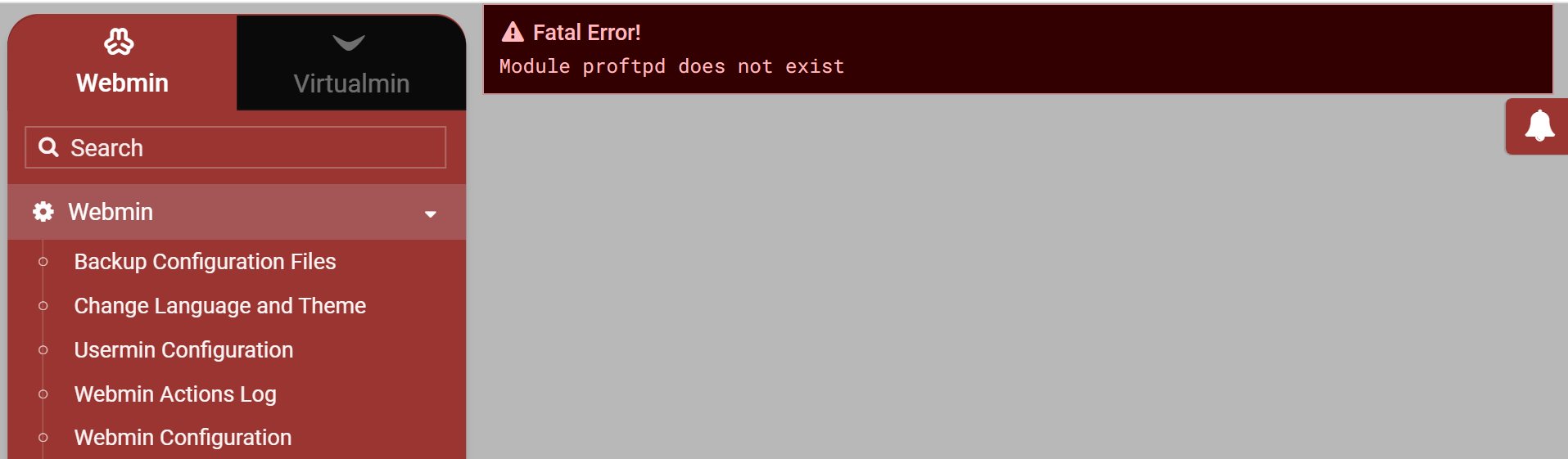
It says Module proftpd does not exist, not referring to the proftpd app. That was the first clear clue.
Right back at the start.
Ask Ilia where to find the now missing Available Modules menu item where I suspect that Proftpd module will show and you can re-install it.
Module, not application.
and i did refresh modules and looked in unused modules
but it is not listed
@Ilia where is it or should that error read “application” ?
This error means the Webmin proftpd module is missing.
Try running dnf reinstall webmin or apt-get install --reinstall webmin to fix it.
If for whatever reason it’s disabled in user ACLs, go to “Webmin ⇾ Webmin Users: Edit Webmin User / Available Webmin modules” and enable the “ProFTPD Server” module.
And, also, I’d recommend stopping messing with production systems. If you want to learn, spin up a virtual machine and play around there instead.
from webmin->webmin configuration->webmin modules
I seem to remember some time ago that there was an option to add a default module from a drop down list, maybe it’s still there but I don’t see it, have you changed the UI so that drop down list is no longer displayed, if so it maybe worth either adding the option back or leave some tool tip to instruct the user how to install a module that has been removed in error. However you can download it from https://download.webmin.com/download/modules/
It was decided that we don’t need it though this is a perfect use case for having it.
by whom and when ?
That doesn’t explain what I asked but thanks for the input
Actually it does, did you read the discussion?
Where does it mention the removal of the option to install a default module ?
It’s ok, was just trying to help
Both the Un-used Modules and Perl Modules were still in place in Webmin version 2.621.
Probably got removed in 2.630 along with the coloured buttons which still look ridiculous despite complaints.