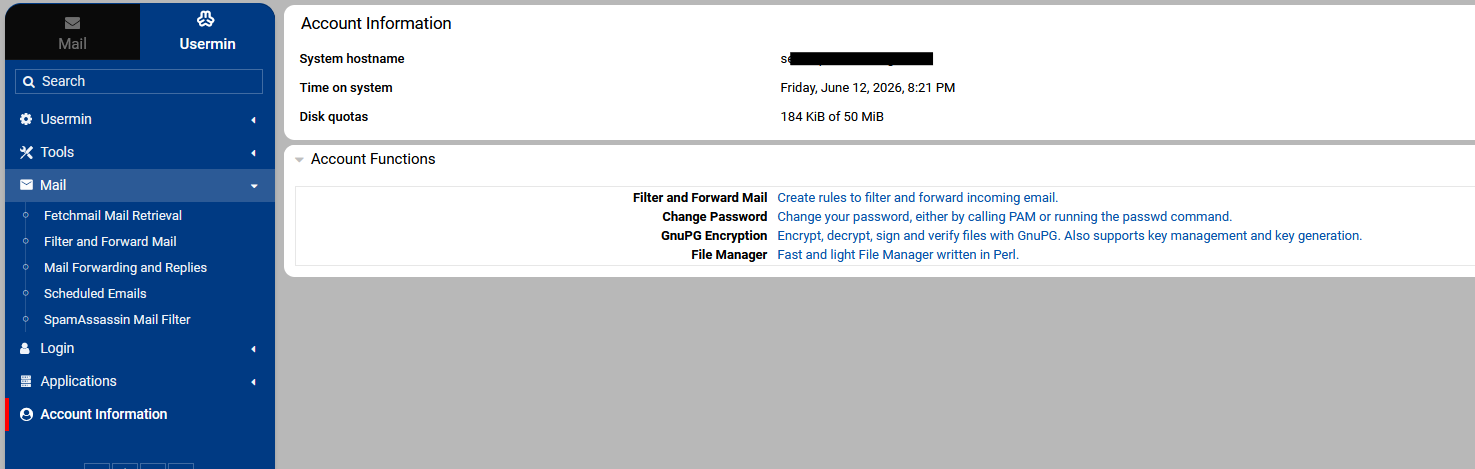
did you look at my post that showed the system was changed with the newer virtualmin repro, assuming as a new virtualmin-config replaced the earlier version one could assume that the underlying virtualmin system just took up the virtualmin 8 and installed the virtualmin repros this would not occur on a webmin only system as it would not install vritualmin-config .. maybe that is the answer
What matters is where you’re getting your Webmin package. (And, maybe Usermin package.)
If you have a recent install from the Virtualmin 8 repos, you have a minimized Webmin package. It has the core modules, and the installer installs a few extras. But, it is a smaller base install than in the past. This also applies if you installed during the Virtualmin 7 release cycle, but then switched to the Virtualmin 8 repos (which is not necessary or recommended, it’s just a thing a lot of people did for some reason).
If you have an older install from the Virtualmin 7 repos, you have a full Webmin package. It has all Webmin modules that we provide.
There is no mystery here.
If you are on the Virtualmin 8 repos (GPL or Pro), you have a minimized Webmin and if there are modules you use that are missing, you would need to install those modules to get those specific features back.
As I said, I think Ilia rushed this switch, and we definitely should have better documentation about the change, and I’m sorry we didn’t get that done. I’ve asked Ilia to add some docs. But, it is not mysterious, it’s not broken, we’re not taking anything away from anyone. All the modules that were removed from the minimized Webmin are available for easy installation from the repo using standard OS package management tools.
I just did a clean install on Rocky 9 with script command on the download page and I don’t see the issue. Maybe its a OS issue. I will try EL 10 version.
I suspect the loss of filter and forward was a “repo switch” case rather than a fresh install. (Which I think is true for most, maybe all, of the cases of “where did this feature go?” in this thread.)
Did you read my post ? The results show that certain parts of the webmin infustructure was changed from virtualmin v7 to virtualmin v8 the time of this update also coincides with the update to the apt config files. I’m not the person to, as you say, to go off roading on a production server it’s a case for me to install and forget, I will reiterate I did NOT change anything
Apparently upgrading to Pro also switches repos. I didn’t know that, and I don’t like it, but Ilia thought he’d addressed the problem by installing all modules in use, but obviously some were missed.
Obviously not, there may be a few people out there who are yet to notice. This caused my some problems with firewall and firewall6 being removed and thinking I was using firewalld which had been disabled due to the init peoblem, so effectively the script I use in place of fail2ban and firewalld was not saving it’s rules as the directories had been removed. On top of that firewalld was reenabled which then clashed with init and ended up locked out, good job my supplier offers kvm which allowed my to purge firewalld and get access back
How exactly did you install Virtualmin Pro? Nothing is lost if you upgrade to Pro using the standard procedure. If you manually switch repositories and then upgrade packages, you will “lose” the modules that were part of the full Webmin package, though it isn’t something you should do, I mean to upgrade repos manually. And to be clear, nothing is taken away from anyone.
If you do a clean install, the Webmin Custom Commands module won’t be installed by default, and you’ll need to install it using the dnf install webmin-custom or apt install webmin-custom command.
If you upgrade repositories using virtualmin setup-repos or by running curl -fsSL https://download.virtualmin.com/repository | sudo sh -s -- -s -B stable,
then when switching to the new repositories, the Webmin core package will be installed automatically, along with all the Webmin modules you’re currently using.
It was also documented, but it’s hard to find. I’ll add a link to it from the main Virtualmin documentation page.
That’s something I should implement to make it easier to add or remove Webmin modules available in the repo, when the Webmin core package is installed. It’s not too hard to do, so I’ll look into adding this.
The Usermin package is untouched and completely unrelated to the OP’s question. If you want to enable missing modules for Usermin, go to Webmin ⇾ Usermin Configuration: Available Modules and enable the modules you want to use.
The solution should be to add a new simple Webmin UI option for installing and removing those excluded modules, along with a popup after a clean install that explains this is the Webmin core package and informs the user what it is and how to install the required packages.
That was never the intention! Was it a clean install, or did it happen with the existing system?
Yes, I think pushing a message to the UI is going to be necessary.
Is it possible that the Webmin Custom Commands module was previously disabled in the ACLs? Also, could you explain how you performed the upgrade? Did you upgrade the repository or switch to Virtualmin Pro?
If you tell me exactly what you did, I’ll tell you exactly how it happened.
Don’t make it more complicated than it is. Though it is my bad, as I didn’t explain the change clearly. However, you can just install whatever is missing by running dnf install webmin-custom or dnf install webmin-whatever-module-name.
-3 is just a build number that indicates a change was made to the build. In 99% of cases, you’ll only see the build number as -1. We had a bug last time. Yet, you don’t need to worry about it, just install it.
As I explained above, changing repositories shouldn’t cause any problems if it isn’t done manually.
No, this isn’t something that could happen. Virtualmin Pro isn’t connected to dnf update.
There are no automatic transitions. You can switch repos in two ways: upgrade from GPL to Pro, or run virtualmin setup-repos or curl -fsSL https://download.virtualmin.com/repository | sudo sh -s -- -s -B stable. Repos don’t change on their own.
Correct! As we will start recommending repo changes on September 30, 2026.
However, repo-change process has been tested multiple times, and is not expected to remove any modules currently used by the full Webmin package.
That said, if you switch repos and the full Webmin package uses “Custom Commands” module or any other module not disabled in ACLs or not placed in “Un-used Modules” category on menu, they will be automatically installed during the switch.
No, neither Virtualmin nor Usermin packages been changed.
That’s still the case. I think you’re running into some other unrelated bug. Let me know if I’m wrong.
There is documentation as I mentioned above, but it’s hard to find, and I’ll fix that.
Yet, I don’t expect users to rely on the documentation. I think all new installs should have a one-time popup on the UI that explains the new Webmin core package and shows where and how to install the needed missing modules.
Yes, the module is also available for me. If it is missing, it might have been disabled on the “Webmin ⇾ Usermin Configuration: Available Modules” page by the master admin.
I’d really really like to fix that if it’s a real issue! I’ll need to run more tests and see. But I ran multiple tests in the past and it worked for me just fine.
Thanks, I really love having to read long threads over and over when a simple reply can help. Thanks also for expending the extra energy to create humour, always appreciated.
It does not and cannot change the repos. But, upgrading to Pro can change the repos.
And, virtualmin-config does not run after installation unless you explicitly run it (using the virtualmin config-system command). The configuration changes you got at install time (which are different between Virtualmin 7 and Virtualmin 8) will never be altered by a software update.
No package update will ever change your Virtualmin configuration or the configuration of the files being managed by Virtualmin. It is always safe to install updates. (Which is why I’m not enthusiastic about upgrading to Pro changing repos, because that has side effects, which we promise not to do.)
The problems in this thread are all based on a change of repo from Virtualmin 7 repos to Virtualmin 8 repos which leads to a minimized Webmin package being installed. I really don’t think that should happen on an upgrade to Pro as it breaks a promise I’ve always made about software updates and upgrades, and I’m still discussing it with Ilia. I think repo changes are a big deal, especially when there’s a major/breaking change like the Webmin package changing in a dramatic way, so I don’t think they should ever happen automatically. I think you should have to explicitly perform that action, and hopefully read some docs about what it means first.
On server1 Rocky9, I have upgraded to pro recently, and then my modules disappeared in the next update, so I guess that confirms the repo change theory.
However, on another install, server2 also Rocky9, it was already on pro (for many months) and yet the modules also went missing from there too (removed). The repo wasn’t changed o neither by me.
I support the continuous evolution of the software and thank your team for all the dedication, but would like to see better policies put in place, especially around heads up comms.