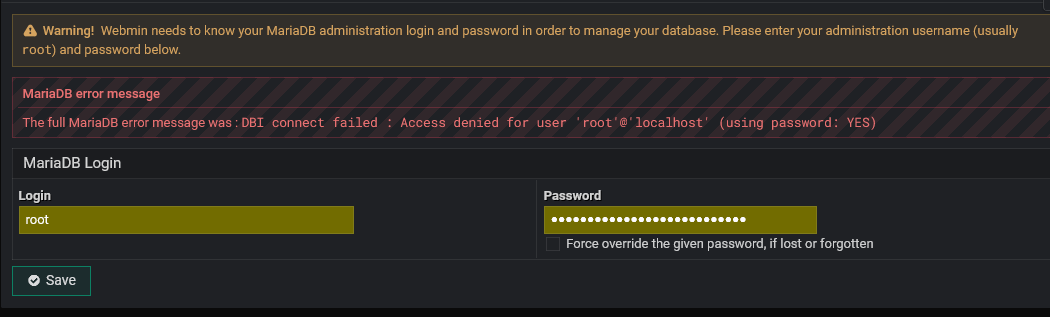
i have being using virtualmin for a long time most of my vps server’s mariadb database servers got crashed after changing default root password and it never get fixed even after following all steps. the only solution is to reinstall the virtualmin again and loss all important mysql database.
this is the biggest bug in virtualmin. it never happened once or twice but it happened many times with me. the developer should provide an option to fix this problem on a priority.
this user also had the same problem but there is no solution:
check this is issue. i am not only the person who faced it, there are thousands of people who have got this problem.
1.while installation it asks for the password. set new or use default. when you set new password after that problem will start and you will not be able to change reset the root password.
when you go to the mysql database server and change the root password after that if you restart the mariadb server it will give you failed to start server error and will keep saying access denied for user root@localhost.
if you follow all the steps to fix it the mariadb server will crash permanently.
tell me the location of root password where virtualmin saves it. i changed the password everywhere but nothing happened.
this is a serious issue because it is related to database server. you should not allow users to change the root password for mariadb server in hashed or plain both. if someone changes the password he should be able to fix it. but mariadb goes offline forever.
it worked for you because you didnt change the mysql password after post installation.
if you would have been changed the password after post installation in mariadb password section your virtualmin will keep running until you change root mariadb password. once you change the password and restart the database server it will go offline forever. it will crash permanently. and there is not solution to fix it.
how to repair it without losing data ? any command to fix broken packages and servers without losing data ?
even after if i fix the problem i will be afraid forever because it may give problem in future, so every time i get such problem i make a fresh installation of everything. (i keep backup of all data).
i was testing if you fixed this bug or not before installation a production app on the server but the mariadb server got crashed again. it proved you have not fixed this bug yet so i will have to use default virtualmin generated mariadb root password and i will not change the root password of mariadb after post installation.
If you could look back, read my questions, and answer them one by one without skipping any, it would make it much easier for us to help you solve whatever problem you’re having.
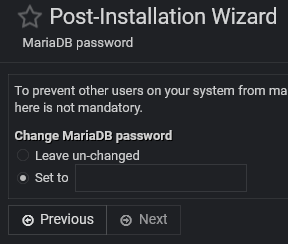
after post installation i set the new password (without special charactor) here instead using “leave un-changed” default password. after that it will start giving problem. this is the main issue. do it from your end to test.
after that change password from mariadb server admin page under webmin > servers > mariadb database server and tick on “force change password…” than you will start getting problem. the mariadb server will crash forever.
Solution is: remove this field in post installation or make it disabled, dont let users change the mariadb root password just after installation during post installation wizard. if they want to change they should go to webmin > servers > mariadb database servers > change administrative password to change the mysql maridadb root password after installation and post installation process.
Is this the screen you’re seeing right after the clean installation? Are these the exact two options, “Leave unchanged” and “Set to”? Or do you see it when running it later again?
Which MariaDB version and OS are you having this issue on? I just tested on Ubuntu 24.04, and the “Force override the given password, if lost or forgotten” option worked as expected for me as well.
its not issue of version. mariadb 10.11.14 debian 12.
it is virtualmin issue. just after installation of virtualmin it opens post installation wizard and asks for the root password of mariadb, if you change the root password of mariadb virtualmin doesnt save it in the server. but it keeps running so nothing happened, after some weeks or months when you do something or change the root password again the mariadb will get crashed forever. it will keep saying “access denied for user root@localhost using password yes”, will not go in safe mode will not restart cant change password using ssh or using file manager. you will have to make fresh installation again. and next time dont change root password of mysql during post installation settings.
because every engineer is busy always. i am not asking for help i told you about the bug. so that you could fix it. there is no solution of it after problem. the solution is to be done in the beginning just after installation during post installation wizard.
thousands of people have any problem, only hundreds of them make complaints in which only 2-3 people takes action for that problem to protect others also. it applies on every field not only in technical.
it is similar to offline for virtualmin because if you cant access it, cant change its password, cant make in safe mode, cant restart, cant start, so it is offline/crashed stat. just reinstall it to fix it and never change the root password under post installation wizard.
So the database IS NOT CRASHED? The community here works hard to solve problems. IF, and we assume that to be a BIG IF at this point, your point is valid we must have accurate and thorough answers. You insist on deleting a feature no one else seems to have problems with. I’m sure @Ilia will do everything he can if he can reproduce the problem. Remember, computers flip bits randomly sometimes.
There are ways of proceeding. First one I’ve found.
it is crashed, because after changing password if you change the password again the mariadb database will not start again. and this window is from virtualmin wizard not from mariadb server, the mariadb server got disappeared. also from dashboard server status section so it is called crashed. not starting condition.