I cannot give versions as I cannot access the server. I have just updated about 50 packages including a kernel tweak I think and now the server will not start. I cannot even access it over ssh as the connection is refused.
If you can’t access it via ssh, either, it’s not Virtualmin that crashed; Virtualmin is not involved at all. Your server seemingly didn’t recover from the reboot.
You’ll need to see the console error messages to know what’s happening. If it responds to pings, then the kernel booted and the networking layer is up, which points at firewall changes or similar (maybe a cloud-init change at your host, we’ve seen cases where a hosting provider updated cloud-init configuration in such a way that it either broke networking entirely or applied a firewall that broke connections to services).
If you can’t ping, then the new kernel presumably failed to boot.
In all cases, without ssh or Webmin access, you’ll need a console. Most hosts offer a virtual console for their VMs.
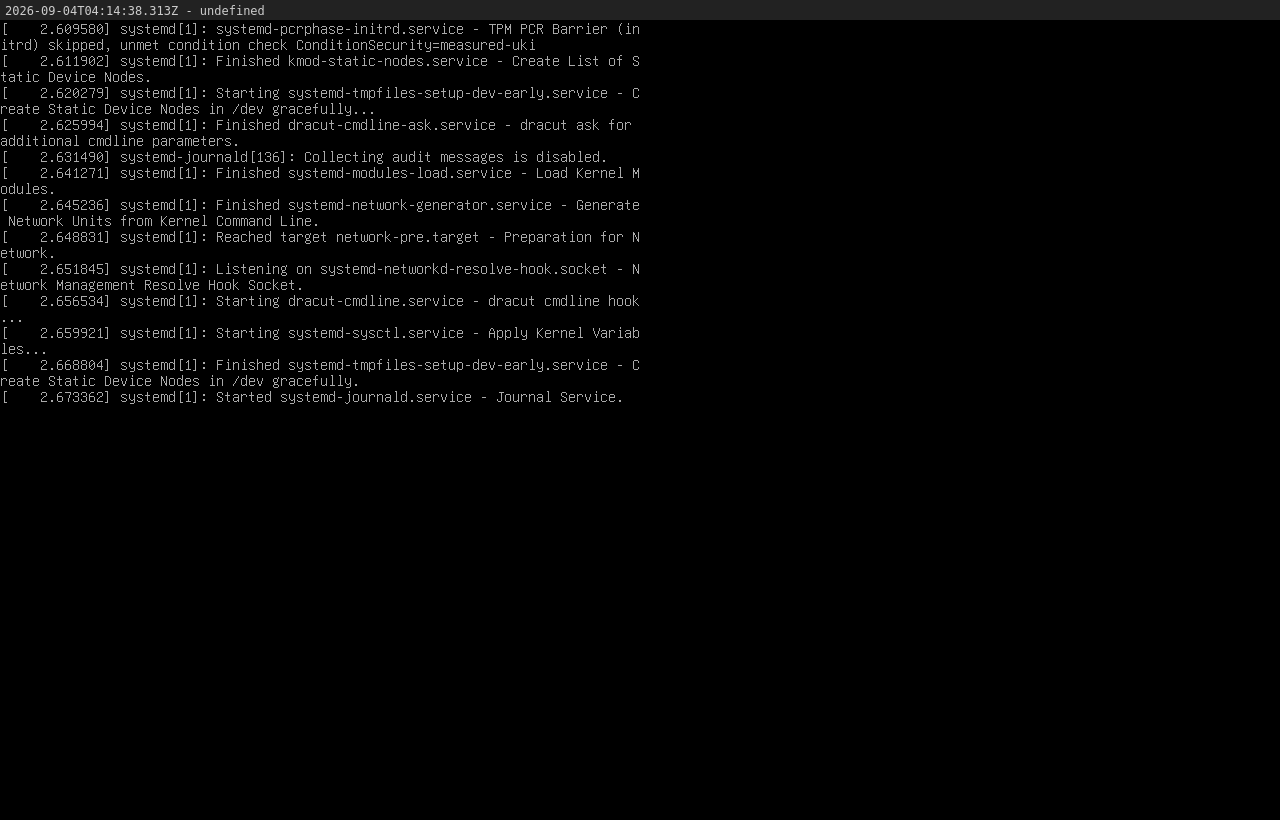
I am hosted at Ionos and I have access to my account where there is a console but it too is stuck. None of the keys respond but I have been able to download a screenshot (attached).
That’s quite early in the boot process, which hints at a kernel issue. Try booting into the previous kernel. You presumably can see a GRUB boot screen for a couple/few seconds immediately after a reboot; try interrupting it and selecting an older kernel.
If you rebooted after a kernel update, it’s not odd at all. That’s when one would expect a kernel upgrade to take effect, and if it’s going to cause trouble that’s the only opportunity it has to cause trouble.
Spoke to Ionos but as it is a bare machine the support is limited. They have however helped to get access to a remote dvd drive and I am now running the latest gparted iso. I have these options:
Presumably through terminal I should be able to reverse the kernel change? The grub menu refuses to load despite me banging away at the esc key or holding down the shift key.
Is there a link you can give me to help me reset the kernel? I assume this is a ubuntu mess up?
Can´t seem to get the internet to work so I will talk to them again however the terminal session is working so if I do not need to download packages, I should be OK.
NB I have now got the internet working on the gparted iso.
If you open up two web browser windows, fire off a reboot action in one, keep the console in the other, you should be able to see the server POST. This should allow you to see where the boot fails. You might also be able to select the kernel version.
Fortunately the 20.04 ubuntu server is still live to use but I am still struggling with the new server. I tried the dual window but the problem is I cannot communicate with the server OS to reboot, I can only restart the server and that then breaks the remote console window.
I did manage to ssh via a live gparted drive and reverted from kernel 7.0.0-31 to 7.0.0-30 but the problem remained. Today I will do the same but revert to 7.0.0.15 to see if that works. I do not have a version 6 kernel. If I have ssh access can I reload a version 6 to try to get it to work?
Will - apt install linux-image-6.x.x-x-generic - pull in all dependencies? Do I need to use a force command to revert to older package versions if required?
If the previous kernel doesn’t boot, then it’s not the kernel that’s the problem. At least one of the currently installed kernels was the one your system booted from last, so if you’ve tried all the currently installed kernels you have ruled out the kernel as the problem. Installing a different kernel won’t solve anything.
It’d presumably be something else that updated at the same time. Was there a cloud-init config from your hosting provider at the same time? Were there any network changes you made that may not have taken effect until you rebooted?
You may be in “start fresh and restore from backups” territory if simply rolling back to the previous known-good kernel doesn’t solve it.
Webmin configuration can’t have prevented booting. Webmin is not involved in the system boot; it’s just another service.
But, if you used the Backup Configuration Files and tried to bulk restore those backups on a new OS/version, it’s entirely plausible that could have broken something serious. System configuration files are not generally fungible across major version changes or OS changes. Some services might be, but network, etc. definitely is not.
OK Joe but I am continuing to have serious problems. I have rebuilt the server. Upgraded all packages. Restored two virtual servers and nothing else. I just restarted the server via my VPS control panel and it has once again frozen on journal services. I have no idea now what is causing it. The problem now is I cannot (easily) access the log files. To do so means running up a live gparted drive, mounting and chrooting to view the server files themselves.
Before I start all over again (and try to restart after each process to see what is causing the problem) which log files should I try to lift off the server to check for the error?
Are you using firewalld for firewall management ? If so, if you have access to the server remove it and use either iptables or nftables to manage the firewall bear in mind that iptables is quite old and nftables appears to be the better choice.