I’ve been running Virtualmin on my Ubuntu VPS for a number of years now, and recently decided to move from a VPS to a physical server running from home. My existing server runs a Dovecot/Postfix email server, a Radicale calendar server, and 3 Docker apps - Immich, Grocy and Trilium Notes. I have a couple of questions on moving everything to my new server, that I would appreciate answers or feedback for please.
My old server runs FirewallD, but I am leaning towards just running nftables on my new server, and using the Linux Firewall option in Webmin > Networking to manage it. Are there any opinions on which is the better way to go, or gotchas I should be aware of?
My current docker apps were installed manually (not through Virtualmin) with docker-compose. My preference is to use the Virtualmin Docker install on my new server, and the new Podman feature when it’s released, so will I be able to import or transfer my existing apps into the Virtualmin-based implentation on my new server?
Thanks in advance for any assistance or information you can provide.
We’re switching the installer to default to nftables directly. So, yeah, I recommend nftables. There’s no reason for the added complexity of firewalld on most servers, unless you like it and find it more intuitive/friendly to use (but I think nftables is friendlier).
Generally, yes. Containers are pretty portable, which is one reason to use them. You may need to manually bring the data across, though.
And, the Podman plugin is already released, it’s been out for quite a while. Still under active development, so it still changes pretty regularly, but generally in compatible non-breaking ways.
If you’re on the Virtualmin 8 repos (which is not indicated by which version of the Virtualmin virtual-server module you have, it depends on when you installed), you should just be able to install it, I think. Something like apt install virtualmin-podman
and it appeared to work ok:
% Total % Received % Xferd Average Speed Time Time Time Current
Dload Upload Total Spent Left Speed
100 121 100 121 0 0 217 0 --:–:-- --:–:-- --:–:-- 217
but when I tried to install it using this command:
sudo apt install /tmp/webmin-virtualmin-podman-latest.deb podman skopeo
I get this error:
Reading package lists… Error!
E: Invalid archive signature
E: Internal error, could not locate member control.tar{.zst,.lz4,.gz,.xz,.bz2,.lzma,}
E: Could not read meta data from /tmp/webmin-virtualmin-podman-latest.deb
E: The package lists or status file could not be parsed or opened.
I noticed when I was fault checking, that the installation docs had a slightly different curl command so I tried that one:
curl --fail --show-error --location --user ‘SERIAL:KEY’ https://download.virtualmin.dev/webmin-virtualmin-podman-latest.deb --output /tmp/webmin-virtualmin-podman-latest.deb
but this gave me a 401 error:
curl: (22) The requested URL returned error: 401
Do you have any idea why it’s not installing correctly for me?
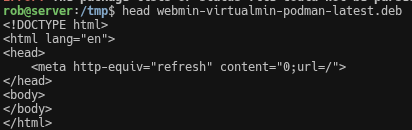
I tried the process again and after running the curl command, it downloaded the file, but it only reports as being 121 bytes in size (which is the same as the first time I tried). It also included a warning about a Unicode character?
When I checked the file with your head command, I just got this html code:
That means curl isn’t following redirects. @Ilia, if you’ve put the files behind a redirect, curl isn’t going to download those files without --location or --follow.
But, again, I thought these packages were in the Virtualmin 8 repos, already, as well, which doesn’t need a curl or all this manual downloading mess.
To be clear, I thought we were talking about a “new server build” based on the title, which means you’d definitely be using the Virtualmin 8 repos, since you shouldn’t install a new system with an old installer version or repos.
It rather means authentication failed. I shared a curl command on the original post that definitely works.
Perhaps a user replaced the single quotes ' with typographic ‘ quotes? Also, the -latest files are all symlinks on the server, so the redirect is not a problem.
Yes! @Jamie, I believe we are ready for the Virtualmin 8.2.0 release. Everything is ready!
I’m copying the curl command directly from the original post, so I wouldn’t think the characters are getting replaced. I also tried manually replacing them with single quotes but got the same error. Does 121 bytes sound right for the downloaded .deb file?
I’m also running the Pro version, so that shouldn’t be the issue. Depending on how long before 8.2 is released, I’m thinking it might be better to just wait for that.