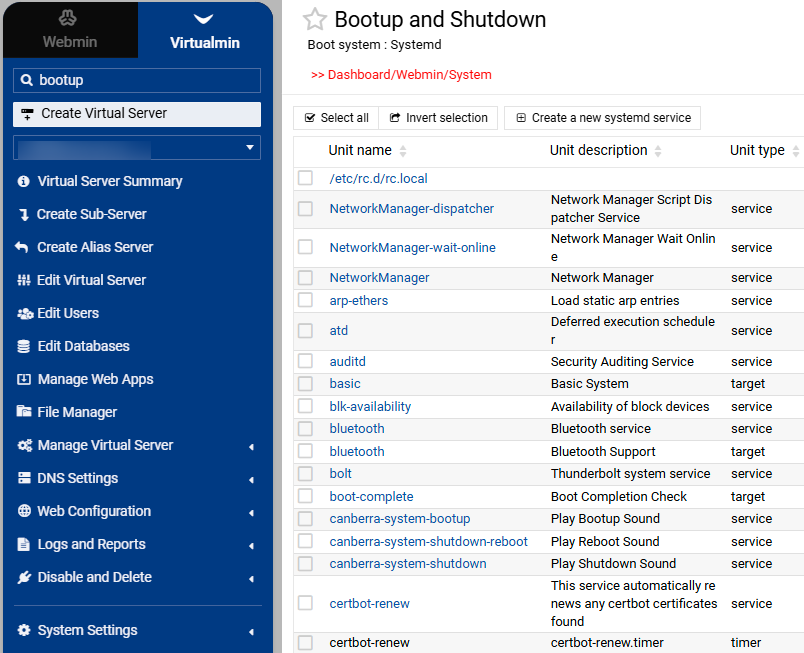
Sometimes it’s easy to get a bit lost. When I do a search for a component in virtualmin (or webmin) Using the excellent search at top left menu, I get to the place I want - but it should show at the top, the breadcrumb so I can easily see where to get to that page next time.
Example: I want to get to Bootup and Shutdown page, can’t find it, do a search for “bootup” result shows the one I want - I go there - but I still do not see where that page lives.
Solution: Add a breadcrumb at the top of the page.
NB ideally but not essential, each part of the breadcrumb would be clickable
As you searched for the “Bootup and Shutdown” module in the Virtualmin menu, it didn’t open the left menu correctly.
It’s likely a bug that needs fixing. If you switched to Webmin mode at the top, it would clearly show where you are after the search. In Webmin mode, you can also use the autocomplete search without doing an actual server-side search.
Adding breadcrumb support wouldn’t be easy, and honestly, it already feels excessive to me, considering it’s always in sync with the left menu which makes it easy to get where you are.
I will rather work on improving the search suggestions to switch correctly between Webmin and Virtualmin.
I don’t think it actually is but TBF I dumped the left menu (switched it off) in favour of favourites in the slider which does everything I want to do however I do have quite a few favourites
Adding breadcrumb support wouldn’t be easy, and honestly, it already feels excessive to me, considering it’s always in sync with the left menu which makes it easy to get where you are.
OK but I don’t think it matters how breadcrumbs or whatnot display - don’t make it a big job - just show the path you are at - perhaps add a column “Location” in search results (see screenshot example). It doesn’t have to be live links so long as there is a clear indication as to where the page actually lives - I can see this is a bit easier to do from Webmin - but at the moment if you are in Virtualmin search, there is nothing to tell you where you are if you use search (unless I am missing something obvious).
There are so many config pages etc and because a lot of changes are happening on your side (for the better, and thank you for your amazing work) - the documentation or google search (or AI suggestions) are often out of date - so I find the search function useful - but once I am on the page I want - I don’t know where it lives - so I can’t learn where to find it next time. So hence my suggestion.
What we will do is make the menu automatically switch to the Webmin or Virtualmin menu depending on the link you click in the search results.
I will also work on implementing autocomplete so it works no matter which menu section is selected. This will allow quick access to any module in Webmin from the Virtualmin tab and vice versa.