OK guys, I’ve run into a problem this morning at 07:10AM which is exact time one of my sites certificates are expiring and auto-renewing.
The problem is, that I have these sites backup-restore from Ubuntu 20 ->> Ubuntu 24.04 about a month ago. Everything was working fine, till this morning. One of certificates expired, and seems like renewed but it broke whole server (all other sites also).
I don’t know where to look for, and this is what I have checked for now.
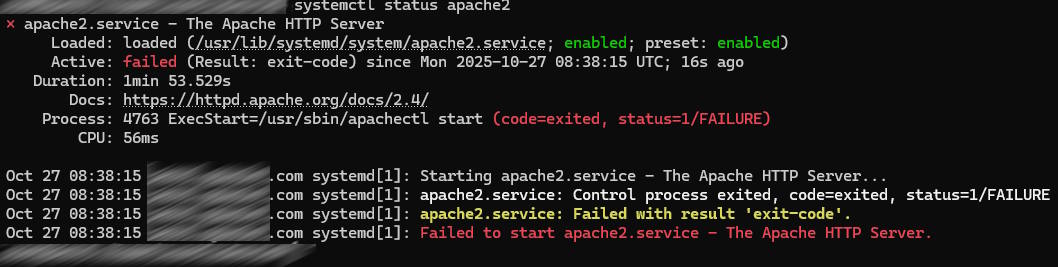
░░ Subject: A start job for unit apache2.service has begun execution
░░ Defined-By: systemd
░░ Support: http://www.ubuntu.com/support
░░
░░ A start job for unit apache2.service has begun execution.
░░
░░ The job identifier is 3320.
Oct 27 08:38:15 sub.domain.com.com systemd[1]: apache2.service: Control process exited, code=exited, status=1/FAILURE
░░ Subject: Unit process exited
░░ Defined-By: systemd
░░ Support: http://www.ubuntu.com/support
░░
░░ An ExecStart= process belonging to unit apache2.service has exited.
░░
░░ The process' exit code is 'exited' and its exit status is 1.
Oct 27 08:38:15 sub.domain.com.com systemd[1]: apache2.service: Failed with result 'exit-code'.
░░ Subject: Unit failed
░░ Defined-By: systemd
░░ Support: http://www.ubuntu.com/support
░░
░░ The unit apache2.service has entered the 'failed' state with result 'exit-code'.
Oct 27 08:38:15 sub.domain.com.com systemd[1]: Failed to start apache2.service - The Apache HTTP Server.
░░ Subject: A start job for unit apache2.service has failed
░░ Defined-By: systemd
░░ Support: http://www.ubuntu.com/support
░░
░░ A start job for unit apache2.service has finished with a failure.
░░
░░ The job identifier is 3320 and the job result is failed.
...skipping...
░░ Subject: A start job for unit apache2.service has begun execution
░░ Defined-By: systemd
░░ Support: http://www.ubuntu.com/support
░░
░░ A start job for unit apache2.service has begun execution.
░░
░░ The job identifier is 3320.
Oct 27 08:38:15 sub.domain.com.com systemd[1]: apache2.service: Control process exited, code=exited, status=1/FAILURE
░░ Subject: Unit process exited
░░ Defined-By: systemd
░░ Support: http://www.ubuntu.com/support
░░
░░ An ExecStart= process belonging to unit apache2.service has exited.
░░
░░ The process' exit code is 'exited' and its exit status is 1.
Oct 27 08:38:15 sub.domain.com.com systemd[1]: apache2.service: Failed with result 'exit-code'.
░░ Subject: Unit failed
░░ Defined-By: systemd
░░ Support: http://www.ubuntu.com/support
░░
░░ The unit apache2.service has entered the 'failed' state with result 'exit-code'.
Oct 27 08:38:15 sub.domain.com.com systemd[1]: Failed to start apache2.service - The Apache HTTP Server.
░░ Subject: A start job for unit apache2.service has failed
░░ Defined-By: systemd
░░ Support: http://www.ubuntu.com/support
░░
░░ A start job for unit apache2.service has finished with a failure.
░░
░░ The job identifier is 3320 and the job result is failed.
...skipping...
░░ Subject: A start job for unit apache2.service has begun execution
░░ Defined-By: systemd
░░ Support: http://www.ubuntu.com/support
░░
░░ A start job for unit apache2.service has begun execution.
░░
░░ The job identifier is 3320.
Oct 27 08:38:15 sub.domain.com.com systemd[1]: apache2.service: Control process exited, code=exited, status=1/FAILURE
░░ Subject: Unit process exited
░░ Defined-By: systemd
░░ Support: http://www.ubuntu.com/support
░░
░░ An ExecStart= process belonging to unit apache2.service has exited.
░░
░░ The process' exit code is 'exited' and its exit status is 1.
Oct 27 08:38:15 sub.domain.com.com systemd[1]: apache2.service: Failed with result 'exit-code'.
░░ Subject: Unit failed
░░ Defined-By: systemd
░░ Support: http://www.ubuntu.com/support
░░
░░ The unit apache2.service has entered the 'failed' state with result 'exit-code'.
Oct 27 08:38:15 sub.domain.com.com systemd[1]: Failed to start apache2.service - The Apache HTTP Server.
░░ Subject: A start job for unit apache2.service has failed
░░ Defined-By: systemd
░░ Support: http://www.ubuntu.com/support
░░
░░ A start job for unit apache2.service has finished with a failure.
░░
░░ The job identifier is 3320 and the job result is failed.
...skipping...
░░ Subject: A start job for unit apache2.service has begun execution
░░ Defined-By: systemd
░░ Support: http://www.ubuntu.com/support
░░
░░ A start job for unit apache2.service has begun execution.
░░
░░ The job identifier is 3320.
Oct 27 08:38:15 sub.domain.com.com systemd[1]: apache2.service: Control process exited, code=exited, status=1/FAILURE
░░ Subject: Unit process exited
░░ Defined-By: systemd
░░ Support: http://www.ubuntu.com/support
░░
░░ An ExecStart= process belonging to unit apache2.service has exited.
░░
░░ The process' exit code is 'exited' and its exit status is 1.
Oct 27 08:38:15 sub.domain.com.com systemd[1]: apache2.service: Failed with result 'exit-code'.
░░ Subject: Unit failed
░░ Defined-By: systemd
░░ Support: http://www.ubuntu.com/support
░░
░░ The unit apache2.service has entered the 'failed' state with result 'exit-code'.
Oct 27 08:38:15 sub.domain.com.com systemd[1]: Failed to start apache2.service - The Apache HTTP Server.
░░ Subject: A start job for unit apache2.service has failed
░░ Defined-By: systemd
░░ Support: http://www.ubuntu.com/support
░░
░░ A start job for unit apache2.service has finished with a failure.
░░
░░ The job identifier is 3320 and the job result is failed.
lines 91-119/119 (END)
I do know what domain certificate has been renewed, but I don’t know much about it… How to resolve this, at least how to exclude this site from making troubles, till I find a solution.??
Edit: when I restore cloud backup Everything works for about 2-3 minutes (till cert renews)
If you back up the /etc/apache2/sites-available/ directory before an LE SSL request and after when Apache starts failing, what files exactly are changed? Can you provide a diff?
Backup is Cloud hosted and I can’t download it. Just able to use rebuild Server.
Now I’m trying what should and shouldn’t but nothing works. Last one I’ve deleted host that I believe is causing problems, but even without that particular host Apache2 wont start at all.
OK, just restored backup again and all sites worked for about 20 seconds. Now they don’t work. I have Virtualmin access via IP.
This is config file
# This is the main Apache server configuration file.  It contains the
# configuration directives that give the server its instructions.
# See http://httpd.apache.org/docs/2.4/ for detailed information about
# the directives and /usr/share/doc/apache2/README.Debian about Debian specific
# hints.
#
#
# Summary of how the Apache 2 configuration works in Debian:
# The Apache 2 web server configuration in Debian is quite different to
# upstream's suggested way to configure the web server. This is because Debian's
# default Apache2 installation attempts to make adding and removing modules,
# virtual hosts, and extra configuration directives as flexible as possible, in
# order to make automating the changes and administering the server as easy as
# possible.

# It is split into several files forming the configuration hierarchy outlined
# below, all located in the /etc/apache2/ directory:
#
#	/etc/apache2/
#	|-- apache2.conf
#	|	`--  ports.conf
#	|-- mods-enabled
#	|	|-- *.load
#	|	`-- *.conf
#	|-- conf-enabled
#	|	`-- *.conf
# 	`-- sites-enabled
#	 	`-- *.conf
#
#
# * apache2.conf is the main configuration file (this file). It puts the pieces
#   together by including all remaining configuration files when starting up the
#   web server.
#
# * ports.conf is always included from the main configuration file. It is
#   supposed to determine listening ports for incoming connections which can be
#   customized anytime.
#
# * Configuration files in the mods-enabled/, conf-enabled/ and sites-enabled/
#   directories contain particular configuration snippets which manage modules,
#   global configuration fragments, or virtual host configurations,
#   respectively.
#
#   They are activated by symlinking available configuration files from their
#   respective *-available/ counterparts. These should be managed by using our
#   helpers a2enmod/a2dismod, a2ensite/a2dissite and a2enconf/a2disconf. See
#   their respective man pages for detailed information.
#
# * The binary is called apache2. Due to the use of environment variables, in
#   the default configuration, apache2 needs to be started/stopped with
#   /etc/init.d/apache2 or apache2ctl. Calling /usr/bin/apache2 directly will not
#   work with the default configuration.


# Global configuration
#

#
# ServerRoot: The top of the directory tree under which the server's
# configuration, error, and log files are kept.
#
# NOTE!  If you intend to place this on an NFS (or otherwise network)
# mounted filesystem then please read the Mutex documentation (available
# at <URL:http://httpd.apache.org/docs/2.4/mod/core.html#mutex>);
# you will save yourself a lot of trouble.
#
# Do NOT add a slash at the end of the directory path.
#
#ServerRoot "/etc/apache2"

#
# The accept serialization lock file MUST BE STORED ON A LOCAL DISK.
#
#Mutex file:${APACHE_LOCK_DIR} default

#
# The directory where shm and other runtime files will be stored.
#

DefaultRuntimeDir ${APACHE_RUN_DIR}

#
# PidFile: The file in which the server should record its process
# identification number when it starts.
# This needs to be set in /etc/apache2/envvars
#
PidFile ${APACHE_PID_FILE}

#
# Timeout: The number of seconds before receives and sends time out.
#
Timeout 300

#
# KeepAlive: Whether or not to allow persistent connections (more than
# one request per connection). Set to "Off" to deactivate.
#
KeepAlive On

#
# MaxKeepAliveRequests: The maximum number of requests to allow
# during a persistent connection. Set to 0 to allow an unlimited amount.
# We recommend you leave this number high, for maximum performance.
#
MaxKeepAliveRequests 100

#
# KeepAliveTimeout: Number of seconds to wait for the next request from the
# same client on the same connection.
#
KeepAliveTimeout 5


# These need to be set in /etc/apache2/envvars
User ${APACHE_RUN_USER}
Group ${APACHE_RUN_GROUP}

#
# HostnameLookups: Log the names of clients or just their IP addresses
# e.g., www.apache.org (on) or 204.62.129.132 (off).
# The default is off because it'd be overall better for the net if people
# had to knowingly turn this feature on, since enabling it means that
# each client request will result in AT LEAST one lookup request to the
# nameserver.
#
HostnameLookups Off

# ErrorLog: The location of the error log file.
# If you do not specify an ErrorLog directive within a <VirtualHost>
# container, error messages relating to that virtual host will be
# logged here.  If you *do* define an error logfile for a <VirtualHost>
# container, that host's errors will be logged there and not here.
#
ErrorLog ${APACHE_LOG_DIR}/error.log

#
# LogLevel: Control the severity of messages logged to the error_log.
# Available values: trace8, ..., trace1, debug, info, notice, warn,
# error, crit, alert, emerg.
# It is also possible to configure the log level for particular modules, e.g.
# "LogLevel info ssl:warn"
#
LogLevel warn

# Include module configuration:
IncludeOptional mods-enabled/*.load
IncludeOptional mods-enabled/*.conf

# Include list of ports to listen on
Include ports.conf


# Sets the default security model of the Apache2 HTTPD server. It does
# not allow access to the root filesystem outside of /usr/share and /var/www.
# The former is used by web applications packaged in Debian,
# the latter may be used for local directories served by the web server. If
# your system is serving content from a sub-directory in /srv you must allow
# access here, or in any related virtual host.
<Directory />
    Options FollowSymLinks
    AllowOverride None
    Require all denied
</Directory>

<Directory /usr/share>
    AllowOverride None
    Require all granted
</Directory>

<Directory /var/www/>
    Options Indexes FollowSymLinks
    AllowOverride None
    Require all granted
</Directory>

#<Directory /srv/>
#	Options Indexes FollowSymLinks
#	AllowOverride None
#	Require all granted
#</Directory>


# AccessFileName: The name of the file to look for in each directory
# for additional configuration directives.  See also the AllowOverride
# directive.
#
AccessFileName .htaccess

#
# The following lines prevent .htaccess and .htpasswd files from being
# viewed by Web clients.
#
<FilesMatch "^\.ht">
    Require all denied
</FilesMatch>


#
# The following directives define some format nicknames for use with
# a CustomLog directive.
#
# These deviate from the Common Log Format definitions in that they use %O
# (the actual bytes sent including headers) instead of %b (the size of the
# requested file), because the latter makes it impossible to detect partial
# requests.
#
# Note that the use of %{X-Forwarded-For}i instead of %h is not recommended.
# Use mod_remoteip instead.
#
LogFormat "%v:%p %h %l %u %t \"%r\" %>s %O \"%{Referer}i\" \"%{User-Agent}i\"" vhost_combined
LogFormat "%h %l %u %t \"%r\" %>s %O \"%{Referer}i\" \"%{User-Agent}i\"" combined
LogFormat "%h %l %u %t \"%r\" %>s %O" common
LogFormat "%{Referer}i -> %U" referer
LogFormat "%{User-agent}i" agent

# Include of directories ignores editors' and dpkg's backup files,
# see README.Debian for details.

# Include generic snippets of statements
IncludeOptional conf-enabled/*.conf

# Include the virtual host configurations:
IncludeOptional sites-enabled/*.conf
SSLOpenSSLConfCmd Curves X25519:prime256v1:secp384r1
SSLHonorCipherOrder Off
This is not the config I mentioned earlier. The config I’m talking about is in /etc/apache2/sites-available/ for a specific domain. You can check which files were changed last in this directory to understand that.
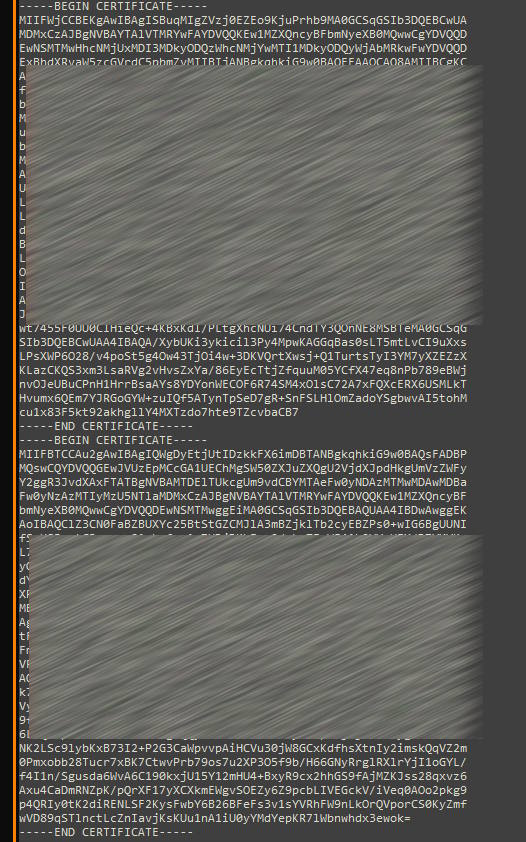
I have checked it more, and the error message you posted, without any obvious config error, indicates that Apache is trying to load a certificate from a file that exists but is of a different or incorrect type.
For example, if you try to load a CA certificate using an ssl.key file, you will get this exact obscure failure.
I’m not sure what could cause this! It could be many things, so I won’t suggest anything.
To fix it across all services manually is also possible but would be time-consuming and require you to know exactly what you’re doing.
To fix it simply, I would just rename the existing domain to something else, create a new domain with the name you want to use, and just copy the files over and deleted the old (renamed).
The script for anyone interested, especially if you have hundreds of websites, can be found here.
I’m confused but I can see some progress. I have all sites running now. (manual enabling one at the time, without *domain.tld.config)
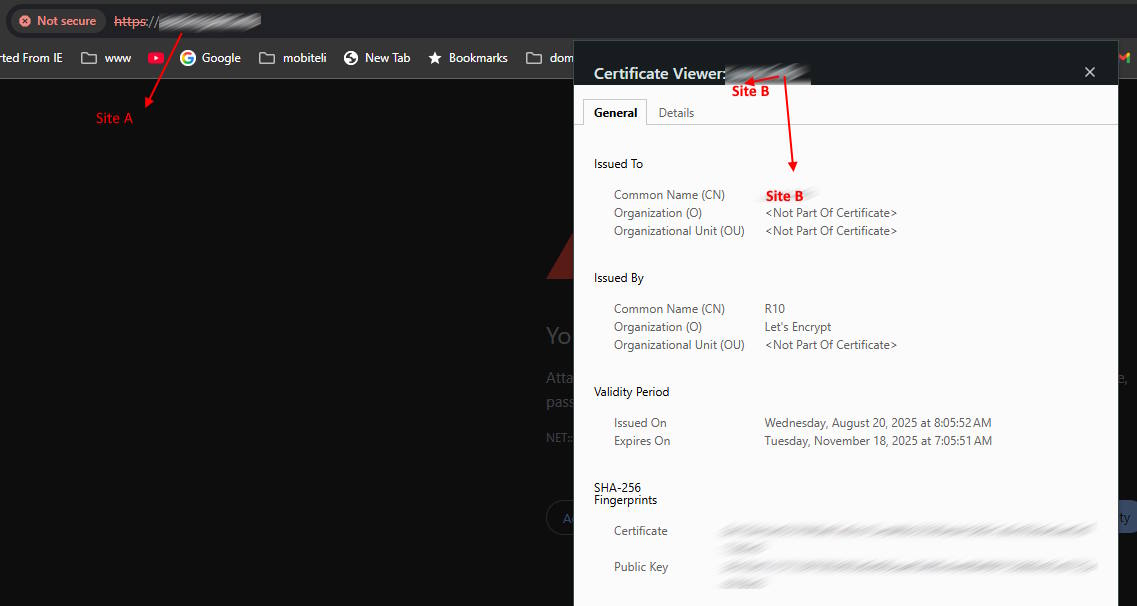
One issue still persistent - main server domain has lost certificate. Now, when I look back, I believe that that was the problem in the first place. For some strange reason Apache2 has stopped once certificate has been renewed. (Certificate for one of the hosts, not main server domain).
I’ll look for this later.
If I don’t find solution, I’ll power up new server.
You don’t need a new server to fix Apache. What you need is enough memory and understanding of your system’s history—what changes were made and what led to the issue.
Can you explain ‘main server domain’ does this refer to the system host name or a domain created using virtualmin that all other domains are sub servers of ?