WP Workbench Issue

OS: Debian Linux 13
Webmin: 2.630
Virtualmin: 8.1.0 Pro
Webserver: Nginx version 1.26.3

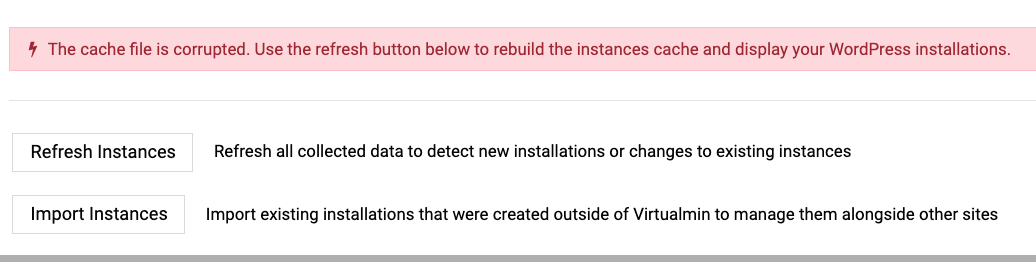
I just installed WP Workbench and receive the following error:

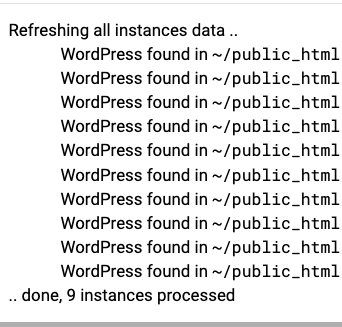
When I click refresh instance, the following loads, but the initial error does not go away.

I also created a Clone site from the Manage Web Apps menu and noticed the following:

  1. The original site has (clone) in the title.
  2. The cloned site has (clone)(clone) in the title

This is appears on screen after cloning:

Creating clone under the same virtual server ..

Flushing object cache ..
.. done
Creating database dump for clone ..
.. done
Copying files to clone ..
.. done
Restoring database into clone ..
.. done
Configuring clone settings ..
Replacing old site URLs in the cloned database ..
.. done
Updating site name ..
.. done
Updating site URL ..
.. error : could not update option siteurl. �
Deactivating maintenance mode ..
.. done
Creating cache for cloned instance ..
.. done
.. done

.. done


Thanks

Hello,

If you manually delete the cache-* files under the /var/webmin/modules/virtualmin-wp-workbench directory, does the error go away?

Thanks for the response. There was a single file in that directory: cache-root.json

I deleted the file, and then clicked on Find Instances. WP workbench find the instances, but I still have the same error when I return to the dashboard. Thanks

Thanks

That’s very unexpected! What is the output of the df -h command?

Here are the results. Thanks

Filesystem      Size  Used Avail Use% Mounted on
udev            3.9G     0  3.9G   0% /dev
tmpfs           795M  1.3M  794M   1% /run
/dev/vda4       251G   13G  228G   6% /
tmpfs           3.9G     0  3.9G   0% /dev/shm
tmpfs           5.0M     0  5.0M   0% /run/lock
tmpfs           3.9G   32K  3.9G   1% /tmp
tmpfs           1.0M     0  1.0M   0% /run/credentials/systemd-journald.service
/dev/vda3       944M  135M  744M  16% /boot
/dev/vda2       241M   512  241M   1% /boot/efi
tmpfs           1.0M     0  1.0M   0% /run/credentials/getty@tty1.service
tmpfs           795M  8.0K  795M   1% /run/user/0

So, what does this file contain? Can you drag and drop it here?

The redacted file is attached. Thanks
masked_cache-root.json.zip (19.1 KB)

Thanks!

Can you check the ~/logs directory for any error messages for each domain? The log files are in ~/logs/wp_cli_log or ~/logs/wp_debug_log (if that file exists).

I suspect one of the plugins or themes is emitting compressed or other binary output during WP-CLI execution, and WP Workbench is then surfacing that bad output somehow.

And, could you also run the following as the domain owner and paste the output for all domains (or a broken one only if you manage to find one)?

cd ~
~/bin/wp --path=public_html option get siteurl
~/bin/wp --path=public_html option get siteurl 2>&1 | hexdump -C | head -40

Then run the same command with plugins and themes skipped:

cd ~
~/bin/wp --path=public_html option get siteurl --skip-plugins --skip-themes
~/bin/wp --path=public_html option get siteurl --skip-plugins --skip-themes 2>&1 | hexdump -C | head -40

Here are the results:
wp_cli_log shows the following:

PHP Warning:  Attempt to read property "ID" on false in phar:///home/xxxx/bin/wp/vendor/wp-cli/eval-command/src/Eval_Command.php(39) : eval()'d code on line 1
Warning: Attempt to read property "ID" on false in phar:///home/xxxx/bin/wp/vendor/wp-cli/eval-command/src/Eval_Command.php(39) : eval()'d code on line 1
Error: Failed to get latest version (HTTP code 403).
xxxx@server:~$ ~/bin/wp --path=public_html option get siteurl
https://gren...com

xxxx@server:~$ ~/bin/wp --path=public_html option get siteurl 2>&1 | hexdump -C | head -40
00000000  68 74 74 70 73 3a 2f 2f  67 72 65 6e 61 64 61 68  |https://gren...|
00000010  6f 75 73 74 6f 6e 61 73  73 6f 63 69 61 74 69 6f  |xxxxxxxxxxxx|
00000020  6e 2e 6f 72 67 0a                                 |n.com.|
00000026


Did you set up those WordPress sites through Virtualmin, or were they already installed? If they existed before, did you use the “Import Instances” option in the WP Workbench Manager?

Also, which WP-CLI version are those domains running?

~/bin/wp --path=public_html --skip-plugins --skip-themes --version

And what is the output of:

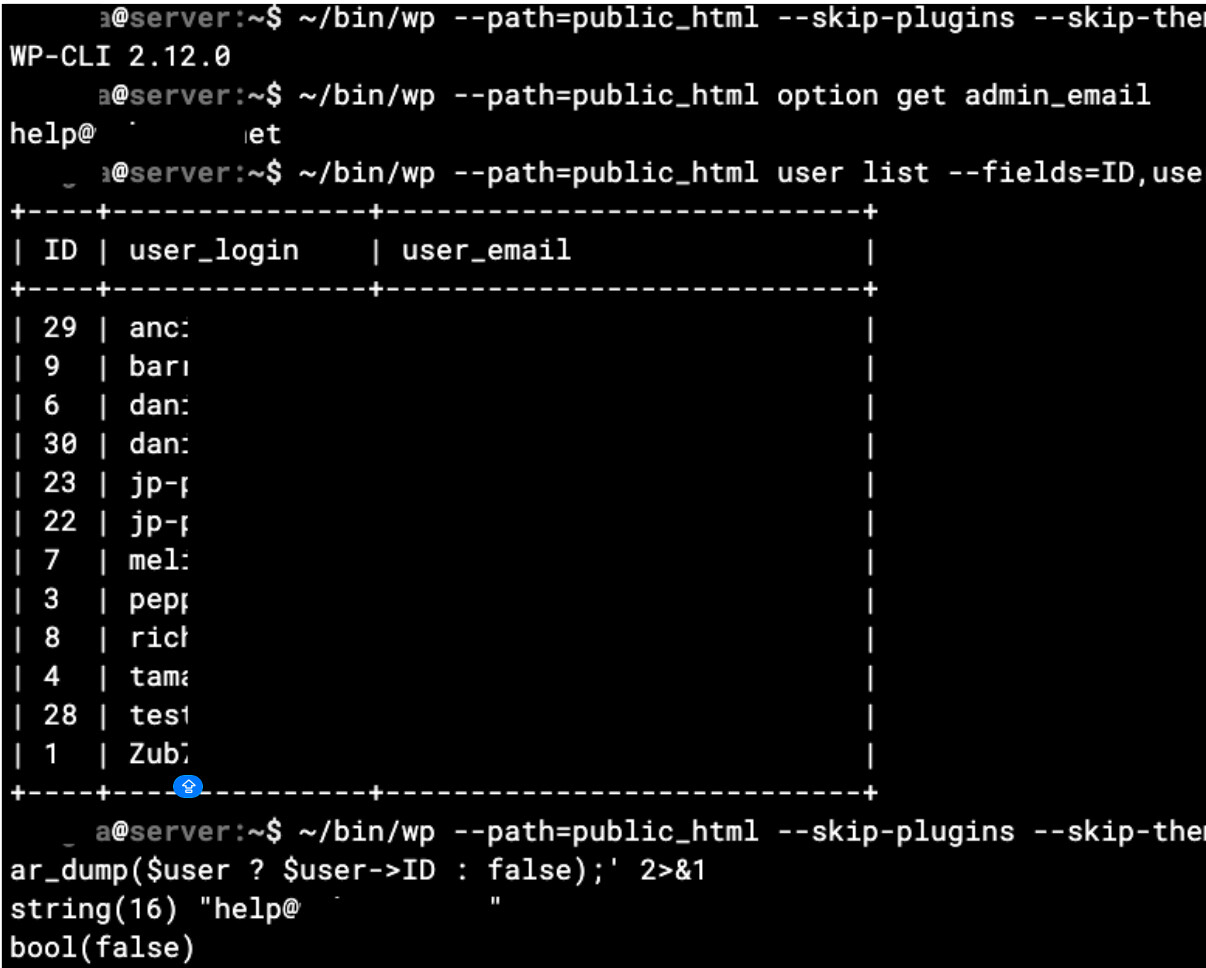
~/bin/wp --path=public_html option get admin_email
~/bin/wp --path=public_html user list --fields=ID,user_login,user_email --format=table
~/bin/wp --path=public_html --skip-plugins --skip-themes eval '$admin_user_email = get_option("admin_email"); $user = get_user_by("email", $admin_user_email); var_dump($admin_user_email); var_dump($user ? $user->ID : false);' 2>&1

The sites already existed and I imported them using the Import instances option.

CLI version is: WP-CLI 2.12.0

Here are the results of the commands:

Thanks

Thank you fir your help. I got it working.

I started by backing up and then deleting the sites that were not live, and It was a site that I created just before upgrading to Pro.

Thank you again.

Can you send me this WordPress website along with its database in DM? I’d like to take a closer look at what was going on to make WP Workbench more resilient.
Also, which PHP execution mode did you use for the domain that had the issue?

PHP-FPM

Thanks

Thanks!

Virtualmin WP Workbench 2.1.2, will be more resilient against plugins that emit PHP warnings to stdout.