| SYSTEM INFORMATION|
|OS type and version|Ubuntu Linux 24.04.3|
|Webmin version|2.520|
|Virtualmin version|7.50.0 Professional|
|Related packages| wp workbench|
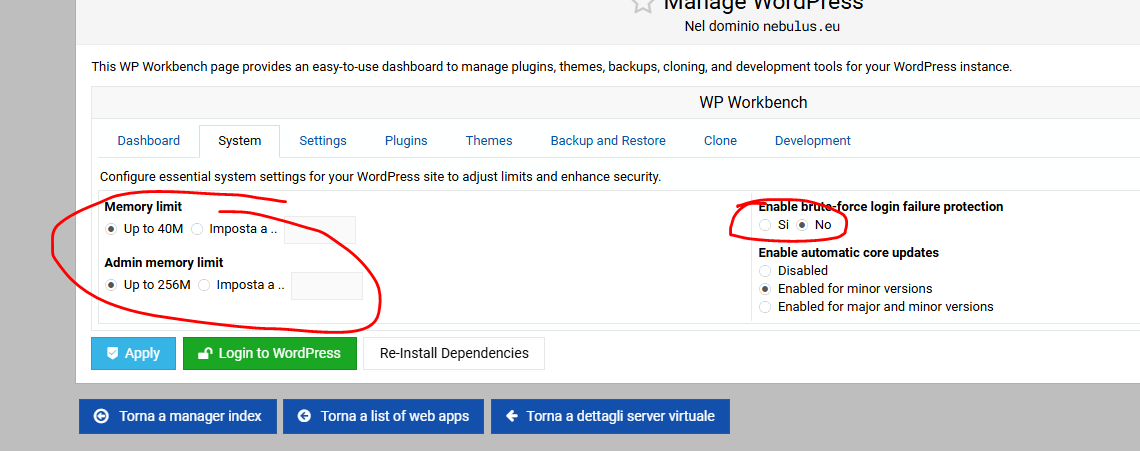
how to set up default parameters for WP Workbench
for example : (change default circled values )
Yes, when using workbench i install wordpress and then i get those parameters.
how to change those default parameters so i don’t have to go each new wordpress installation every time to change manually those parameters.
There’s no UI option to do it right now. However, I’ll add this to my to-do list to make it configurable via templates.
At the moment, the best option you have is to use WP Workbench CLI after each WordPress instance is installed, as shown here:
Furthermore, note that when you change the memory limit in WP Workbench, it will also affect the memory limit for the entire PHP-FPM pool for the domain. Currently, there’s no option to exclude this, but I’ll add it to my to-do list as well.