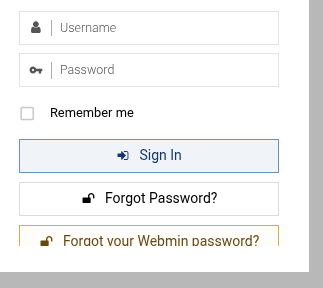
After changing that to “Yes” I now have 2 password reset buttons on my vmin login page, one that says “Forgot your webmin password?” and one that just says “Forgot password?”.
Any Webmin user, or a user created in Virtualmin with an email address set, can reset their password unless the password reset option is disabled on the “Webmin ⇾ Webmin Configuration: Authentication” page.
You can check if a Webmin user (created by Webmin or Virtualmin) has an email address set on the “Webmin ⇾ Webmin Users: username” page.
The user should have an email address configured which you can check in “Webmin ⇾ Webmin Users” page.
What does this mean? What have you tried so far? Was the package removed? What output did you get when you ran the package remove command, as I showed earlier?
OK I have tested that the new user password reset feature works but it only works once the users email is added to the Webmin users page and currently none of our users have this email field configured apart from the one test user I just tried.
I want all users to be able to reset their own passwords so I need a script that will copy every users contact email from Virtualmin → Virtual Server Details to Webmin ⇾ Webmin Users. I should be able to work that out but maybe this should be a feature in virtualin or webmin?
How should I be creating new vmin users so that this email field gets populated?
What does this mean? What have you tried so far? Was the package removed? What output did you get when you ran the package remove command, as I showed earlier?
I mean that I tried running
apt-get purge webmin-virtualmin-password-recovery
Yet it said there was nothing to do because the package had already been removed and doing a purge (vs just a remove, which is what I presume happened during the vmin upgrade) didn’t make any difference although I know purge should also remove settings files related to a package.
I might’ve ended up modifying one of the config files for the old password reset module so maybe that config file is lingering somewhere and doesn’t get cleaned up by doing a purge?
Where is the documentation for using webmin from the command line? webmin doesn’t seem to have a man page or any help text it you run it without arguments so I have no idea what valid sub-commands it has.
Really I just need to know how I configure a users webmin password using a webmin command so that I can write a script to add this to all webmin users and enable all users to reset their passwords.
I might’ve ended up modifying one of the config files for the old password reset module so maybe that config file is lingering somewhere and doesn’t get cleaned up by doing a purge?
I’ve checked my notes and the file I was thinking of used to be at
but the /usr/share/webmin/virtualmin-password-recovery dir no longer exists so that’s not the problem causing the extra password reset button to linger.