Around July 12 or 13, I updated the packages from Webmin. I remember there were several package names involved: Python, all PHP versions, Apache, everything. There were many updates.
A few days before or at the same time, Webmin or Virtualmin was also updated, but I don’t remember exactly.
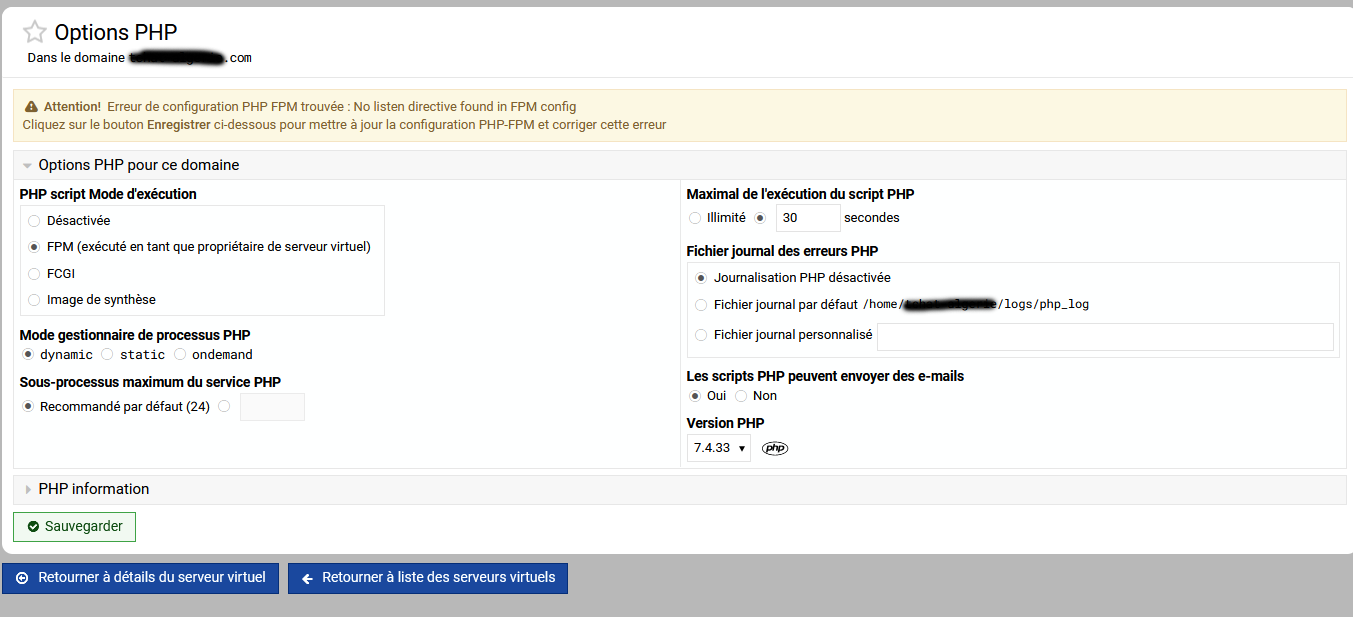
It looks like something went wrong, because all my websites configured with different PHP versions have switched PHP versions, and none of the configuration files can be found anymore. It shows the following message:
Attention! Erreur de configuration PHP FPM trouvée : No listen directive found in FPM config
Cliquez sur le bouton Enregistrer ci-dessous pour mettre à jour la configuration PHP-FPM et corriger cette erreur
Since July 12-13, I have also been experiencing server interruptions related to Apache or PHP, but I’m not sure which one.
About an hour ago, there was another Apache or PHP freeze. The CPU usage and memory are normal, but it looks like something has frozen, probably around PHP or Apache.
It could be related to these missing configuration files.
Ahhhhhhhhhhhhh, I think I now understand what is actually causing this bug! @Jamie, I believe it originates from the fix introduced for issue #112.
That fix automatically repairs outdated php_fpm_version metadata during a configuration check. However, the same check runs from Virtualmin’s postinstall script. On Debian/Ubuntu, dpkg may still be configuring PHP packages at that point, so Virtualmin sees an incomplete FPM inventory and can incorrectly replace a valid version.
This is now fixed in the patch linked below primarily by skipping FPM version repair during postinstall and leaving it for a manual configuration check after the package transaction finishes.
I think it has been fixed for the next version of Virtualmin, but that alone will not repair the issue. The problem has to be fixed manually by clicking “Save” again and reselecting the correct PHP version that was previously in use.
I will never be able to tell whether the Virtualmin update correctly restores the PHP versions because I manually restored every PHP version and restored all the original configuration files from /etc/php/[version]/ that matched the PHP version used by all 80 websites.
However, everything was corrected again 1-2 days ago because I installed PHP 8.5 and updated the PHP version on about 70% of the websites. I also switched from mpm_prefork to mpm_event, but that is unrelated to the PHP-FPM configuration.
It seems that when Virtualmin was updated at the beginning of July, it stored an incorrect PHP version in its Virtualmin configuration and lost the previously configured PHP version. However, there is still a way to determine which PHP version a website was originally using: simply look in /etc/php/[version]/fpm/{your_website}. The directory path itself tells you which PHP version the website was using.
I notice that when it happens to a site (I usually stumble across it by accident) it does not happen on ALL the sites on a box. Plus, I have found that the original PHP version is usually retained in the site. It’s just that the only way to know what PHP it’s using is with a script in the site telling the PHP info. Is there any kind of script one could run to generate a list of which sites on a box are affected (in the error state)? One can just go to the PHP page and select each site from the dropdown but a script would sure be easier LOL!