Hi there,
Thanks for great software!
I’ve followed the documentation to close the local ports to the Internet and proxy the webmin GUI at a custom domain.
All working great, except e-mail alerts show 127.0.0.1 as the client’s IP address in alerts.
Is there option to fix this?
e.g.
This email was sent by Webmin in response to a user action.

Webmin module: virtual-server
Module title: Virtualmin Virtual Servers
Action performed at: <span data-filesize-bytes='1791208512'>10/06/2026 12:55 AM</span>
Performed on system: XXXXXXXX
Performed by user: YYYYYY
Client address: 127.0.0.1
Webmin script: backup_sched.cgi

Modified scheduled backup for all domains
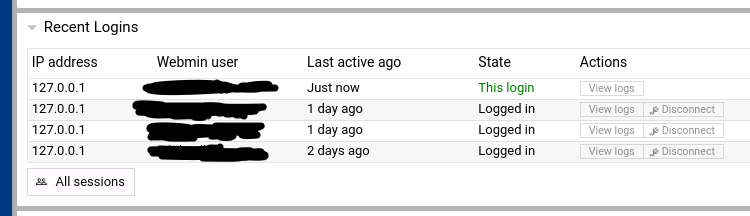
… same on the Dashboard under Recent Logins:
Friendly follow up on this one.
I’ve followed the documentation, and even done some web searching to add these to the proxied nginx conf:
location / {
    proxy_pass https://127.0.0.1:10000/;
    proxy_http_version 1.1;
    proxy_set_header Upgrade $http_upgrade;
    proxy_set_header Connection Upgrade;
    proxy_set_header Host $host;
    proxy_set_header X-Real-IP $remote_addr;
    proxy_set_header X-Forwarded-For $proxy_add_x_forwarded_for;
    proxy_buffering off;
    proxy_request_buffering off;
}
But still not joy unforch. What’s going wrong here?
The IPs in both the email notifications and the ‘Recent Logins’ should be the upstream IP, not 127.0.0.1.
Ahh. With all the additions above, this setting also needs to checked:
Webmin → Webmin → Webmin Configuration → IP Access Control → Trust level for proxy headers
Yes, trust the remote IP address provided by proxies
Might be good to update the documentation with that? It took ages of trial and error and digging around in the dark to figure this out, haha 
I can contribute a pitch of a PR somewhere, if someone will direct me to the docs repo? Very happy to be part of this community and helping great software.