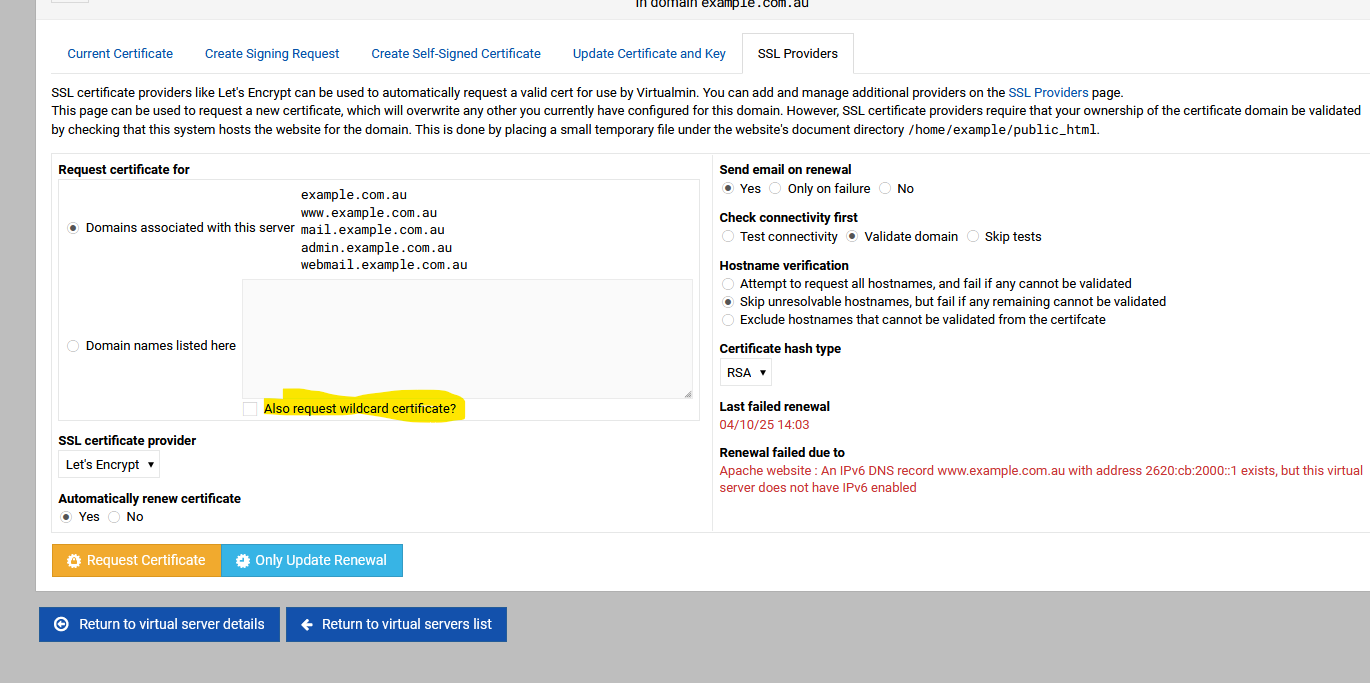
Hi Guys
This May Be A noobe question but im trying to setup wildcard for my domain when simply doing a standard ssl renew or request new its fine but if i click add wildcard i get this error i have used mysite instaead of my domain
Saving debug log to /var/log/letsencrypt/letsencrypt.log
Renewing an existing certificate for mysite.com and *.mysite.com
Certbot failed to authenticate some domains (authenticator: manual). The Certificate Authority reported these problems:
Domain: mysite.com
Type: unauthorized
Detail: Incorrect TXT record “v=spf1 include:mailgun.org ~all” found at _acme-challenge.mysite.com
Hint: The Certificate Authority failed to verify the DNS TXT records created by the --manual-auth-hook. Ensure that this hook is functioning correctly and that it waits a sufficient duration of time for DNS propagation. Refer to “certbot --help manual” and the Certbot User Guide.
Some challenges have failed.
Ask for help or search for solutions at https://community.letsencrypt.org. See the logfile /var/log/letsencrypt/letsencrypt.log or re-run Certbot with -v for more details.
Please put this in the simplist ways i know your all pretty 3lite Thank in advance oh and my DNS is Via GoDaddy
That’s an incoherent TXT record for _acme-challenge. That’s an SPF record, which has nothing to do with ACME.
Virtualmin can only request a wildcard certificate from Let’s Encrypt if it is managing your DNS, whether locally or via a cloud service.
It believes it is managing your DNS, or it wouldn’t have offered to request a wildcard, but the fact that it fails and the fact that the TXT record on _acme-challenge is seemingly a copy/paste error, leads me to believe you’re actually hosting your DNS somewhere outside of the control of Virtualmin. Thus, you cannot get a wildcard certificate using Virtualmin, and you should configure Virtualmin so that it doesn’t believe it is managing your DNS by disabling the DNS Feature in Features and Plugins (you’ll have to turn off DNS for all the domains that have it enabled, first).
You don’t put it anywhere. You cannot get a wildcard certificate with Virtualmin if Virtualmin is not managing your DNS.
You can manually create a wildcard with certbot, but you’ll also have to renew it manually, because to automate it the tool (whether certbot or Virtualmin) needs to be able to modify the TXT record for the _acme-challenge name in your zone.
But you can’t on a Virtualmin system as Joe explained it to you, except if you allow VM to handle the DNS. If If you use VM dns then just tick the the wildcard in the SSL provider section. No need to add records.
But, just don’t use a wildcard. There’s very few reasons to use a wildcard.
You can use web validation to get as many certs as you want, and you can verify for a bunch of domains on a single cert (not unlimited, but several) as long as they’re hosted on the Virtualmin system.
why after every update this once great system is being slowly restricted to for pro membership this is going to kill this project and greed the open source scene ssl sub and so much more maybe ask for donations i would do that but not passive for like microsoft does on install you can except term or no windows wtf
what? where? - I have more than one GPL copy and have not seen any new restriction.
now of course the Pro version gets updates first but that is to be expected
And, the only thing that will kill the project is us not making enough money to make it pay for its development. If we relied on donations only, it would have been dead decades ago, and we would have never been able to hire Ilia, who has done all the UI work, a lot of the docs/website work, and a lot more to boot, for the past several years.
We all have other jobs, and we do this because we believe it improves the world for people to be able to easily self-host their websites, etc…but it’s a lot of work, and it’s not often fun work. It’s a lot of tedious work keeping it going across a bunch of platforms, keeping up with package and security updates and incompatibilities, dealing with translations and accessibility, etc. We would all make more money doing something else, and none of us were born to money, we work for a living. So, the money matters, and donations wouldn’t bring anywhere near enough of it. Just look at the research on Open Source donations and sponsorship, if you doubt it, we’re not the only project with thousands or millions of users that doesn’t make more than a few bucks from donations.
Anyway, we told you the options for getting a wildcard with Virtualmin. There are several ways to do it in Virtualmin GPL, a couple extra ways in Pro (because Pro adds support for two more cloud DNS types, but you could use Route 53 in GPL, because once again, I’ll point out that we don’t remove things from GPL…and Route 53 was added to GPL before we started gating the cloud features a little bit to try to increase revenue enough to survive). And, you can also just use certbot manually. Nothing is stopping you. We’re not stopping you from getting a wildcard. Virtualmin GPL is not stopping you from getting a wildcard.
@paccione for Virtualmin to support wildcard certificates, it needs to manage your DNS. We don’t yet support GoDaddy DNS, which is why it fails.
@Jamie, maybe we should add that as a Pro feature too, since GoDaddy is very popular.
@paccione You see the checkbox in the “Manage Virtual Server ⇾ Setup SSL Certificate / SSL Providers” page only because the “DNS for domain” feature is enabled in the “Edit Virtual Server” page. However, it just creates local DNS records that don’t interact with the outside world because you’re hosting your DNS at GoDaddy.
Sometimes things are much simpler than we think, and there is no conspiracy behind.
Actually, GoDaddy doesn’t seem like a great choice for a cloud DNS provider, as it seems to only support domains registered with them … and also, sub-domains aren’t supported.
Also, I can’t find any documentation for an API for managing DNS records! So I think this is completely off the table..
GoDaddy isn’t great on a lot of fronts. I don’t really want to encourage their use, in general. Technically unsound (quite poor security record), at the very least.
So, I don’t think it’s a big loss if we can’t support them as a registrar or cloud DNS provider.
For cloud DNS we support Google, Cloudflare, NameCheap, and Bunny (we I have no familiarity with, not sure why it was so early to be supported) in Pro. In GPL, we have Route 53, and you can use Cloudmin Services for Cloudmin-managed cloud DNS if you have Cloudmin Pro.
For registrar reseller support, I don’t remember who all we support. But, they’re all available for GPL or Pro.
I use and like NameCheap and Porkbun. We don’t yet support Porkbun, anywhere, I don’t think. But, it’s probably a good one to consider for the future, as it’s consistently among the lowest cost options for registrations, and I don’t think they have the security problems GoDaddy has had (nor do they have a CEO who’s murdered an elephant for fun).