Virtualmin Pro - Ghost Install Script Errors

SYSTEM INFORMATION
OS type and version Debian Linux 12
Webmin version 2.653
Virtualmin version 8.1.0 Professional
Webserver version Apache/2.4.68 (Debian)
Related packages Ghost (Virtualmin Pro Web App Installer)

Updated to Virtualmin Pro today just to get the Ghost install script and got these errors:

added 563 packages in 6m

92 packages are looking for funding
  run `npm fund` for details

Love open source? We’re hiring JavaScript Engineers to work on Ghost full-time.
https://careers.ghost.org

- Inspecting operating system
- Checking for deprecations

[17:54:52] Checking for Ghost-CLI updates [started]
[17:54:53] Checking for Ghost-CLI updates [completed]

- Checking for latest Ghost version
✔ Checking for latest Ghost version
[17:54:56] Checking system Node.js version [started]
[17:54:56] Checking system Node.js version - found v22.19.0 [title changed]
[17:54:56] Checking system Node.js version - found v22.19.0 [completed]
[17:54:56] Checking current folder permissions [started]
[17:54:56] Checking current folder permissions [completed]
[17:54:56] Checking memory availability [started]
[17:54:56] Checking memory availability [completed]
[17:54:56] Checking free space [started]
[17:54:56] Checking free space [completed]
[17:54:56] Checking SQLite build dependencies [started]
[17:54:56] Checking SQLite build dependencies - found Python v3.11.2 [title changed]
[17:54:56] Checking SQLite build dependencies - found Python v3.11.2 [title changed]
[17:54:56] Checking SQLite build dependencies - found Python v3.11.2 [completed]
[17:54:56] Setting up install directory [started]
[17:54:56] Setting up install directory [completed]
[17:54:56] Downloading and installing Ghost [started]
[17:54:56] Downloading and installing Ghost v6.19.3 [title changed]
[17:54:56] Getting download information [started]
[17:54:58] Getting download information [completed]
[17:54:58] Downloading [started]
[17:56:51] Downloading [completed]
[17:56:51] Installing dependencies [started]
[17:56:53] → yarn install v1.22.22
[17:56:56] → [1/5] Validating package.json...
[17:56:56] → [2/5] Resolving packages...
[17:57:21] → [3/5] Fetching packages...
[18:00:28] → info There appears to be trouble with your network connection. Retrying...
[18:01:01] → info There appears to be trouble with your network connection. Retrying...
[18:01:35] → info There appears to be trouble with your network connection. Retrying...
[18:01:48] → info There appears to be trouble with your network connection. Retrying...
[18:02:08] → info There appears to be trouble with your network connection. Retrying...
[18:02:22] → info There appears to be trouble with your network connection. Retrying...
[18:02:44] → info Visit https://yarnpkg.com/en/docs/cli/install for documentation about this command.
[18:02:56] → info There appears to be trouble with your network connection. Retrying...
[18:03:29] → info There appears to be trouble with your network connection. Retrying...
[18:07:20] → info There appears to be trouble with your network connection. Retrying...
[18:10:14] → info There appears to be trouble with your network connection. Retrying...
[18:10:48] → info There appears to be trouble with your network connection. Retrying...
[18:11:21] → info There appears to be trouble with your network connection. Retrying...
[18:11:54] → info There appears to be trouble with your network connection. Retrying...
[18:12:20] → info There appears to be trouble with your network connection. Retrying...
[18:13:19] → info There appears to be trouble with your network connection. Retrying...
[18:15:25] → info There appears to be trouble with your network connection. Retrying...
[18:15:58] → info There appears to be trouble with your network connection. Retrying...
[18:16:33] → info There appears to be trouble with your network connection. Retrying...
[18:17:06] → info There appears to be trouble with your network connection. Retrying...
[18:21:41] → info There appears to be trouble with your network connection. Retrying...
[18:22:14] → info There appears to be trouble with your network connection. Retrying...
[18:22:48] → info There appears to be trouble with your network connection. Retrying...
[18:23:21] → info There appears to be trouble with your network connection. Retrying...
[18:24:38] Installing dependencies [failed]
[18:24:38] → Command failed: yarn install --no-emoji --no-progress
warning ghost@6.19.3: The engine "cli" appears to be invalid.
warning Lockfile has incorrect entry for "@tryghost/errors@1.3.8". Ignoring it.
warning Resolution field "@tryghost/errors@1.3.8" is incompatible with requested version "@tryghost/errors@^1.3.9"
warning Resolution field "moment@2.24.0" is incompatible with requested version "moment@^2.29.4"
warning Resolution field "@tryghost/errors@1.3.8" is incompatible with requested version "@tryghost/errors@^1.3.9"
warning Resolution field "moment@2.24.0" is incompatible with requested version "moment@^2.27.0"
warning Resolution field "moment@2.24.0" is incompatible with requested version "moment@2.27.0"
warning Resolution field "@tryghost/errors@1.3.8" is incompatible with requested version "@tryghost/errors@1.3.6"
warning Resolution field "@tryghost/logging@2.5.0" is incompatible with requested version "@tryghost/logging@2.4.19"
warning Resolution field "jackspeak@2.3.6" is incompatible with requested version "jackspeak@^3.1.2"
error Error: https://registry.yarnpkg.com/@faker-js/faker/-/faker-7.6.0.tgz: ESOCKETTIMEDOUT
    at ClientRequest. (/home/domain/public_html/ghostblog/node_modules/yarn/lib/cli.js:142037:19)
    at Object.onceWrapper (node:events:633:28)
    at ClientRequest.emit (node:events:519:28)
    at TLSSocket.emitRequestTimeout (node:_http_client:863:9)
    at Object.onceWrapper (node:events:633:28)
    at TLSSocket.emit (node:events:531:35)
    at Socket._onTimeout (node:net:604:8)
    at listOnTimeout (node:internal/timers:588:17)
    at process.processTimers (node:internal/timers:523:7)

yarn install v1.22.22
[1/5] Validating package.json...
[2/5] Resolving packages...
[3/5] Fetching packages...
info There appears to be trouble with your network connection. Retrying...
info Visit https://yarnpkg.com/en/docs/cli/install for documentation about this command.
info There appears to be trouble with your network connection. Retrying...

[18:24:38] Downloading and installing Ghost v6.19.3 [failed]
[18:24:38] → Command failed: yarn install --no-emoji --no-progress
warning ghost@6.19.3: The engine "cli" appears to be invalid.
warning Lockfile has incorrect entry for "@tryghost/errors@1.3.8". Ignoring it.
warning Resolution field "@tryghost/errors@1.3.8" is incompatible with requested version "@tryghost/errors@^1.3.9"
warning Resolution field "moment@2.24.0" is incompatible with requested version "moment@^2.29.4"
warning Resolution field "@tryghost/errors@1.3.8" is incompatible with requested version "@tryghost/errors@^1.3.9"
warning Resolution field "moment@2.24.0" is incompatible with requested version "moment@^2.27.0"
warning Resolution field "moment@2.24.0" is incompatible with requested version "moment@2.27.0"
warning Resolution field "@tryghost/errors@1.3.8" is incompatible with requested version "@tryghost/errors@1.3.6"
warning Resolution field "@tryghost/logging@2.5.0" is incompatible with requested version "@tryghost/logging@2.4.19"
warning Resolution field "jackspeak@2.3.6" is incompatible with requested version "jackspeak@^3.1.2"
error Error: https://registry.yarnpkg.com/@faker-js/faker/-/faker-7.6.0.tgz: ESOCKETTIMEDOUT
    at ClientRequest. (/home/domain/public_html/ghostblog/node_modules/yarn/lib/cli.js:142037:19)
    at Object.onceWrapper (node:events:633:28)
    at ClientRequest.emit (node:events:519:28)
    at TLSSocket.emitRequestTimeout (node:_http_client:863:9)
    at Object.onceWrapper (node:events:633:28)
    at TLSSocket.emit (node:events:531:35)
    at Socket._onTimeout (node:net:604:8)
    at listOnTimeout (node:internal/timers:588:17)
    at process.processTimers (node:internal/timers:523:7)

yarn install v1.22.22
[1/5] Validating package.json...
[2/5] Resolving packages...
[3/5] Fetching packages...
info There appears to be trouble with your network connection. Retrying...
info Visit https://yarnpkg.com/en/docs/cli/install for documentation about this command.
info There appears to be trouble with your network connection. Retrying...

A ProcessError occurred.

Debug Information:
    OS: Debian GNU/Linux, v12
    Node Version: v22.19.0
    Ghost-CLI Version: 1.31.1
    Environment: development
    Command: 'ghost install 6.19.3 --port 3000 --url http://domain.com/ghostblog local'

Additional log info available in: /home/domain/.ghost/logs/ghost-cli-debug-2026-08-17T01_24_38_733Z.log

Try running ghost doctor to check your system for known issues.

You can always refer to https://ghost.org/docs/ghost-cli/ for troubleshooting.

When going to the link under the install terminal output the page gives a “Forbidden” error.

Any suggestions on what I an do to complete the installation?

John
This morning I received this email from this server:

The following web apps managed by Virtualmin have new versions available :

Domain name                    Web app name              Old version New version
------------------------------ ------------------------- ----------- -----------
roguevalleydigital.com         Ghost                     6.19.3      6.54.1

I thought cool, maybe this will fix the broken install mentioned above.

I un-installed the previous install, ran the Ghost install with the new version. It took 30 minuted to run on this 12 core 64GB RAM server, but at least it did not throw all the errors listed above:

Downloading http://nodejs.org/dist/v22.22.1/node-v22.22.1-linux-x64.tar.gz (54.28 MiB) ..
     Received 1 KiB (0 %)
     Received 5.42 MiB (10 %)
     Received 10.85 MiB (20 %)
     Received 16.28 MiB (30 %)
     Received 21.71 MiB (40 %)
     Received 27.14 MiB (50 %)
     Received 32.56 MiB (60 %)
     Received 37.99 MiB (70 %)
     Received 43.42 MiB (80 %)
     Received 48.85 MiB (90 %)
     Received 54.28 MiB (100 %)
.. download complete
Downloading https://github.com/TryGhost/Ghost/archive/refs/tags/v6.54.1.zip ..
Downloading http://scripts.virtualmin.com:80/ghost-6.54.1.zip (33.62 MiB) ..
     Received 1 KiB (0 %)
     Received 3.36 MiB (10 %)
     Received 6.72 MiB (20 %)
     Received 10.08 MiB (30 %)
     Received 13.45 MiB (40 %)
     Received 16.81 MiB (50 %)
     Received 20.17 MiB (60 %)
     Received 23.53 MiB (70 %)
     Received 26.9 MiB (80 %)
     Received 30.26 MiB (90 %)
     Received 33.62 MiB (100 %)
.. download complete

Now installing Ghost version 6.54.1 ..
Ghost installation complete. Go to https://roguevalleydigital.com/ghostblog/ghost to create the admin account.
More information on using this web app can be found at http://ghost.org/


.. done
Applying webserver configuration ..
.. done

However, when going to the link at the end of the installation to complete the install: 503 Service unavailable.

Thanks for reporting it!

Virtualmin Ghost installer version 9 will address these issues.

Any ETA on when the version 9 installer will be available?

Provided that the default web app updater is enabled, it is typically delivered to your server within a day.

How can I check to see if the updater is enabled, or if it was automatically enabled?

In the mean time since the Ghost install failed and the website has been down a couple days I tried to restore the original Wordpress website.

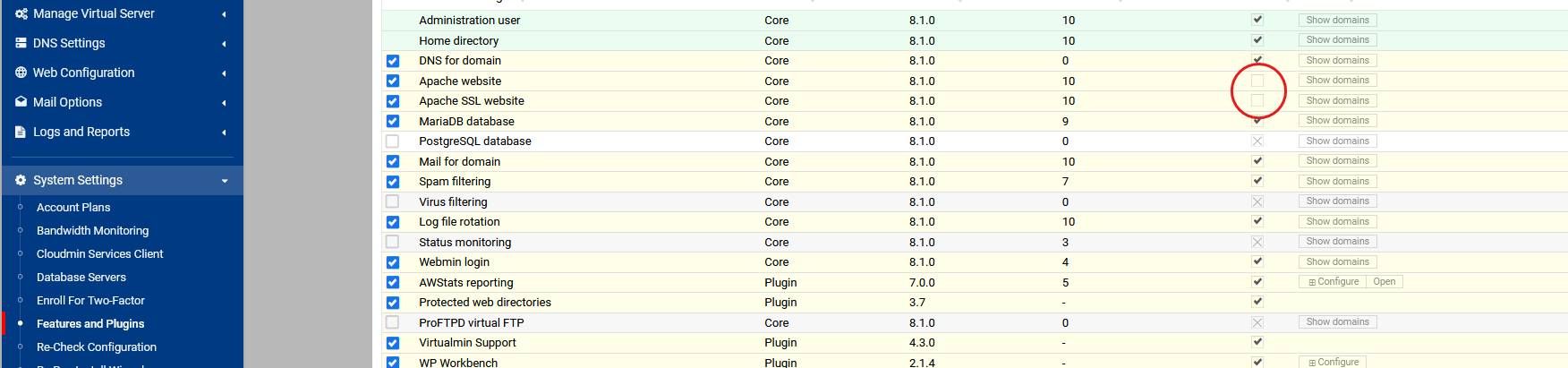
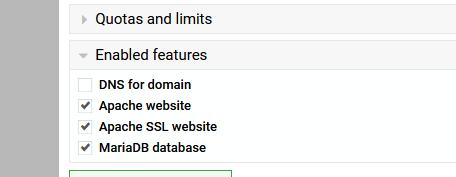
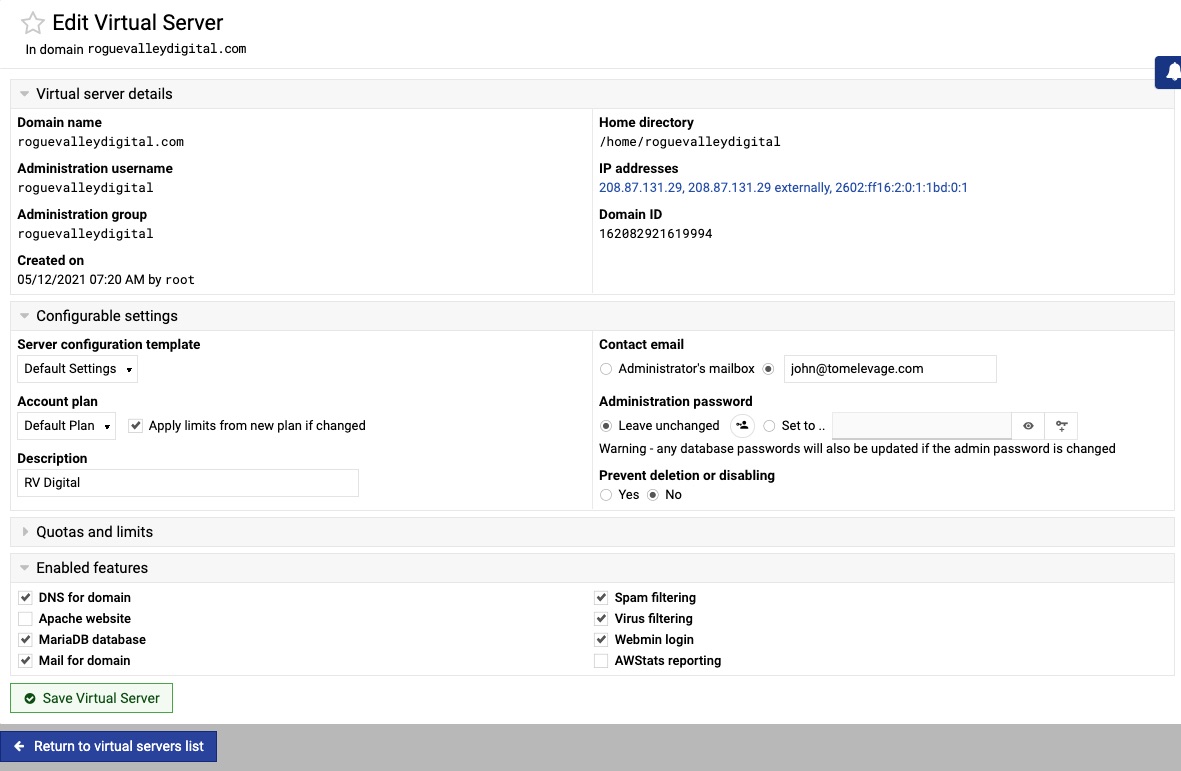
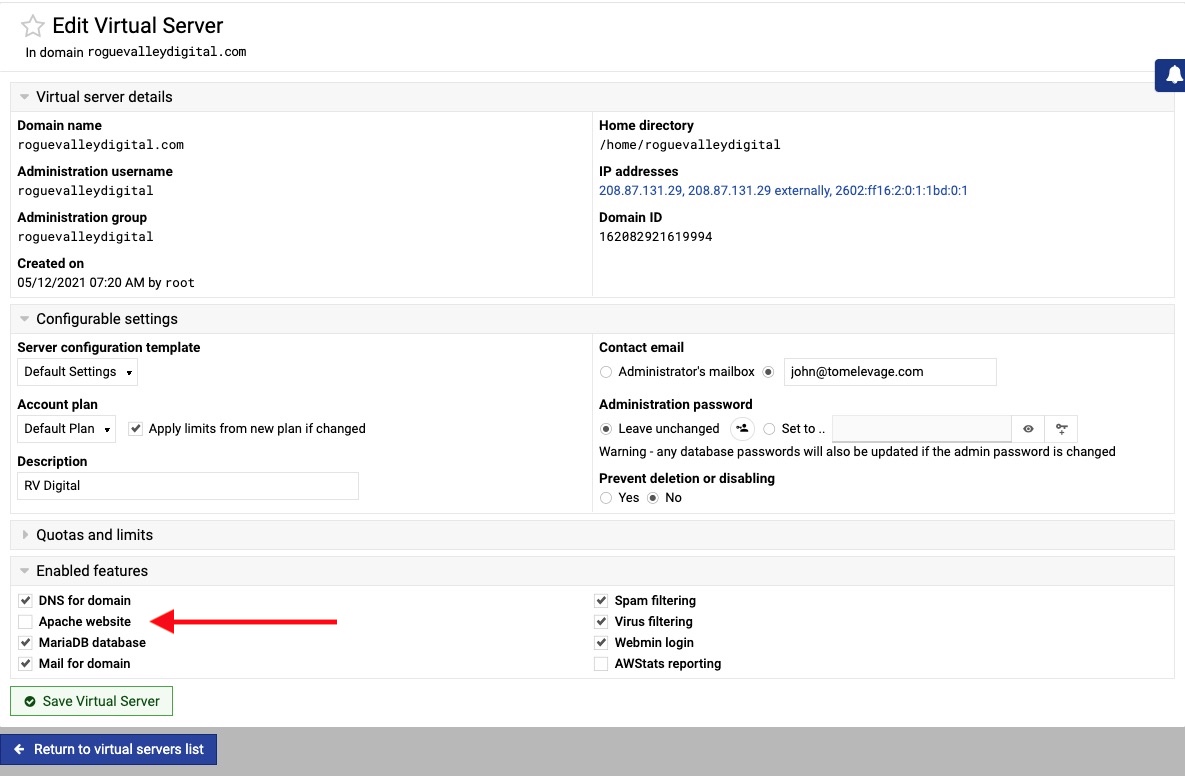
After restoring a backup I see something strange. Under “Edit Virtual Server” Apache is un-checked. See this:

If I try enabling it by checking the box I get this error:

How can I re-enable Apache?

Since Apache is disabled the Web Apps and Web Configuration left side menu is unavailable so I cannot change the PHP version, for example.

I tried to install Ghost again this morning on a different, new and empty, domain and it failed.

Here is the install terminal:

Downloading http://nodejs.org/dist/v22.22.1/node-v22.22.1-linux-x64.tar.gz (54.28 MiB) ..
     Received 1 KiB (0 %)
     Received 5.42 MiB (10 %)
     Received 10.85 MiB (20 %)
     Received 16.28 MiB (30 %)
     Received 21.71 MiB (40 %)
     Received 27.14 MiB (50 %)
     Received 32.56 MiB (60 %)
     Received 37.99 MiB (70 %)
     Received 43.42 MiB (80 %)
     Received 48.85 MiB (90 %)
     Received 54.28 MiB (100 %)
.. download complete
Found https://github.com:443/TryGhost/Ghost/archive/refs/tags/v6.54.1.zip in cache ..

Now installing Ghost version 6.54.1 ..
Ghost installation failed:
added 289 packages in 7m

80 packages are looking for funding
  run `npm fund` for details

Love open source? We’re hiring JavaScript Engineers to work on Ghost full-time.
https://careers.ghost.org

- Inspecting operating system
- Checking for deprecations

[STARTED] Checking for Ghost-CLI updates
[COMPLETED] Checking for Ghost-CLI updates

- Checking for latest Ghost version
✔ Checking for latest Ghost version
[STARTED] Checking system Node.js version
[COMPLETED] Checking system Node.js version - found v22.22.1
[STARTED] Checking current folder permissions
[COMPLETED] Checking current folder permissions
[STARTED] Checking memory availability
[COMPLETED] Checking memory availability
[STARTED] Checking free space
[COMPLETED] Checking free space
[STARTED] Checking pnpm installation
[COMPLETED] Checking pnpm installation - found corepack v0.34.6
[STARTED] Setting up install directory
[COMPLETED] Setting up install directory
[STARTED] Downloading and installing Ghost
[STARTED] Checking version compatibility
[COMPLETED] Checking version compatibility
[STARTED] Downloading
[COMPLETED] Downloading
[STARTED] Installing dependencies
[OUTPUT] [WARN] Unsupported engine: wanted: {"node":"^22.23.1"} (current: {"node":"v22.22.1","pnpm":"11.15.1"})

[OUTPUT] ? Verifying lockfile against supply-chain policies (1210 entries)...

[OUTPUT] ✓ Lockfile passes supply-chain policies (1210 entries in 298ms)

[OUTPUT] Lockfile is up to date, resolution step is skipped

[OUTPUT] Progress: resolved 1, reused 0, downloaded 0, added 0

[OUTPUT] Packages: +1185
[OUTPUT] ++++++++++++++++++++++++++++++++++++++++++++++++++++++++++++++++++++++++++++++++

[OUTPUT] Progress: resolved 1185, reused 0, downloaded 0, added 0

[OUTPUT] Progress: resolved 1185, reused 0, downloaded 1, added 0

[OUTPUT] Progress: resolved 1185, reused 0, downloaded 2, added 0

[OUTPUT] Progress: resolved 1185, reused 0, downloaded 5, added 0

[OUTPUT] Progress: resolved 1185, reused 0, downloaded 7, added 0

[OUTPUT] Progress: resolved 1185, reused 0, downloaded 12, added 0

[OUTPUT] Progress: resolved 1185, reused 0, downloaded 30, added 0

[OUTPUT] Progress: resolved 1185, reused 0, downloaded 39, added 0

[OUTPUT] Progress: resolved 1185, reused 0, downloaded 41, added 0

[OUTPUT] Progress: resolved 1185, reused 0, downloaded 51, added 0

[OUTPUT] Progress: resolved 1185, reused 0, downloaded 59, added 0

[OUTPUT] Progress: resolved 1185, reused 0, downloaded 69, added 3

[OUTPUT] Progress: resolved 1185, reused 0, downloaded 77, added 4

[OUTPUT] Progress: resolved 1185, reused 0, downloaded 92, added 4

[OUTPUT] Progress: resolved 1185, reused 0, downloaded 100, added 4

[OUTPUT] Progress: resolved 1185, reused 0, downloaded 106, added 4

[OUTPUT] Progress: resolved 1185, reused 0, downloaded 111, added 7

[OUTPUT] Progress: resolved 1185, reused 0, downloaded 123, added 8

[OUTPUT] Progress: resolved 1185, reused 0, downloaded 136, added 8

[OUTPUT] Progress: resolved 1185, reused 0, downloaded 151, added 8

[OUTPUT] Progress: resolved 1185, reused 0, downloaded 162, added 11

[OUTPUT] Progress: resolved 1185, reused 0, downloaded 173, added 12

[OUTPUT] Progress: resolved 1185, reused 0, downloaded 186, added 12

[OUTPUT] Progress: resolved 1185, reused 0, downloaded 206, added 15

[OUTPUT] Progress: resolved 1185, reused 0, downloaded 226, added 16

[OUTPUT] Progress: resolved 1185, reused 0, downloaded 242, added 19

[OUTPUT] Progress: resolved 1185, reused 0, downloaded 264, added 21

[OUTPUT] Progress: resolved 1185, reused 0, downloaded 273, added 22

[OUTPUT] Progress: resolved 1185, reused 0, downloaded 282, added 23

[OUTPUT] Progress: resolved 1185, reused 0, downloaded 289, added 25

[OUTPUT] Progress: resolved 1185, reused 0, downloaded 297, added 25

[OUTPUT] Progress: resolved 1185, reused 0, downloaded 313, added 27

[OUTPUT] Progress: resolved 1185, reused 0, downloaded 324, added 29

[OUTPUT] Progress: resolved 1185, reused 0, downloaded 335, added 29

[OUTPUT] Progress: resolved 1185, reused 0, downloaded 345, added 30

[OUTPUT] Progress: resolved 1185, reused 0, downloaded 355, added 31

A ProcessError occurred.

Debug Information:
    OS: Debian GNU/Linux, v12
    Node Version: v22.22.1
    Ghost-CLI Version: 1.32.2
    Environment: development
    Command: 'ghost install 6.54.1 --port 3000 --url https://roguevalleyinternet.com local'

Additional log info available in: /home/roguevalleyinternet/.ghost/logs/ghost-cli-debug-2026-08-19T17_32_22_442Z.log

Try running ghost doctor to check your system for known issues.

You can always refer to https://ghost.org/docs/ghost-cli/ for troubleshooting.

Installation can be continued manually at https://roguevalleyinternet.com/
More information on using this web app can be found at http://ghost.org/

.. installation was only partially complete

I am hoping we can resolve this, but more importantly for me at this time is that the previously reported error of apache being disabled (see red arrow in marked image above) because I cannot get a SSL certificate or change the PHP version.

Even though the Edit Virtual Server page shows Apache disabled (unchecked) the website is running, it is just stuck without a SSL certificate and on PHP8.1.

Have you checked apache config file for the domain name?
Try this might work,
Uncheck apache as default in Features and plugins

Then check if either is ticked.

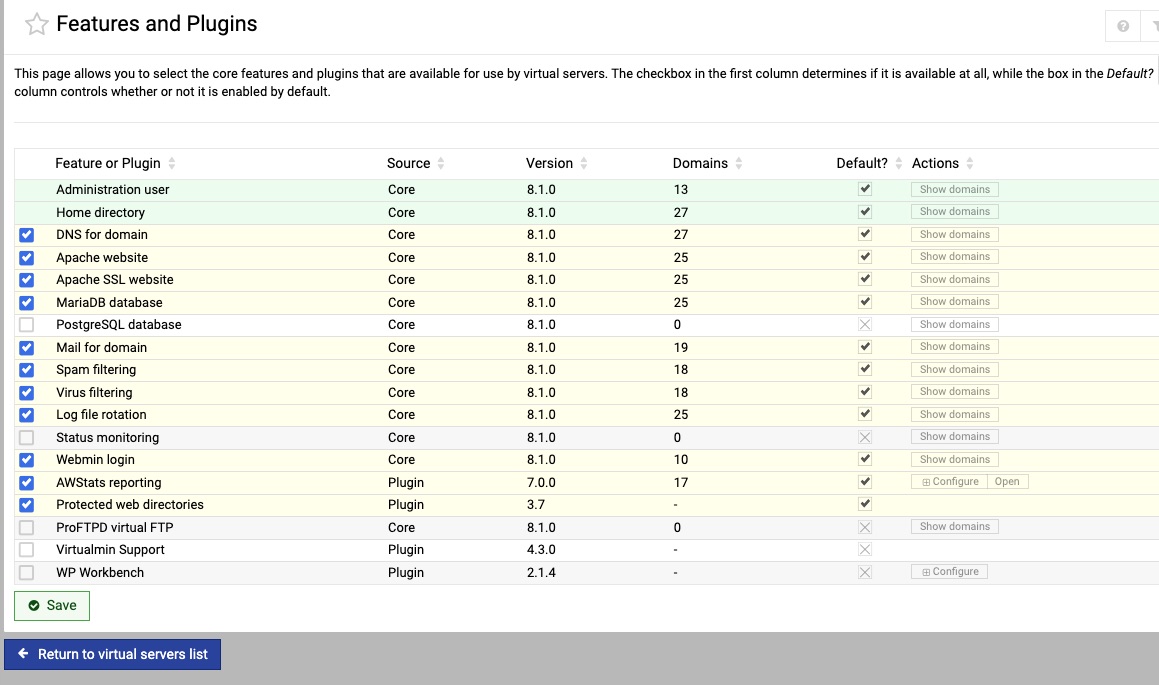
It is checked in “Features and Plugins”. See image:

And it is un-checked under “Edit Virtual Server” (see above image already uploaded).

This is only happening on this one domain and only happened after running the Virtualmin Pro web app script for Ghost and started after installing and un-installing Ghost 4 times.

This morning I received this email:

The following web apps managed by Virtualmin have new versions available :

Domain name                    Web app name              Old version New version
------------------------------ ------------------------- ----------- -----------
roguevalleyinternet.com        Ghost                     6.54.1      6.57.1

Here is the results:

Downloading http://nodejs.org/dist/v22.23.2/node-v22.23.2-linux-x64.tar.gz (54.21 MiB) ..
     Received 1 KiB (0 %)
     Received 5.42 MiB (10 %)
     Received 10.84 MiB (20 %)
     Received 16.26 MiB (30 %)
     Received 21.68 MiB (40 %)
     Received 27.1 MiB (50 %)
     Received 32.53 MiB (60 %)
     Received 37.95 MiB (70 %)
     Received 43.37 MiB (80 %)
     Received 48.79 MiB (90 %)
     Received 54.21 MiB (100 %)
.. download complete
Downloading https://github.com/TryGhost/Ghost/archive/refs/tags/v6.57.1.zip ..
Downloading https://codeload.github.com/TryGhost/Ghost/zip/refs/tags/v6.57.1 ..
     Received 1 MiB
     Received 2 MiB
     Received 3 MiB
     Received 4 MiB
     Received 5 MiB
     Received 6 MiB
     Received 7 MiB
     Received 8 MiB
     Received 9 MiB
     Received 10 MiB
     Received 11 MiB
     Received 12 MiB
     Received 13 MiB
     Received 14 MiB
     Received 15 MiB
     Received 16 MiB
     Received 17 MiB
     Received 18 MiB
     Received 19 MiB
     Received 20 MiB
     Received 21 MiB
     Received 22 MiB
     Received 23 MiB
     Received 24.01 MiB
     Received 25.01 MiB
     Received 26.01 MiB
     Received 27.01 MiB
     Received 28.01 MiB
     Received 29.01 MiB
     Received 30.01 MiB
     Received 31.01 MiB
     Received 32.01 MiB
     Received 33.01 MiB
.. download complete

Now installing Ghost version 6.57.1 ..
Ghost installation failed:
added 299 packages in 7m

80 packages are looking for funding
  run `npm fund` for details

Love open source? We’re hiring JavaScript Engineers to work on Ghost full-time.
https://careers.ghost.org

- Inspecting operating system
- Checking for deprecations

[STARTED] Checking for Ghost-CLI updates
[COMPLETED] Checking for Ghost-CLI updates

- Checking for latest Ghost version
✔ Checking for latest Ghost version
[STARTED] Checking system Node.js version
[COMPLETED] Checking system Node.js version - found v22.23.2
[STARTED] Checking current folder permissions
[COMPLETED] Checking current folder permissions
[STARTED] Checking memory availability
[COMPLETED] Checking memory availability
[STARTED] Checking free space
[COMPLETED] Checking free space
[STARTED] Checking pnpm installation
[COMPLETED] Checking pnpm installation - found corepack v0.34.6
[STARTED] Setting up install directory
[COMPLETED] Setting up install directory
[STARTED] Downloading and installing Ghost
[STARTED] Checking version compatibility
[COMPLETED] Checking version compatibility
[STARTED] Downloading
[COMPLETED] Downloading
[STARTED] Installing dependencies
[OUTPUT] ? Verifying lockfile against supply-chain policies (1211 entries)...

[OUTPUT] ✓ Lockfile passes supply-chain policies (1211 entries in 1s)

[OUTPUT] Lockfile is up to date, resolution step is skipped

[OUTPUT] Progress: resolved 1, reused 0, downloaded 0, added 0

[OUTPUT] Packages: +1186
[OUTPUT] ++++++++++++++++++++++++++++++++++++++++++++++++++++++++++++++++++++++++++++++++

[OUTPUT] Progress: resolved 1186, reused 0, downloaded 0, added 0

[OUTPUT] Progress: resolved 1186, reused 0, downloaded 1, added 0

[OUTPUT] Progress: resolved 1186, reused 0, downloaded 5, added 0

[OUTPUT] Progress: resolved 1186, reused 0, downloaded 23, added 0

[OUTPUT] Progress: resolved 1186, reused 0, downloaded 38, added 0

[OUTPUT] Progress: resolved 1186, reused 0, downloaded 41, added 0

[OUTPUT] Progress: resolved 1186, reused 0, downloaded 42, added 0

[OUTPUT] Progress: resolved 1186, reused 0, downloaded 47, added 0

[OUTPUT] Progress: resolved 1186, reused 0, downloaded 50, added 0

[OUTPUT] Progress: resolved 1186, reused 0, downloaded 54, added 0

[OUTPUT] Progress: resolved 1186, reused 0, downloaded 65, added 0

[OUTPUT] Progress: resolved 1186, reused 0, downloaded 71, added 2

[OUTPUT] Progress: resolved 1186, reused 0, downloaded 76, added 3

[OUTPUT] Progress: resolved 1186, reused 0, downloaded 93, added 4

[OUTPUT] Progress: resolved 1186, reused 0, downloaded 109, added 4

[OUTPUT] Progress: resolved 1186, reused 0, downloaded 116, added 4

[OUTPUT] Progress: resolved 1186, reused 0, downloaded 127, added 4

[OUTPUT] Progress: resolved 1186, reused 0, downloaded 142, added 8

[OUTPUT] Progress: resolved 1186, reused 0, downloaded 147, added 8

[OUTPUT] Progress: resolved 1186, reused 0, downloaded 149, added 8

[OUTPUT] Progress: resolved 1186, reused 0, downloaded 154, added 8

[OUTPUT] Progress: resolved 1186, reused 0, downloaded 162, added 8

[OUTPUT] Progress: resolved 1186, reused 0, downloaded 173, added 8

[OUTPUT] Progress: resolved 1186, reused 0, downloaded 189, added 12

[OUTPUT] Progress: resolved 1186, reused 0, downloaded 208, added 12

[OUTPUT] Progress: resolved 1186, reused 0, downloaded 224, added 12

[OUTPUT] Progress: resolved 1186, reused 0, downloaded 230, added 14

[OUTPUT] Progress: resolved 1186, reused 0, downloaded 238, added 16

A ProcessError occurred.

Debug Information:
    OS: Debian GNU/Linux, v12
    Node Version: v22.23.2
    Ghost-CLI Version: 1.32.2
    Environment: development
    Command: 'ghost install 6.57.1 --port 3000 --url https://roguevalleyinternet.com/ghostblog local'

Additional log info available in: /home/roguevalleyinternet/.ghost/logs/ghost-cli-debug-2026-08-20T16_35_24_747Z.log

Try running ghost doctor to check your system for known issues.

You can always refer to https://ghost.org/docs/ghost-cli/ for troubleshooting.

Installation can be continued manually at https://roguevalleyinternet.com/ghostblog/
More information on using this web app can be found at http://ghost.org/

.. installation was only partially complete

Unfortunately the installer still fails.

Has anyone had success installing Ghost via the Virtualmin Pro install script?

did you uncheck the default tick

Didn’t Ilia say version 9? Or was that a typo.

Hey @stefan1959, I cannot read that image you uploaded, it is too small for my old eyes.

Under default, untick default. Then you can see both when you edit the virtual server.
Best to keep ticked if you want them as default though.

I think I have not explained this well. I will try to do better this time:

I purchased a Virtualmin Pro license because of the Ghost install script. After six or seven attempts to install it on one of my domains I have not had any success. Now, after all the installing and un-installing the domain I was trying to install Ghost on is broken.
On my part I un-wisely chose one of our most important domains to do this testing on instead of a parked domain. My bad on that one.

So the situation for the domain rogievalleydigital.com is that if I look under “Edit Virtual Server” I see that “Apache Website” is un-ticked. Which is wrong because the website is indeed running a wordpress website.

Then, if I go to tick Apache website to enable it I get this error:

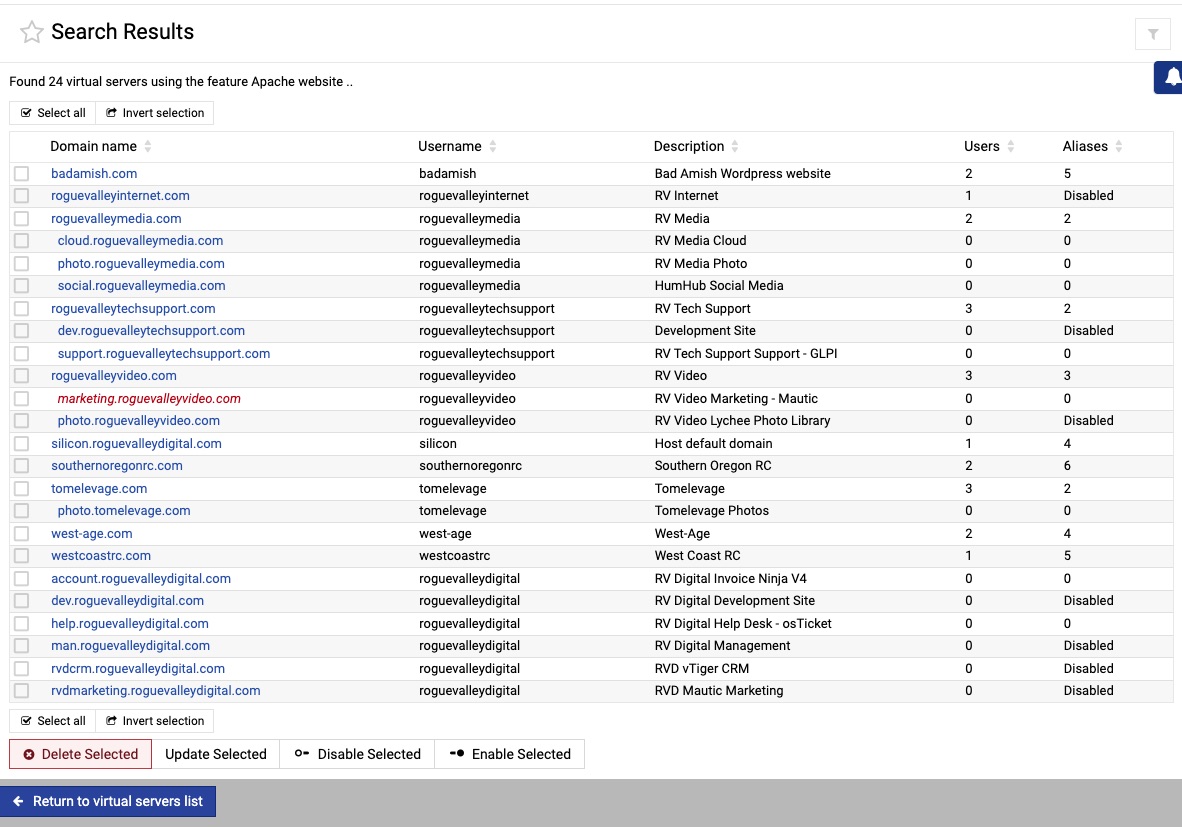
Then if I go to | System Settings | Features and Plugins screen I see this:

I then click “Show Domains” and the domain roguevalleydigital.com is not listed as shown here:

I still want to resolve the Ghost installation issue, however I really NEED to un-bork the domain roguevalleydigital.com because even though the website is showing another issue seems to be something to do with email because our email clients have started complaining and asking for a password that was never changed. Also the Let’s Encrypt SSL certificate is not working.

FYI::

After the usermin update today I thought I would try again but another failure.

Downloading http://nodejs.org/dist/v22.23.2/node-v22.23.2-linux-x64.tar.gz (54.21 MiB) ..
     Received 1 KiB (0 %)
     Received 5.42 MiB (10 %)
     Received 10.84 MiB (20 %)
     Received 16.26 MiB (30 %)
     Received 21.68 MiB (40 %)
     Received 27.1 MiB (50 %)
     Received 32.53 MiB (60 %)
     Received 37.95 MiB (70 %)
     Received 43.37 MiB (80 %)
     Received 48.79 MiB (90 %)
     Received 54.21 MiB (100 %)
.. download complete
Downloading https://github.com/TryGhost/Ghost/archive/refs/tags/v6.57.1.zip ..
Downloading https://codeload.github.com/TryGhost/Ghost/zip/refs/tags/v6.57.1 ..
     Received 1 MiB
     Received 2 MiB
     Received 3 MiB
     Received 4 MiB
     Received 5 MiB
     Received 6 MiB
     Received 7 MiB
     Received 8 MiB
     Received 9 MiB
     Received 10 MiB
     Received 11 MiB
     Received 12 MiB
     Received 13 MiB
     Received 14 MiB
     Received 15 MiB
     Received 16 MiB
     Received 17.01 MiB
     Received 18.01 MiB
     Received 19.01 MiB
     Received 20.01 MiB
     Received 21.01 MiB
     Received 22.01 MiB
     Received 23.01 MiB
     Received 24.01 MiB
     Received 25.01 MiB
     Received 26.01 MiB
     Received 27.01 MiB
     Received 28.01 MiB
     Received 29.01 MiB
     Received 30.01 MiB
     Received 31.01 MiB
     Received 32.01 MiB
     Received 33.01 MiB
.. download complete

Now installing Ghost version 6.57.1 ..
Ghost installation failed:
added 299 packages in 57s

80 packages are looking for funding
  run `npm fund` for details

Love open source? We’re hiring JavaScript Engineers to work on Ghost full-time.
https://careers.ghost.org

- Inspecting operating system
- Checking for deprecations

[STARTED] Checking for Ghost-CLI updates
[COMPLETED] Checking for Ghost-CLI updates

- Checking for latest Ghost version
✔ Checking for latest Ghost version
[STARTED] Checking system Node.js version
[COMPLETED] Checking system Node.js version - found v22.23.2
[STARTED] Checking current folder permissions
[COMPLETED] Checking current folder permissions
[STARTED] Checking memory availability
[COMPLETED] Checking memory availability
[STARTED] Checking free space
[COMPLETED] Checking free space
[STARTED] Checking pnpm installation
[COMPLETED] Checking pnpm installation - found corepack v0.34.6
[STARTED] Setting up install directory
[COMPLETED] Setting up install directory
[STARTED] Downloading and installing Ghost
[STARTED] Checking version compatibility
[COMPLETED] Checking version compatibility
[STARTED] Downloading
[COMPLETED] Downloading
[STARTED] Installing dependencies
[OUTPUT] ✓ Lockfile passes supply-chain policies (verified 2d ago)

[OUTPUT] Lockfile is up to date, resolution step is skipped

[OUTPUT] Progress: resolved 1, reused 0, downloaded 0, added 0

[OUTPUT] Packages: +1186
[OUTPUT] ++++++++++++++++++++++++++++++++++++++++++++++++++++++++++++++++++++++++++++++++

[OUTPUT] Progress: resolved 1186, reused 0, downloaded 0, added 0

[OUTPUT] Progress: resolved 1186, reused 0, downloaded 1, added 0

[OUTPUT] Progress: resolved 1186, reused 0, downloaded 10, added 0

[OUTPUT] Progress: resolved 1186, reused 0, downloaded 35, added 0

[OUTPUT] Progress: resolved 1186, reused 0, downloaded 43, added 0

[OUTPUT] Progress: resolved 1186, reused 0, downloaded 62, added 2

[OUTPUT] Progress: resolved 1186, reused 0, downloaded 85, added 4

[OUTPUT] Progress: resolved 1186, reused 0, downloaded 93, added 4

[OUTPUT] Progress: resolved 1186, reused 0, downloaded 101, added 6

[OUTPUT] Progress: resolved 1186, reused 0, downloaded 112, added 8

[OUTPUT] Progress: resolved 1186, reused 0, downloaded 127, added 9

[OUTPUT] [WARN] GET https://registry.npmjs.org/@swc/helpers/-/helpers-0.5.23.tgz error (ERR_PNPM_UNKNOWN). Will retry in 10 seconds. 2 retries left.

[OUTPUT] [WARN] GET https://registry.npmjs.org/is-stream/-/is-stream-4.0.1.tgz error (ERR_PNPM_UNKNOWN). Will retry in 10 seconds. 2 retries left.

A ProcessError occurred.

Debug Information:
    OS: Debian GNU/Linux, v12
    Node Version: v22.23.2
    Ghost-CLI Version: 1.32.2
    Environment: development
    Command: 'ghost install 6.57.1 --port 3000 --url https://roguevalleyinternet.com local'

Additional log info available in: /home/roguevalleyinternet/.ghost/logs/ghost-cli-debug-2026-08-22T17_40_20_488Z.log

Try running ghost doctor to check your system for known issues.

You can always refer to https://ghost.org/docs/ghost-cli/ for troubleshooting.

Installation can be continued manually at https://roguevalleyinternet.com/
More information on using this web app can be found at http://ghost.org/

.. installation was only partially complete

Its a weird issue if wordress is installed and apache is unticked.
Seeing you have pro version, my create a ticket and staff can investigate (a reason to buy pro).

hmmm… OP posted in another thread the intention of downgrading back to GPL as soon as he had used the script on all his sites. Sort of defeats the PRO support model.

Yes I did. I was up front about it and titled the topic “Pre-Sales Question” and one of the folks here @Ilia saw and replied to that thread.

Correct and I hope you get your problem sorted. The team is small and do give priority attention to pro accounts and work through all problems as fast as they can. I don’t have the experience to help or I would.