I’m not a fan of the dashboard (it’s far to busy for me) So through the theme I have set 2 different options for the default page in both webmin & virtualmin and I have not noticed a change in behaviour try setting webmin to dashboard & virtualmin to virtualmin virtual servers in the theme settings, and as long as you have those set when tabbing between webmin & virtualmin those choices are respected, however if both are set to dashboard those settings are not respected
Yeah, Switching between tabs utilizes the settings for the Default Page in the Authentic Theme settings which is to design. Therefore using the tabs to open the dashboard (specifically) would not work but might work as a way to get to the Default Page the users sets. This is never a problem when you move from tab to tab as it works as designed, but it does nothing if you are in any webmin menu item and want to move quickly to your Default Page. In that case no change occurs to the page you are viewing. So If I am on the Webmin Tab, select File manager menu item, I will be taken to the file Manager. Now if I want to quickly move back to my default tab, selecting the Webmin Tab again does nothing. But I can get there if I select the Virtualmin tab and then select the Webmin tab because the event only occurs when the tabs change.
I would suggest that whenever the Virtualmin Tab is selected the page that is displayed is the Default Virtualmin page and whenever the Webmin Tab is selected the Default Webmin page is displayed. This would be a consistent, repeatable behaviour.
If the Dashboard is always the required choice the best option is to use the specific Dashboard menu item or set the Default Page to Dashboard and implement the above change.
I suggest everyone use the F1 to learn new and better ways of doing things around Webmin and Virtualmin UI.
We certainly don’t need a dashboard link with a home icon in each table header, as you can navigate to the dashboard simply by using the Alt+I or ⌥ I shortcuts.
Moreover, the home page can be configured. Tying it only to the dashboard makes it even more confusing.
On top of everything, you have a mini-dashboard as a right-side slider that is always available. You can open it quickly by clicking on it or using the Alt+E or ⌥ E shortcut keys.
Why use your mouse to click the Webmin switch at the top left of the navigation menu instead of the “Dashboard” link at the bottom of it?  And why not use a shortcut key instead?
Sorry if it sounds like I am complaining in any way. I work with whatever you guys feel is the best solution. I am just trying to point out my use scenario for your information. Mine is probably quite a bit different than most of your users though. I have worked with these systems for a lot of years but not as my main work (or play) focus. I therefore do not use these things on a regular basis. I think shortcut keys and learning new ways is really important and I totally agree with them however when you reach my age trying to remember shortcut keys is no longer as easy as it used to be.
As @tpnsolutions points out, the Dashboard menu item is there (at the bottom) but it may require scrolling on a smaller screen. No big deal, but it does take extra steps as does my way of switching back and forth with the Webmin/Virtualmin tabs. Same end result as the shortcut key but does not require much of my memory.
My idea was simply to use an on_click event rather than an on_change event when the tab is selected.
Nobody memorizes a billion hotkeys.
Let me clarify one thing to the folks who’ve joined the conversation.
When I refer to “Dashboard” I really mean whatever you’ve configured in the Authentic theme page. Dashboard just happens to be what I configured. So a “home”, button or what have you would logically open whatever was configured in the theme settings.
Yeah, that kinda conflicts with my suggestion of having a “ Dashboard” link at the top of the menu.
This is why changing things people are used to is hard and usually a bad idea, even if it makes sense from an “act like every other UI acts” perspective. And, it’s also why configurability is a double-edged sword. Home doesn’t mean dashboard for everyone.
I’m stumped. I don’t know what the right idea here is. Hotkeys is definitely not it. Most Virtualmin users are using Virtualmin a few times a week, at most, not several hours a day. Asking them to memorize a bunch of hotkeys is user-hostile. Offering hotkeys is great. But, making that the only good/fast way to get somewhere people want to go regularly is toxic. I only memorize a bunch of keyboard shortcuts for a few pieces of software (mostly just vim), one should not demand it of users.
I guess an actual “Home” button, not labeled “Dashboard”, that goes to whatever the default page is (usually Dashboard, but whatever the chosen default opening page is), would be reasonable. I hate adding more to the menu without removing something, but at least it’s not mystery meat navigation as it has historically been (having the Virtualmin tab change the content pane when it’s not switching between Webmin and Virtualmin is crazy).
@Joe,
Since the right panel doesn’t change on clicking the Virtualmin icon (while the Virtualmin side is active) per our discussion.
Perhaps the icon shouldn’t be linked period, and vise versa when you’re on the Webmin side or the interface have it not linked either.
This IMHO would feel more logical if the purpose of the icons is to switch which switch between Virtualmin, Webmin (and Cloudmin respectively).
That’s the same as me. I use Dashboard as my default for Webmin but not for Virtualmin.
I agree that its not a good idea to make changes unless they are necessary.
When referring to Home I believe we all agree that this means the user defined Default Pages.
I understand currently that moving from tab to tab (on_change) displays the User Default Page in the right window.
I would suggest that using an on_click event consistently displays the User Default Page in the right window.
As it used to be, right?
Alright, I will add a third radio option to the existing “Load default page on tab switch” feature for users who are used to it.
Not sure if this behaviour has been mentioned.
In the domain list click on 'List" that appears next to the number of users as you mouse over it.
Now click top Virtualmin to get back to the server list. Nothing happens.
You then have to click Webmin and go to that dashboard and then you can click Virtualmin to get back to the server list.
Taking the scenic route.
Just installed Webmin 2.510.
Which version do I have to go back to for this to work properly?
2.500 or 2.402 ?
Neither! Don’t ever use outdated software!
Go to “Theme Configuration: General Defaults,” find the “Load Default Page on Navigation Switch” option, and set it to “Yes, Always.”

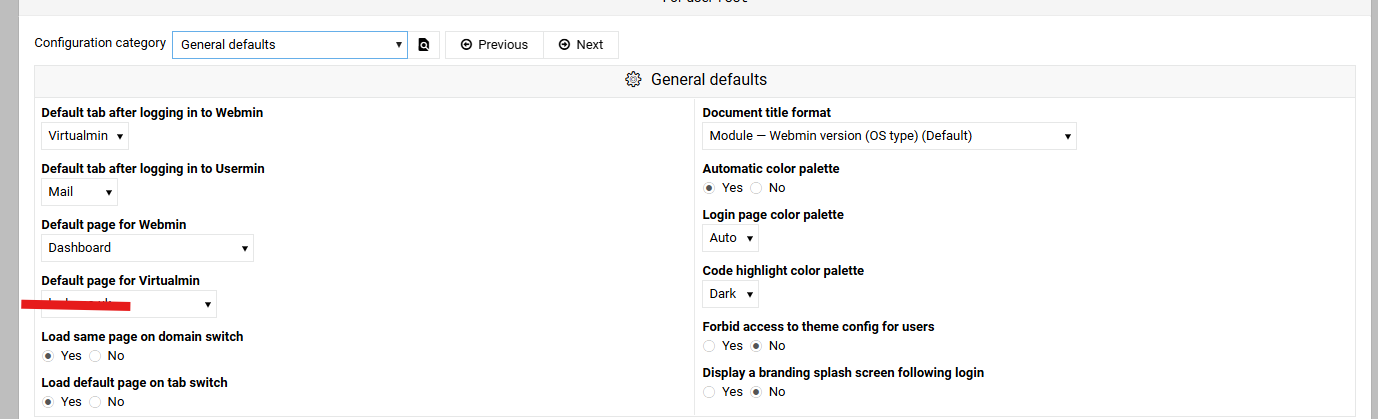
This for me is for Webmin, not Virtualmin (that can wait).
I can’t find anything like what you guys are suggesting.
And before anybody complains, I was told to use this thread even though my problem was with Webmin.
When Webmin 2.510 is pushed to the Virtualmin repos and you install it, there will be an option named “Load default page on navigation switch” in the theme configuration to control that.
So bad luck for Webmin only servers?