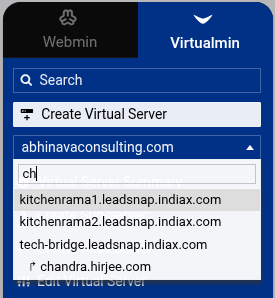
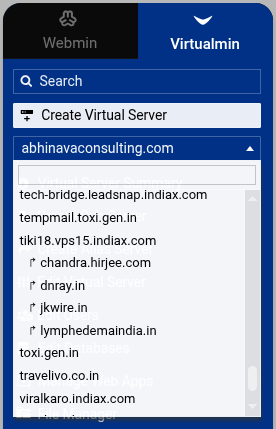
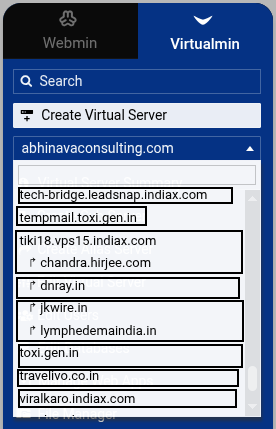
I just dodged a bullet. I almost deleted a sub server belonging to one virtual server because it incorrectly displayed as a sub server of another virtual server when search is used in the virtual server dropdown box.
Yeah, this is working as intended (you’re seeing every site with ch in the name as you searched for, and the parent of that name doesn’t have a ch in it), but I can see how that would be confusing. I’m not sure how to best resolve that confusion, though…if search shows the parent no matter what, it’s going to show something that doesn’t actually match the query term, which is bug-like.
Maybe it should show the parent greyed out or something? I dunno. Messy problem.
You can’t delete directly from the domain selection menu…when you select it, it takes you to that domain/subserver/alias. And, yes, there is a confirmation page. It’s easy to zone out while doing repetitive tasks or whatever, and I’ve messed up by not stopping and looking at things…it’s not at all unbelievable that one might be clicking around and think you’re somewhere you’re not.
I just still don’t know how to solve it in this particular case without introducing other problems.
I agree. Once, I was just one click away from accidentally deleting a production domain in the same way, so I implemented a “Prevent deletion or disabling” feature on the “Edit Virtual Server” page.
I recommend enabling it if you’re worried about accidentally deleting the wrong domain.
It is already two steps, you click delete and then click confirm. Forcing it to be disabled makes it three steps. At some point we have to let users do what they want to do.
I guess it is my way of thinking. I have a disabled server because I’m kinda gun shy about this kind of thing. Now that someone else has the domain name and I have the backups I guess I should delete it finally.