That does work but it’s a bit clunky unlike a tail which just adds the new lines the whole div get’s replaced with new content so the div flashes and your back at the top of the div again. I would guess it’s less clunky if you have refresh turned off
If you have a mail.info log, like I do (being a Really Olde Spart) then ALL of the information is in one file for tracing email problems.
Well I don’t so I use the journal, which tbf, is better than log files splattered all over the place, I guess if you really wanted to you could nearly tail the contents of /var/log in one hit rather than jumping from log to log
I’m just giving the use case for WHY you would want something like journalctl -u dovecot -u postfix@-service -u spamd
There are different processes with hands in the mail delivery. Some you might not even think about. Having a filter to display everthing touching an email is nice. I suppose you could go with a time stamp but there may be lots of noise on a busy server.
Jun  7 12:33:09 main postfix/anvil[693818]: statistics: max connection count 1 for (smtps:73.129.57.71) at Jun  7 12:27:27
Jun  7 12:33:09 main postfix/anvil[693818]: statistics: max cache size 2 at Jun  7 12:27:27
Jun  7 12:36:26 main dovecot: imap-login: Disconnected (no auth attempts in 1 secs): user=<>, rip=20.163.6.253, lip=74.208.47.115, TLS, session=<LJfBfqxTnKIUowb9>
Jun  7 12:36:26 main dovecot: imap-login: Disconnected (no auth attempts in 0 secs): user=<>, rip=20.163.6.253, lip=74.208.47.115, TLS handshaking: SSL_accept() failed: error:1408F10B:SSL routines:ssl3_get_record:wrong version number, session=<S+XDfqxTqqIUowb9>
Jun  7 12:37:06 main postfix/smtpd[703130]: warning: hostname clinicahumanas.sdr.gvt.net.br does not resolve to address 177.135.223.123: Name or service not known
Jun  7 12:37:06 main postfix/smtpd[703130]: connect from unknown[177.135.223.123]
Jun  7 12:37:16 main postfix/smtpd[703130]: warning: unknown[177.135.223.123]: SASL LOGIN authentication failed: authentication failure, sasl_username=admin@x.net
Jun  7 12:37:17 main postfix/smtpd[703130]: lost connection after AUTH from unknown[177.135.223.123]
Jun  7 12:37:17 main postfix/smtpd[703130]: disconnect from unknown[177.135.223.123] ehlo=1 auth=0/1 commands=1/2
Jun  7 12:37:22 main postfix/smtpd[703130]: connect from unknown[49.0.36.122]
Jun  7 12:37:26 main postfix/smtpd[703239]: connect from host59.sub-63-47-149.myvzw.com[63.47.149.59]
Jun  7 12:37:28 main postfix/smtpd[703247]: connect from unknown[130.185.102.59]
Jun  7 12:37:28 main postfix/smtpd[703247]: SSL_accept error from unknown[130.185.102.59]: lost connection
Jun  7 12:37:28 main postfix/smtpd[703247]: lost connection after CONNECT from unknown[130.185.102.59]
Jun  7 12:37:28 main postfix/smtpd[703247]: disconnect from unknown[130.185.102.59] commands=0/0
^CUgh, regexes will be very inefficient for this task. Queries should use the journal features.
As far as I remember, we do use the --grep journal flag:
journalctl --reverse --no-hostname --lines 10000 --grep "postfix|dovecot"
I see how it could be useful. I just don’t yet know how to implement it cleanly on the UI side in a way that works with both the old Framed and Authentic themes.
@Ilia Just for your reference 
At one point you did implement custom logs searches/journal logs but then I think it was removed/rolled back after discussions with your colleagues.
- System Logs Viewer - Some improvements
- My initial issue request
- another example of a custom log thing
journalctl -t postfix/smtpd -t postfix/smtp
- Add support for additional units in systemd log viewer - Pull request with the code
Is it worth looking at this issue at the same time View Journal - Add custom date range filter. as mentioned by @joe here
I think the ideal journal UI would be a direct view of the most recent lines from the journal (what you get when you type just
journalctl), and a few query options for selecting a unit (-u) and a time range (--sinceand--until) and optional search terms.
The since filed is present, but should have 14 days added, maybe 21 days as well.
Thanks
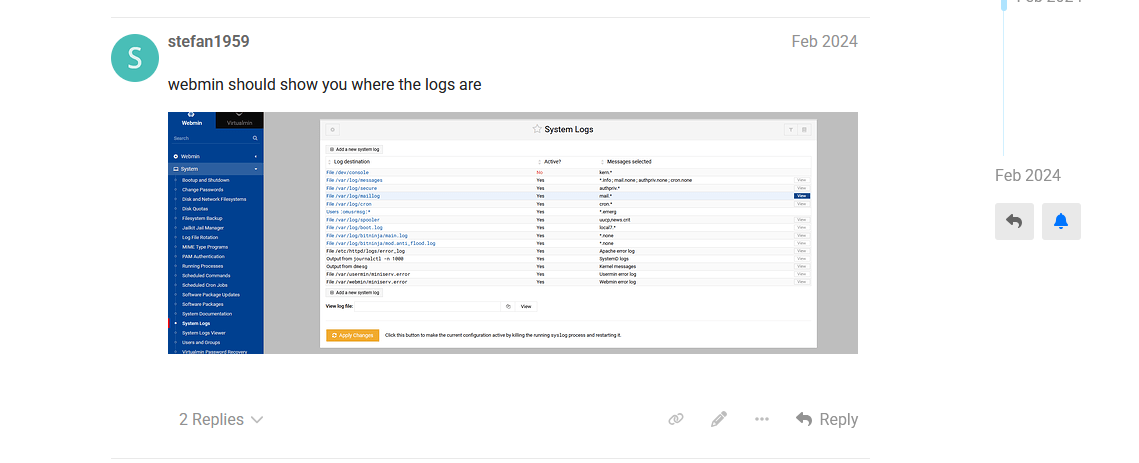
@shoulders The “System Log Viewer” is the logviewer Webmin module, now called “System Logs”. The old RS-based Rsyslog is the syslog Webmin module, now called “System Logs RS”, and it shouldn’t be used on modern EL systems like Rocky.
@stefan1959 You don’t need Rsyslog on Rocky 9. /var/log/mail.log isn’t there in standard setup. Yet, if you want it displayed, just add /var/log/mail.log to the “Other log files to show” box in module config, and it’ll appear as before.
Its actually called maillog not mail.log, my OP was about them being removed or disappearing.
I’ve always had them, then after a update they all gone not just the mail log. I will add the ones I want but hopefully a new update won’t remove them again.
Oh, got it! I’ll take a closer look at this. Thanks for the info!
I knew what you meant early on and checked mine on Debian 10. All were still there. Just a point of fact for @Ilia .
Please make a new topic for conversations about the journal. This thread is about System Logs RS.