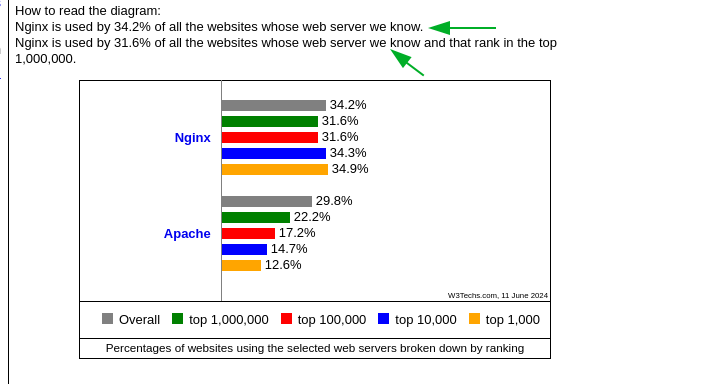
the data analyst does add the caveat “we know” so if they new all that caveat would not be on the page, so in real world terms these figures could be different, maybe LiteSpeed is really at the top of the tree ?
However I spun up an instance using Debian 12 & a LEMP stack and there are a few differences on how webmin/virtualmin displays data.
In LEMP virtualmin → System Settings ->Virtualmin Configuration there are lots of references to apache, there are other places as well but as this is off topic open a new thread to discuss this
to admin & webmail, save & restart nginx and of course request the certificate, which worked and navigating to admin.domain.tld worked with the new certificate in place
Well it doesn’t upgrade it automatically like Cloudpanel does. I was upgrading it on Debian 12 using the Sury repostitory previously. But decided to not upgrade and keep it at 8.2 with Virtualmin. But I was surprised on this new install with Cloudpanel that it went straight to 8.3 without the Sury repository. Not sure what it did. But it didn’t use the Sury repository.
Ok I see what they did now. They have their own repositories:
deb https://d17k9fuiwb52nc.cloudfront.net/ bookworm main deb https://d17k9fuiwb52nc.cloudfront.net/ bookworm nginx deb https://d17k9fuiwb52nc.cloudfront.net/ bookworm php-7.1 deb https://d17k9fuiwb52nc.cloudfront.net/ bookworm php-7.2 deb https://d17k9fuiwb52nc.cloudfront.net/ bookworm php-7.3 deb https://d17k9fuiwb52nc.cloudfront.net/ bookworm php-7.4 deb https://d17k9fuiwb52nc.cloudfront.net/ bookworm php-8.0 deb https://d17k9fuiwb52nc.cloudfront.net/ bookworm php-8.1 deb https://d17k9fuiwb52nc.cloudfront.net/ bookworm php-8.2 deb https://d17k9fuiwb52nc.cloudfront.net/ bookworm php-8.3 deb https://d17k9fuiwb52nc.cloudfront.net/ bookworm php-8.4 deb https://d17k9fuiwb52nc.cloudfront.net/ bookworm proftpd deb https://d17k9fuiwb52nc.cloudfront.net/ bookworm varnish-7
cloundpanel is very specialized in what it can do, basically its just web sites and its not that usefully selling hosting services to customers. A few of my customers just want mail there domain, cloundpanel can’t do that.
I do like what it installs for web sites though.
yeah it’s not entirely setup for for selling hosting services. Probably could be done but not built-in. I’m not planning on selling hosting though. This is just for myself. I like its simplicity.
Maybe Virtualmin could beat them to it and make a super simple version but with re-selling features.
I just found out there is a way to setup a custom domain email address using Cloudflare email routing, Gmail, and a SMTP service and all free. That sounds like the solution I was looking for in a custom domain email address. Seen some tutorials for it on Youtube.
Although I don’t really need it right now anyway. But sounds like a good solution if I ever did.
I found out Cloudpanel can install MailCow https://www.cloudpanel.io/docs/v2/guides/applications/mailcow/
Which is basically the whole mail stack of Postfix, Dovecot, Spamassassin, ClamAV, etc. So I guess it has email after all.
Also found out that WHMCS (Web Host Manager Complete Solution) https://download.whmcs.com/ can be installed with Cloudpanel separately.
I was thinking maybe keep all the advanced features but make an advanced menu mode for it. And then make a simple mode and reduce it down to the basics.
To double check, I just did a fresh install of Virtualmin LEMP on Ubuntu 22.04. I changed the ports for Webmin and Usermin to 2083 and 2096 for Cloudflare DNS. Went to Server Templates, Website for Domain, and selected “No” for Redirect webmail.${DOM} and Redirect admin.${DOM} so that I can get SSL to work with Cloudflare proxies on. And I still get the error on virtual server creation:
… Nginx website failed! : virtualmin-nginx::feature_setup failed : virtualmin-nginx::feature_add_web_webmail_redirect failed : flush_file_lines called on non-loaded file /etc/nginx/sites-available/domain.tld.conf
Yes, I’ve already been considering creating a new “Plume Theme” that won’t have the Webmin menu at all and won’t resemble the Webmin/Virtualmin GUI as we know it. It will feature a dashboard-like design with only essential stats and functions, preventing users from breaking anything or making any changes, except for basic actions like enabling/disabling features and, at most, advanced actions like entering an IP address for an SPF record or similar.
Did you install it on a clean instance without any pre-installed software? Was it a custom ISO or a cloud image? If it was a cloud image, which provider was that?
Yes clean instance, nothing pre-installed. Just Ubuntu 22.04 LTS. It’s the image provided by Contabo VPS. Didn’t see any errors during automated script install.
@Jamie, this is clearly a nasty bug! When Edit Server Template → Website for domain has Redirect webmail.${DOM} and Redirect admin.${DOM} disabled on Nginx systems, the domain creation simply fails with the error above. I see this bug on both Debian 12 and Ubuntu 22.04.
Great! I’ll have to try it out later and see if it works now. I’m feeling pretty smart now that I’ve discovered how to unlock Cloudflare support for the ten of millions of Virtualmin / Nginx users out there! I don’t know how everyone missed that. I’m turning off the redirects because of this Nginx redirect issue. I found out earlier. The redirects need to be enclosed in location / { } . Or else .well-known for the Let’s Encrypt SSL certificate authentication won’t be excluded from the redirects. And SSL authenticaiton fails. And that’s why it fails when Cloudflare proxies are on. Important so Let’s Encrypt can also renew the SSL certicicates with Cloudflare proxies on. Or else not really worth using. But if you enclose the redirects it will work. I could do it manually each time. But I like it automatic. That’s why I decided to just turn off the redirects instead. But would be nice if .well-known was excluded from the redirects so it works right after creating the virtual server. Then the redirects could stay enabled. Like this:
 I’d appreciate it if you could provide more details about your Nginx failure on a clean Ubuntu 22.04 install.
 I don’t know how everyone missed that. I’m turning off the redirects because of this Nginx redirect issue. I found out earlier. The redirects need to be enclosed in location / { } . Or else .well-known for the Let’s Encrypt SSL certificate authentication won’t be excluded from the redirects. And SSL authenticaiton fails. And that’s why it fails when Cloudflare proxies are on. Important so Let’s Encrypt can also renew the SSL certicicates with Cloudflare proxies on. Or else not really worth using. But if you enclose the redirects it will work. I could do it manually each time. But I like it automatic. That’s why I decided to just turn off the redirects instead. But would be nice if .well-known was excluded from the redirects so it works right after creating the virtual server. Then the redirects could stay enabled. Like this: