Software.virtualmin.com access problem

SYSTEM INFORMATION
OS type and version Ubuntu Linux 22.04.5
Webmin version 2.610
Virtualmin version 7.50.2 GPL
Webserver version Apache 2.4.52
Related packages SUGGESTED

Good day!
I saw that my server stopped catching any updates from the https://software.virtualmin.com.

I also get a long response when imaging to https://forum.virtualmin.com

Location Moscow.

Reading package lists...
Building dependency tree...
Reading state information...
The following package was automatically installed and is no longer required:
  nvidia-firmware-580-580.95.05
Use 'apt autoremove' to remove it.
Recommended packages:
  libdbd-mariadb-perl libnet-libidn2-perl
The following packages will be upgraded:
  usermin webmin webmin-virtual-server webmin-virtualmin-awstats
  webmin-virtualmin-htpasswd
5 upgraded, 0 newly installed, 0 to remove and 0 not upgraded.
Need to get 42.0 MB/42.2 MB of archives.
After this operation, 1024 B of additional disk space will be used.
Get:1 https://software.virtualmin.com/vm/7/gpl/apt virtualmin/main amd64 usermin all 2.520 [10.3 MB]
Ign:1 https://software.virtualmin.com/vm/7/gpl/apt virtualmin/main amd64 usermin all 2.520
Get:2 https://software.virtualmin.com/vm/7/gpl/apt virtualmin/main amd64 webmin all 2.620 [27.3 MB]
Ign:2 https://software.virtualmin.com/vm/7/gpl/apt virtualmin/main amd64 webmin all 2.620
Get:3 https://software.virtualmin.com/vm/7/gpl/apt virtualmin/main amd64 webmin-virtual-server all 8.0.0.gpl-1 [4385 kB]
Ign:3 https://software.virtualmin.com/vm/7/gpl/apt virtualmin/main amd64 webmin-virtual-server all 8.0.0.gpl-1
Get:1 https://software.virtualmin.com/vm/7/gpl/apt virtualmin/main amd64 usermin all 2.520 [10.3 MB]
Ign:1 https://software.virtualmin.com/vm/7/gpl/apt virtualmin/main amd64 usermin all 2.520
Get:2 https://software.virtualmin.com/vm/7/gpl/apt virtualmin/main amd64 webmin all 2.620 [27.3 MB]
Ign:2 https://software.virtualmin.com/vm/7/gpl/apt virtualmin/main amd64 webmin all 2.620
Get:3 https://software.virtualmin.com/vm/7/gpl/apt virtualmin/main amd64 webmin-virtual-server all 8.0.0.gpl-1 [4385 kB]
Ign:3 https://software.virtualmin.com/vm/7/gpl/apt virtualmin/main amd64 webmin-virtual-server all 8.0.0.gpl-1
Get:1 https://software.virtualmin.com/vm/7/gpl/apt virtualmin/main amd64 usermin all 2.520 [10.3 MB]
Ign:1 https://software.virtualmin.com/vm/7/gpl/apt virtualmin/main amd64 usermin all 2.520
Get:2 https://software.virtualmin.com/vm/7/gpl/apt virtualmin/main amd64 webmin all 2.620 [27.3 MB]
Ign:2 https://software.virtualmin.com/vm/7/gpl/apt virtualmin/main amd64 webmin all 2.620
Get:3 https://software.virtualmin.com/vm/7/gpl/apt virtualmin/main amd64 webmin-virtual-server all 8.0.0.gpl-1 [4385 kB]
Ign:3 https://software.virtualmin.com/vm/7/gpl/apt virtualmin/main amd64 webmin-virtual-server all 8.0.0.gpl-1
Get:1 https://software.virtualmin.com/vm/7/gpl/apt virtualmin/main amd64 usermin all 2.520 [10.3 MB]
Ign:1 https://software.virtualmin.com/vm/7/gpl/apt virtualmin/main amd64 usermin all 2.520
Get:2 https://software.virtualmin.com/vm/7/gpl/apt virtualmin/main amd64 webmin all 2.620 [27.3 MB]
Ign:2 https://software.virtualmin.com/vm/7/gpl/apt virtualmin/main amd64 webmin all 2.620
Get:3 https://software.virtualmin.com/vm/7/gpl/apt virtualmin/main amd64 webmin-virtual-server all 8.0.0.gpl-1 [4385 kB]
Ign:3 https://software.virtualmin.com/vm/7/gpl/apt virtualmin/main amd64 webmin-virtual-server all 8.0.0.gpl-1
Get:1 https://software.virtualmin.com/vm/7/gpl/apt virtualmin/main amd64 usermin all 2.520 [10.3 MB]
Err:1 https://software.virtualmin.com/vm/7/gpl/apt virtualmin/main amd64 usermin all 2.520
  Connection timed out [IP: 2001:bc8:710:9a94:dc00:ff:fe82:8d31 443]
Get:2 https://software.virtualmin.com/vm/7/gpl/apt virtualmin/main amd64 webmin all 2.620 [27.3 MB]
Err:2 https://software.virtualmin.com/vm/7/gpl/apt virtualmin/main amd64 webmin all 2.620
  Connection timed out [IP: 2001:bc8:710:9a94:dc00:ff:fe82:8d31 443]
Get:3 https://software.virtualmin.com/vm/7/gpl/apt virtualmin/main amd64 webmin-virtual-server all 8.0.0.gpl-1 [4385 kB]
Err:3 https://software.virtualmin.com/vm/7/gpl/apt virtualmin/main amd64 webmin-virtual-server all 8.0.0.gpl-1
  Connection timed out [IP: 2001:bc8:710:9a94:dc00:ff:fe82:8d31 443]
E: Failed to fetch https://software.virtualmin.com/vm/7/gpl/apt/pool/main/u/usermin/usermin_2.520_all.deb  Connection timed out [IP: 2001:bc8:710:9a94:dc00:ff:fe82:8d31 443]
E: Failed to fetch https://software.virtualmin.com/vm/7/gpl/apt/pool/main/w/webmin/webmin_2.620_all.deb  Connection timed out [IP: 2001:bc8:710:9a94:dc00:ff:fe82:8d31 443]
E: Failed to fetch https://software.virtualmin.com/vm/7/gpl/apt/pool/main/w/webmin-virtual-server/webmin-virtual-server_8.0.0.gpl-1_all.deb  Connection timed out [IP: 2001:bc8:710:9a94:dc00:ff:fe82:8d31 443]
E: Unable to fetch some archives, maybe run apt-get update or try with --fix-missing?

Not sure why it is trying an IPV6 address first. It works from an outside address. Can you try forcing IPV4?

I have to check IPV6 stuff outside my hardware, home and otherwise but it does seem to answer:
https://dnschecker.org/ping-ipv6.php

Can you find out where your server is?
Maybe this is a regional block.

Reading package lists...
Building dependency tree...
Reading state information...
Recommended packages:
  libdbd-mariadb-perl
The following packages will be upgraded:
  usermin webmin
2 upgraded, 0 newly installed, 0 to remove and 3 not upgraded.
Need to get 37.6 MB of archives.
After this operation, 0 B of additional disk space will be used.
Get:1 https://software.virtualmin.com/vm/7/gpl/apt virtualmin/main amd64 usermin all 2.520 [10.3 MB]
Ign:1 https://software.virtualmin.com/vm/7/gpl/apt virtualmin/main amd64 usermin all 2.520
Get:2 https://software.virtualmin.com/vm/7/gpl/apt virtualmin/main amd64 webmin all 2.620 [27.3 MB]
Ign:2 https://software.virtualmin.com/vm/7/gpl/apt virtualmin/main amd64 webmin all 2.620
Get:1 https://software.virtualmin.com/vm/7/gpl/apt virtualmin/main amd64 usermin all 2.520 [10.3 MB]
Ign:1 https://software.virtualmin.com/vm/7/gpl/apt virtualmin/main amd64 usermin all 2.520
Get:2 https://software.virtualmin.com/vm/7/gpl/apt virtualmin/main amd64 webmin all 2.620 [27.3 MB]
Ign:2 https://software.virtualmin.com/vm/7/gpl/apt virtualmin/main amd64 webmin all 2.620
Get:1 https://software.virtualmin.com/vm/7/gpl/apt virtualmin/main amd64 usermin all 2.520 [10.3 MB]
Ign:1 https://software.virtualmin.com/vm/7/gpl/apt virtualmin/main amd64 usermin all 2.520
Get:2 https://software.virtualmin.com/vm/7/gpl/apt virtualmin/main amd64 webmin all 2.620 [27.3 MB]
Ign:2 https://software.virtualmin.com/vm/7/gpl/apt virtualmin/main amd64 webmin all 2.620
Get:1 https://software.virtualmin.com/vm/7/gpl/apt virtualmin/main amd64 usermin all 2.520 [10.3 MB]
Ign:1 https://software.virtualmin.com/vm/7/gpl/apt virtualmin/main amd64 usermin all 2.520
Get:2 https://software.virtualmin.com/vm/7/gpl/apt virtualmin/main amd64 webmin all 2.620 [27.3 MB]
Ign:2 https://software.virtualmin.com/vm/7/gpl/apt virtualmin/main amd64 webmin all 2.620
Get:1 https://software.virtualmin.com/vm/7/gpl/apt virtualmin/main amd64 usermin all 2.520 [10.3 MB]
Err:1 https://software.virtualmin.com/vm/7/gpl/apt virtualmin/main amd64 usermin all 2.520
  Connection timed out [IP: 2001:bc8:710:9a94:dc00:ff:fe82:8d31 443]
Get:2 https://software.virtualmin.com/vm/7/gpl/apt virtualmin/main amd64 webmin all 2.620 [27.3 MB]
Err:2 https://software.virtualmin.com/vm/7/gpl/apt virtualmin/main amd64 webmin all 2.620
  Connection timed out [IP: 2001:bc8:710:9a94:dc00:ff:fe82:8d31 443]
E: Failed to fetch https://software.virtualmin.com/vm/7/gpl/apt/pool/main/u/usermin/usermin_2.520_all.deb  Connection timed out [IP: 2001:bc8:710:9a94:dc00:ff:fe82:8d31 443]
E: Failed to fetch https://software.virtualmin.com/vm/7/gpl/apt/pool/main/w/webmin/webmin_2.620_all.deb  Connection timed out [IP: 2001:bc8:710:9a94:dc00:ff:fe82:8d31 443]
E: Unable to fetch some archives, maybe run apt-get update or try with --fix-missing?

We don’t impose any blocks on the software.virtualmin.com server, but there might be something else happening. That server is in Europe (France, I think). You could try a traceroute to see roughly where it’s failing.

But, we also have a new repository in the US, with Cloudfront for distribution worldwide (though I don’t know the state of things in Russia, as I know there are some sanctions, but I don’t think it applies to internet stuff). That’s at download.virtualmin.com, you could check to see if you can reach that from your server, and if so, you could switch to the new Virtualmin 8 repo.

I don’t know if we have automation for switching to that new repo, yet (normally you can use virtualmin setup-repos to switch to the “current” repo, if you’re on an older repo, but we literally just flipped the switch to the new Virtualmin 8 repos hours ago).

@Ilia does setup-repos know about the new repo at download.virtualmin.com? Or would they need to fetch the new install script and run it with the --setup flag, instead?

virtualmin setup-repos switched to download.virtualmin.com on my system, and it’s offering 8.0 versions of several virtualmin packages.

The 8.0.0 virtual-server module package is available in the Virtualmin 7 repos on software.virtualmin.com. You don’t need to switch to get updates on an existing system. I’m not suggesting it for everyone (the packages in the new repos aren’t well-tested for upgrades from older installs), merely as a way for OP to get access to updates since the old repo simply doesn’t work for them for some reason.

To be clear: The same package versions are in both repos. There is no benefit to switching to the Virtualmin 8 repos from the Virtualmin 7 repos. At some point, the Virtualmin 7 repos will be retired (when the signing key expires), but that has not occurred and is still a couple years away, I think. Until then, packages will appear in the 7 repos around the same time they appear in the 8 repos.

1 Like

Honestly, it’s probably also worth just adding -o Acquire::ForceIPv4=true to your apt command to see if it’s just some weird IPv6 routing wonkiness as a one-time test.

1 Like

Yes, it knows. Anyone using Virtualmin 8 or later can run virtualmin setup-repos to reconfigure repos to the new ones. Nothing else is needed.

And, starting April 1, anyone using Virtualmin 8 with the old software.virtualmin.com repo will see a warning message during the config check suggesting they upgrade to the new repo by running the same command.

Furthermore, I will make a more detailed post in the news tomorrow explaining what changes for existing users when switching repos. In particular, they will get a core version of Webmin, and some other Webmin modules might not be available. They will need to be installed manually using the webmin-module-name package name.

1 Like

No. We need to discuss that. The change from a full Webmin to a minimal one is extremely disruptive!

1 Like

Alright, sure, we can move it a year ahead if you prefer. Or better add a link to the documented page explaining what will change and what to expect instead of showing just a command suggesting to update the repos.

I think link to the documentation would be the best option in config check?

I can’t even go to the forum now without a VPN.
Can you tell me what has changed?

Updates are coming from other sources:
Reading package lists…
Building dependency tree…
Reading state information…
Suggested packages:
libssl-doc
The following packages will be upgraded:
libssl-dev libssl3 openssl
3 upgraded, 0 newly installed, 0 to remove and 5 not upgraded.
Need to get 5464 kB of archives.
After this operation, 1024 B of additional disk space will be used.
Get:1 Index of /ubuntu/ jammy-security/main amd64 libssl-dev amd64 3.0.2-0ubuntu1.21 [2375 kB]
Get:2 Index of /ubuntu/ jammy-security/main amd64 libssl3 amd64 3.0.2-0ubuntu1.21 [1905 kB]
Get:3 Index of /ubuntu/ jammy-security/main amd64 openssl amd64 3.0.2-0ubuntu1.21 [1184 kB]
Auto packing the repository in background for optimum performance.
See “git help gc” for manual housekeeping.
[master 5fc0a7f0] saving uncommitted changes in /etc prior to apt run
56 files changed, 898 insertions(+), 86 deletions(-)
create mode 120000 apache2/mods-enabled/proxy_wstunnel.load
create mode 100644 apache2/sites-available/push.delausait.ru.conf
create mode 120000 apache2/sites-enabled/push.delausait.ru.conf
create mode 100644 letsencrypt/archive/push.delausait.ru/cert1.pem
create mode 100644 letsencrypt/archive/push.delausait.ru/chain1.pem
create mode 100644 letsencrypt/archive/push.delausait.ru/fullchain1.pem
create mode 100644 letsencrypt/archive/push.delausait.ru/privkey1.pem
create mode 100644 letsencrypt/csr/34470_csr-certbot.pem
create mode 100644 letsencrypt/keys/0041_key-certbot.pem
create mode 100644 letsencrypt/live/push.delausait.ru/README
create mode 120000 letsencrypt/live/push.delausait.ru/cert.pem
create mode 120000 letsencrypt/live/push.delausait.ru/chain.pem
create mode 120000 letsencrypt/live/push.delausait.ru/fullchain.pem
create mode 120000 letsencrypt/live/push.delausait.ru/privkey.pem
create mode 100644 letsencrypt/renewal/push.delausait.ru.conf
create mode 100644 php/7.4/fpm/pool.d/176951518830198.conf
create mode 100644 ssl/virtualmin/176951518830198/ssl.ca
create mode 100644 ssl/virtualmin/176951518830198/ssl.cert
create mode 100644 ssl/virtualmin/176951518830198/ssl.combined
create mode 100644 ssl/virtualmin/176951518830198/ssl.everything
create mode 100644 ssl/virtualmin/176951518830198/ssl.key
create mode 100644 systemd/system/fcgiwrap-push-delausait-ru.service
create mode 120000 systemd/system/multi-user.target.wants/fcgiwrap-push-delausait-ru.service
rewrite webmin/apache/delausait.acl (66%)
rewrite webmin/phpini/delausait.acl (62%)
create mode 100755 webmin/virtual-server/domains/176951518830198
rewrite webmin/virtual-server/map.alias (84%)
rewrite webmin/virtual-server/map.reseller (84%)
rewrite webmin/virtual-server/map.subdom (84%)
Preconfiguring packages …
Fetched 5464 kB in 0s (30.1 MB/s)
(Reading database …
(Reading database … 5%
(Reading database … 10%
(Reading database … 15%
(Reading database … 20%
(Reading database … 25%
(Reading database … 30%
(Reading database … 35%
(Reading database … 40%
(Reading database … 45%
(Reading database … 50%
(Reading database … 55%
(Reading database … 60%
(Reading database … 65%
(Reading database … 70%
(Reading database … 75%
(Reading database … 80%
(Reading database … 85%
(Reading database … 90%
(Reading database … 95%
(Reading database … 100%
(Reading database … 234943 files and directories currently installed.)
Preparing to unpack …/libssl-dev_3.0.2-0ubuntu1.21_amd64.deb …
Unpacking libssl-dev:amd64 (3.0.2-0ubuntu1.21) over (3.0.2-0ubuntu1.20) …
Preparing to unpack …/libssl3_3.0.2-0ubuntu1.21_amd64.deb …
Unpacking libssl3:amd64 (3.0.2-0ubuntu1.21) over (3.0.2-0ubuntu1.20) …
Setting up libssl3:amd64 (3.0.2-0ubuntu1.21) …
(Reading database …
(Reading database … 5%
(Reading database … 10%
(Reading database … 15%
(Reading database … 20%
(Reading database … 25%
(Reading database … 30%
(Reading database … 35%
(Reading database … 40%
(Reading database … 45%
(Reading database … 50%
(Reading database … 55%
(Reading database … 60%
(Reading database … 65%
(Reading database … 70%
(Reading database … 75%
(Reading database … 80%
(Reading database … 85%
(Reading database … 90%
(Reading database … 95%
(Reading database … 100%
(Reading database … 234943 files and directories currently installed.)
Preparing to unpack …/openssl_3.0.2-0ubuntu1.21_amd64.deb …
Unpacking openssl (3.0.2-0ubuntu1.21) over (3.0.2-0ubuntu1.20) …
Setting up libssl-dev:amd64 (3.0.2-0ubuntu1.21) …
Setting up openssl (3.0.2-0ubuntu1.21) …
Processing triggers for man-db (2.10.2-1) …
Processing triggers for libc-bin (2.35-0ubuntu3.12) …

Running kernel seems to be up-to-date.

The processor microcode seems to be up-to-date.

Services to be restarted:
systemctl restart apache2.service
systemctl restart clamav-daemon.service
systemctl restart mariadb.service
systemctl restart milter-greylist.service
systemctl restart named.service
systemctl restart opendkim.service
systemctl restart packagekit.service
systemctl restart php5.6-fpm.service
systemctl restart php7.0-fpm.service
systemctl restart php7.1-fpm.service
systemctl restart php7.2-fpm.service
systemctl restart php7.3-fpm.service
systemctl restart php7.4-fpm.service
systemctl restart php8.0-fpm.service
systemctl restart php8.1-fpm.service
systemctl restart php8.2-fpm.service
systemctl restart php8.3-fpm.service
systemctl restart php8.4-fpm.service
systemctl restart postfix@-.service
systemctl restart proftpd.service
systemctl restart redis-server.service
systemctl restart saslauthd.service
systemctl restart ssh.service
systemctl restart systemd-journald.service
/etc/needrestart/restart.d/systemd-manager
systemctl restart systemd-networkd.service
systemctl restart systemd-resolved.service
systemctl restart systemd-timesyncd.service
systemctl restart systemd-udevd.service
systemctl restart udisks2.service
systemctl restart upower.service
systemctl restart usermin.service
systemctl restart webmin.service

Service restarts being deferred:
systemctl restart systemd-logind.service
systemctl restart user@1000.service

No containers need to be restarted.

No user sessions are running outdated binaries.

No VM guests are running outdated hypervisor (qemu) binaries on this host.

We haven’t changed anything. The forum has been on the same server in New Jersey (eastern US) for several years.

I am unaware of any changes in US policy that would limit Russian access, and in fact, the current administration is downright friendly to Putin and Russia, so I can’t imagine why network policy toward Russia would change. Perhaps there are changes on your side? The Russian government does censor some of the internet, don’t they?

Some DNS providers are blocking Russian websites by returning NXDOMAIN. I know they are doing this in the UK (to protect free speech :laughing: ).

The way to get round it (for me) was to use Quad9 for my DNS provider. I also locally hijack all of my DNS requests and push them through this provider and I dont have any access issues.

Run a tracert for the forum domain and see what happens.
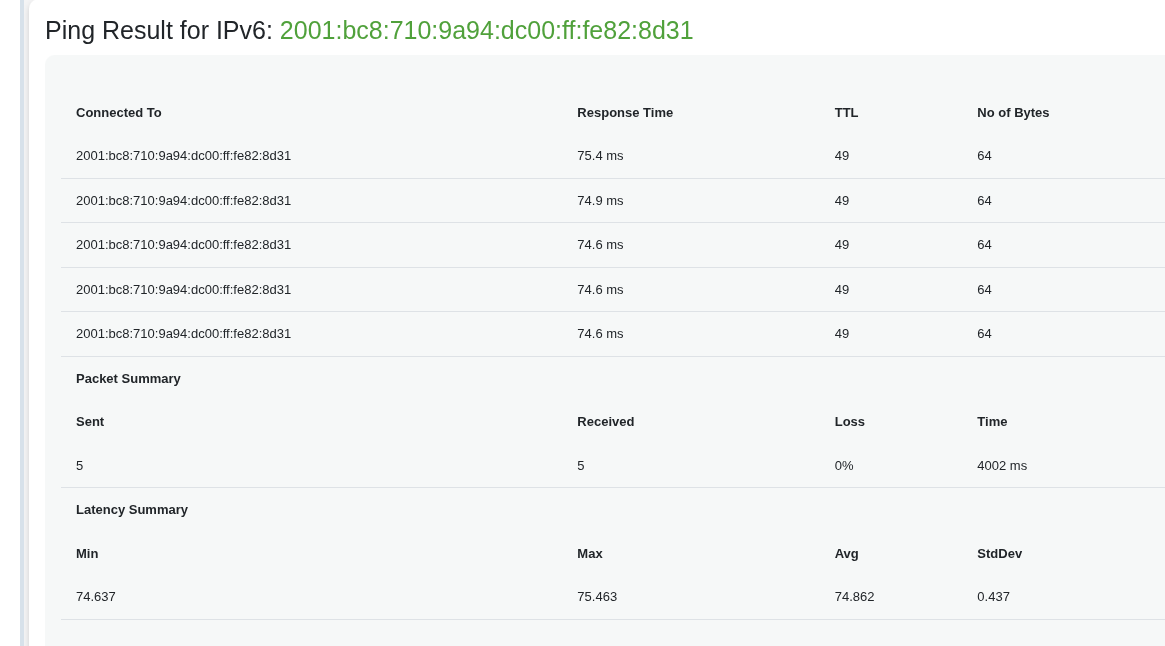
Maybe your IP is blocked rather than your region

DNS isn’t the problem here. In the original post, we see the DNS resolution worked and it resolved to the correct IP.

1 Like

I was sort of saying it is worth checking if the IP is blocked because I know Domains are blocked and sometimes IPs by my Government.

1 Like

even the UK is blocking VPN access (in theory just for children - thin end of the wedge!) - we might as well be in :china: :north_korea: :iran: :oman: :united_arab_emirates: :belarus: :russia:

House of Lords Vote on under 18 ban on VPN use - of course that has to involve age verification - ID checks (get your ID cards at the ready!!)

1 Like

OP is not in the UK.