Since latest upgrade

SYSTEM INFORMATION
OS type and version REQUIRED
Webmin version REQUIRED
Authentic Theme version REQUIRED

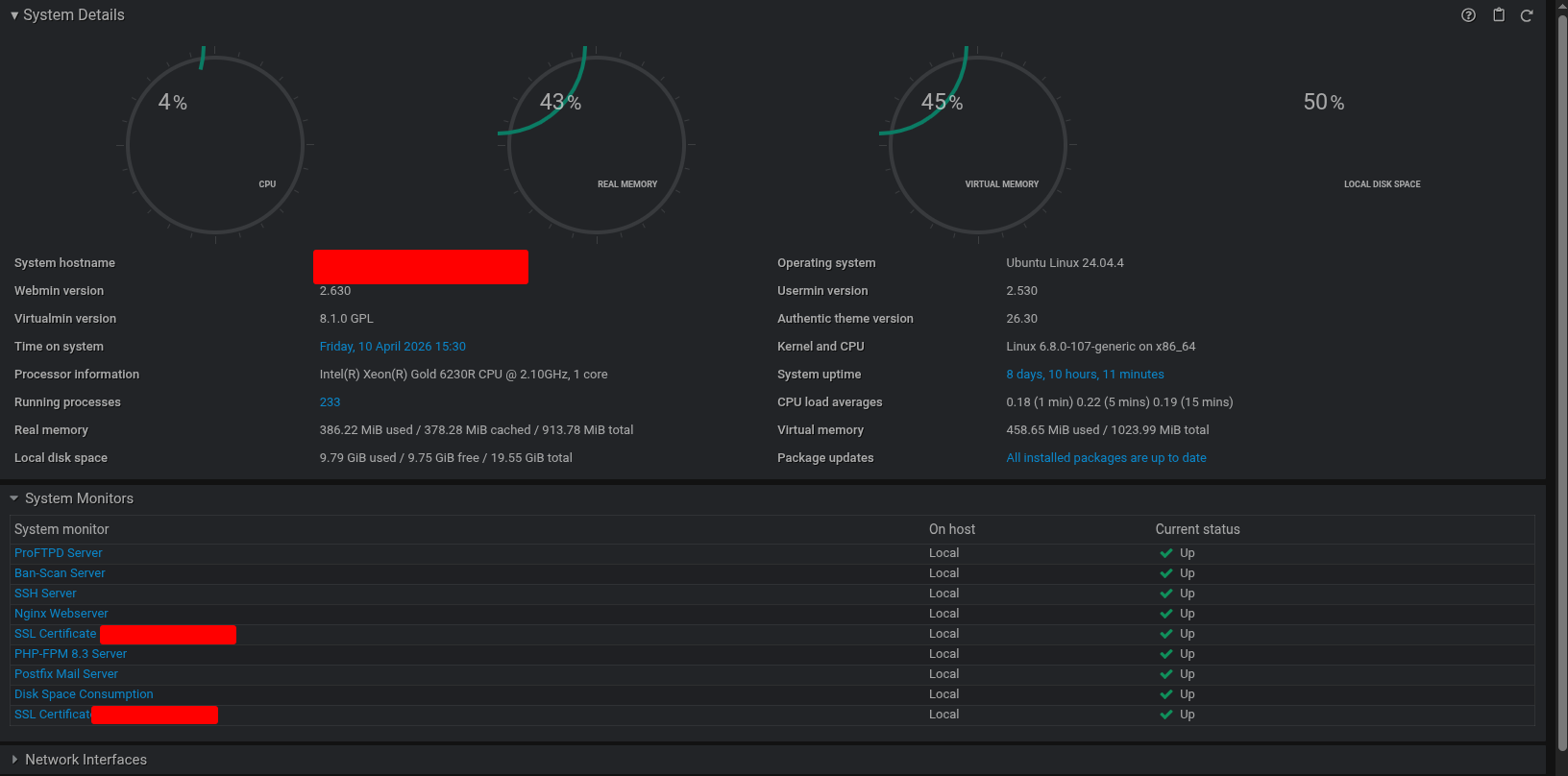
have a look at the screen shot for server information


the clocks seem to be a bit upset this appeared with the latest theme update along with the favicon disappearing from the browser tab. This maybe due to a chrome update please advise

I only see authentic and framed as options so I can’t check, but, have you tried another browser? There was some setting, I think in backups, at one point that was browser sensitive.

it is the authentic theme but using the ‘nightrider’ (dark) css

Try a forced reload (probably <Ctrl>-<F5> or <Cmd>+<Shift>+R) to flush caches and fetch new stylesheets and JS.

Switching back to light theme fixed it, so it was a case of just toggling the themes e.g dark → light → dark. I’ll sew what happens tomorrow as this window is never closed, however the favicon disappeared after about an hour
Switching themes also reloads styles and JavaScript. So, that indicates a forced reload will probably solve it for dark theme, too.

I have never heard of that. You’d need to look in the network tab in Developer Tools to see what error there is about the favicon.

LOL! Try using a different browser or a browser without extensions enabled.

1 Like