| SYSTEM INFORMATION | |
|---|---|
| OS type and version | Ubuntu 26.04 |
| Webmin version | 2.651 |
| Virtualmin version | webmin-virtual-server 8.1.0-1-gpl |
| Webserver version | nginx/1.28.3 |
| Related packages | SUGGESTED |
Hi all.
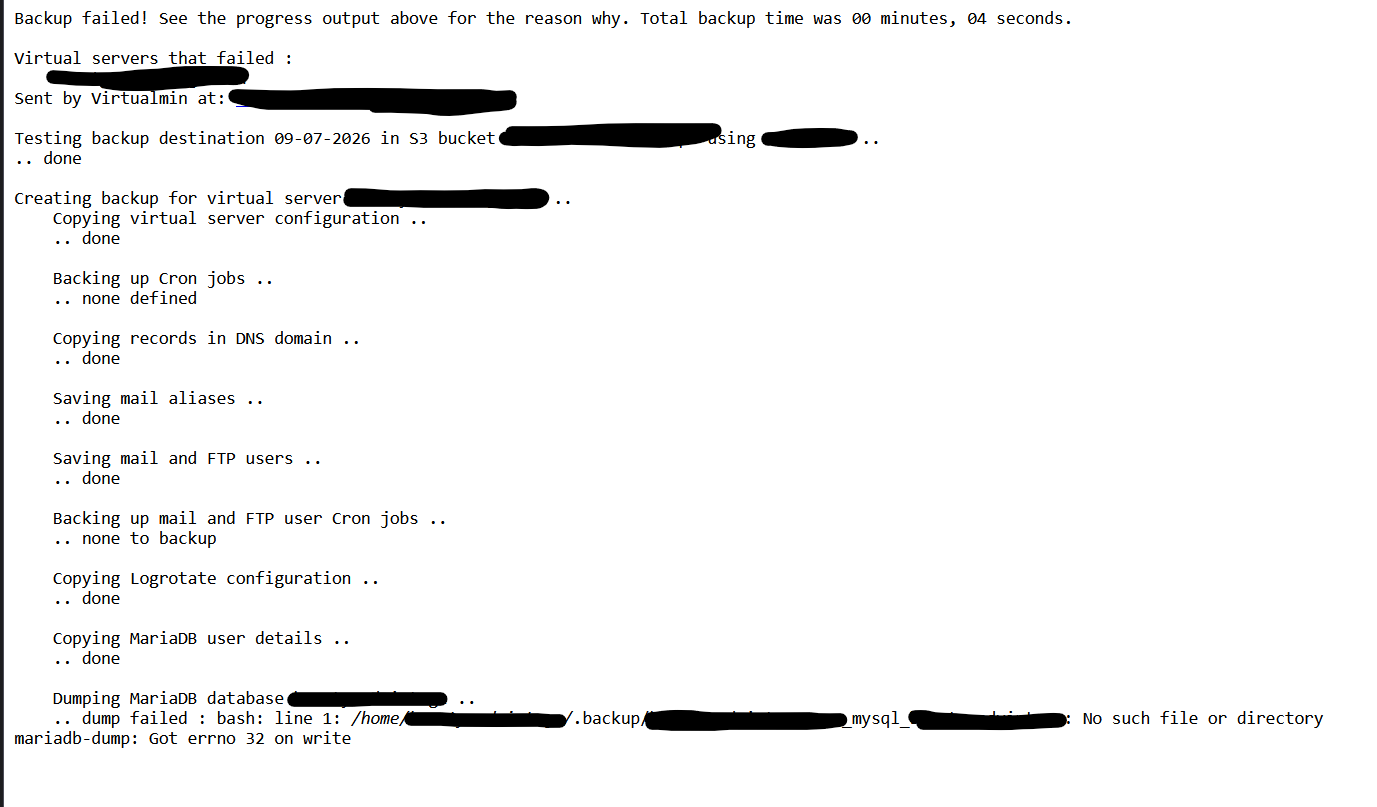
I’m getting this weird bug on one of my virtual servers. Other servers don’t get the same bug.
When I manually create an empty .backup directory inside the home folder of the user, it runs fine. I am getting the same error not only with the mariadb backup, but with other things like the dns records.
Case 1:
Case 2:
Backup failed! See the progress output above for the reason why. Total backup time was 00 minutes, 04 seconds.

Virtual servers that failed :
    XXX
Sent by Virtualmin at: XXX

Testing backup destination 08-07-2026 in S3 bucket XXX using XXX ..
.. done

Creating backup for virtual server XXX ..
    Copying virtual server configuration ..
    .. done

    Backing up Cron jobs ..
    .. none defined

    Copying records in DNS domain ..
    .. backup of dns failed : Failed to open /home/XXX/.backup/XXX_dns_dnssec_keyinfo for writing : No such file or directory
Home folder permissions (for the vhost in question): 0750
Other hosts in the system, with the exact same perms, don’t have the same error. The system is very freshly installed (barely a week old), on a fresh OS installation.
Any help will be greatly appreciated! 
Thanks,
Kyriakos