Created a new VPS with AlmaLinux 10.1
Installed VMin 8, tested - works.
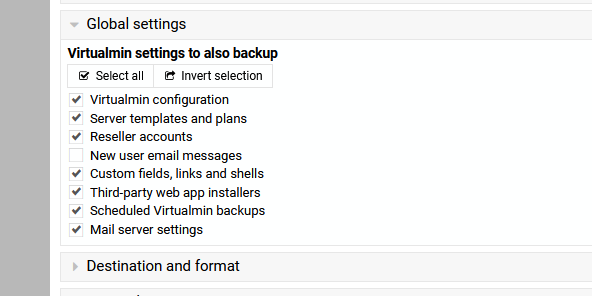
Backed up config from old server on Rocky 9.
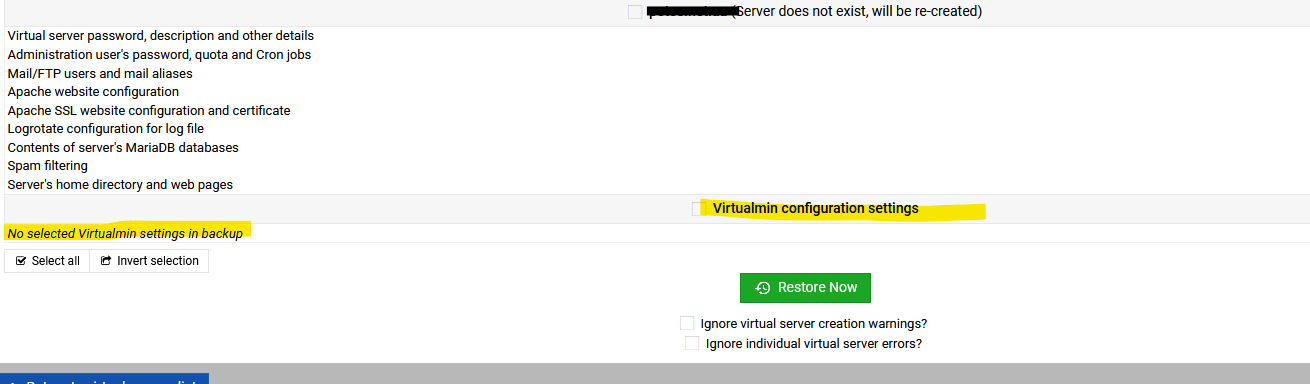
Restored config to new server - no errors reported.
Checking Configuration fails.
your system is not ready for use by Virtualmin : A problem was found with your Postfix alias maps : The map source texthash:/etc/aliases cannot be used : Webmin does not support the map type texthash
Postfix on EL10 works differently to EL9
Solution:
After importing VMin config, convert Postfix maps to EL 10 format
This was not an issue when I used their Rocky 9 image, the only 10 image was AlmaLinux.
I found this:
Postfix in EL10 is built to prefer/use LMDB
Berkeley DB (hash:) is no longer included or not enabled by default.
postconf -m on a clean EL10 install typically shows lmdb but not hash.
To get all of your server settings etc. do you not need to get the webmin backup and restore that.
On android I had this app where it would read the packages you had before an upgrade and then after that would install the same packages. This would be useful if you have to move server but want to keep the config the same.
No need. Can you share virtualmin.tar.gz with me privately if possible? It would make it easier.
That said, if we just copy the config files from the old system to the new one as part of restore, then the behavior is expected. @Jamie, is this what we’re doing?
No we merge some of the global configs from the old and new system - just copying over the whole /etc/webmin/virtual-server directory would not work, as some files are specific to the local system.
What about /etc/ for complete server migration, postfix setting, Apache setting and so on.
People have setups that have taken ages to get right. VM team always say migration. Is better but currently, I think upgrade is the only way to move to a new OS and keep all of your settings.
This also ties in with what a end user thinks is backed up (NB I know this has been mentioned on the forum before, but is relevant, here)
To explain the original post better, EL10 has done away with the Berkeley DB hash system which was used by eg Postfix in EL9 and previous, so dumping /etc/ is what needs to be avoided.
Virtualmin has a responsibility to see that the things it looks after, users, mail, web, etc is migrated successfully.
I think personal customisation of the OS eg changing httpd settings to control the load etc are a separate issue.
@Randomz I hear you about not just dumping the etc folder, but some consideration to the settings within it when migrating to a new server using a migration path of virtualmin.
Maybe listing what exact configurations the virtualmin config stores and then configures on the new server.
At the very least you need to prep the new server to have the same services, which is not as automated as it could be.