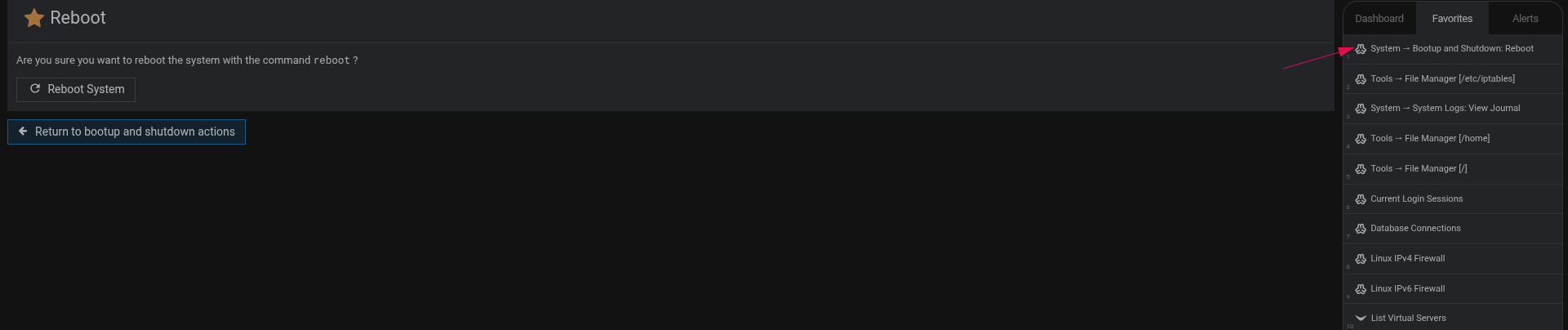
!reboot in the search box works fine for me as root.
With regards to the Bootup & Shutdown area in Webmin and adding a fav link, be nice if there was a reboot button at the top rather than having to scroll down a mile or so to get to it. I thought maybe there was an option in the settings there to have it at the top but alas no.
In fairness, having the reboot and shutdown buttons seem out of place on this page, however if they were to be placed on this page, at the bottom seems to make sense.
My thoughts is that this page should just be for controlling services and “their” startup and shutdown states.
Accessibility: Streamlines administration for users migrating from panels like cPanel or Plesk.
Convenience: Reduces the number of clicks needed after kernel updates or critical system configuration changes.
Visibility: Provides a quick visual confirmation of system control for novice administrators.
Cons (The SysAdmin & Stability Perspective):
Encourages Bad Practices: Frequent rebooting is often a “band-aid” fix that masks underlying issues (memory leaks, zombie processes) instead of solving them.
Data Integrity Risks: A prominent button increases the chance of accidental reboots, which can lead to filesystem corruption or interrupted database transactions (especially during high I/O).
Security & Redundancy: Administrative actions of this magnitude should be intentional and “hidden” behind sub-menus to ensure the operator is fully aware of the consequences.
Multi-Tenant Collateral Damage (The “10+ Virtual Servers” Factor):
Shared Infrastructure Impact: In a Virtualmin environment, a reboot is never “isolated.” One click takes down every single virtual host, website, and database on that machine.
SLA Violations: Forcing a reboot for 10+ different clients/projects simultaneously is an administrative failure if only one service or virtual server was causing issues.
Boot-up Bottleneck: Restarting a system with many virtual servers creates a massive resource spike as all services (PHP-FPM pools, mail filters, etc.) try to initialize at once.
Conclusion:
While a dedicated reboot icon might improve “Ease of Use,” it contradicts the core philosophy of Linux server management: Stability and Uptime . Adding a “one-click” solution to a critical system operation introduces more risks than it solves in terms of workflow efficiency. Therefore, maintaining the current structure—where rebooting is a deliberate, multi-step process—is the technically sound approach.
The current implementation is correct. Keeping the reboot functionality within the “Bootup and Shutdown” module is the technically sound choice. It forces the administrator to be intentional, provides a clear overview of service statuses before shutting down, and prevents catastrophic accidental downtime in multi-tenant environments.
the cons far outweigh the pros although it is nice to have folk move to Webmin/Virtualmin from other panels like cPanel/Plesk it is hopefully a one way journey
Please don’t add another button to the interface. Especially not a reboot button! As has already been mentioned, and as is well known, a server should only be restarted in very rare cases. Such a button would be about the most unnecessary thing you could possibly have.
I don’t want to get into a controversy on this topic, but I’ve noticed in various forums that if a post is elaborate and well-formatted, it’s immediately dismissed as ‘AI-generated.’
My goal was to provide a structured and objective technical analysis of why a global reboot button is a bad idea—especially in multi-tenant environments. Whether I use tools to organize my thoughts or format my data doesn’t change the technical reality: having 10+ virtual servers go down because of a single ‘convenient’ button is a major risk.
Let’s focus on the technical arguments (stability, data integrity, and multi-tenant impact) rather than the formatting of the post.
Thanks, just a reboot icon where I said and job done, no?
You guys seem to love a long way round to everywhere, also why are people so afraid of booting a server?
Do they have no confidence it will come back up, mine are usually back up in 30 seconds, everything refreshed.
Man I love rebooting servers. It proves all is running tickety boo.
So what are the advantages & disadvantages of rebooting a dedicated server?
Can of worms depending on its work I would have thought.
Even when you click the reboot server button in in the boot and shutdown area in webmin, you get the… are you sure option button to go ahead or not with your decision… so what is the problem with a icon where I suggested and the same thing. Wake up, there is no difference, as I said you can protect that choice with a code if you wish. Maybe in VM etc the whole reboot option should be protected with a root pre-entered code that only true root knows… seems daft as root is making the choice, maybe root is hacked?
Today is full of this double auth stuff no?
root is not prestine protection.
You can use other methods but, I am and always have been … root.
As well some people who do not reboot servers and who are just plain lazy or negligent and have no respect for the service they offer, especially hosters of multiple websites sites on low end servers, are just in there on a wing and a prayer. I bet there are miriads out there who are sht scared to boot their server.
@Le_Gallois - I understand your point about confidence in your server’s boot speed, but consider this scenario:
What happens if you have 10 or 20 Virtual Servers (clients) running on that machine and someone clicks that icon by mistake because it was ‘too accessible’?
In a production environment, a reboot isn’t just ‘refreshing things’ — it’s an immediate service outage for every single business hosted on that box. The reason the option is ‘hidden’ in the Bootup and Shutdown menu is to ensure the action is, not accidental.
By mistake? By rights only root reboots and then unless direct ssh access, with software it usually says y/n I agree but surely you get my drift. Maybe you miss my whole point. I think even root needs some sort of auth other than ah, so your root, here we go.
Also when was the last time you rebooted, there are times with updates you MUST reboot for security and update issues, surely? Who can we really trust these days. If your hosting business that rely on you, being a unpro is so dangerous, for all involved. Such is life I guess in this fickle server admin and whatever type of site hosting and service you offer.
That is exactly the point. Since a reboot is a rare and critical event — performed only when ‘MUST’ for security or kernel updates — there is no technical reason to have a permanent icon cluttering the main UI.
If you only reboot once every few weeks or months after specific updates, navigating to the Bootup and Shutdown module is not a burden; it’s a safety measure. Putting a ‘loaded gun’ on every page of the dashboard just for an action you perform rarely only increases the risk of an accidental click.
The current design is consistent with professional system administration: rare, high-impact actions should remain intentional and separated from daily monitoring tasks.
As I explained earlier, you can add this reboot confirmation page to the favorites and access it with a few clicks. Or, if you assign it to a hotkey (as I also explain earlier), you can access it with one key combo. It literally takes seconds. Or hit /, type !reboot, and press Enter.
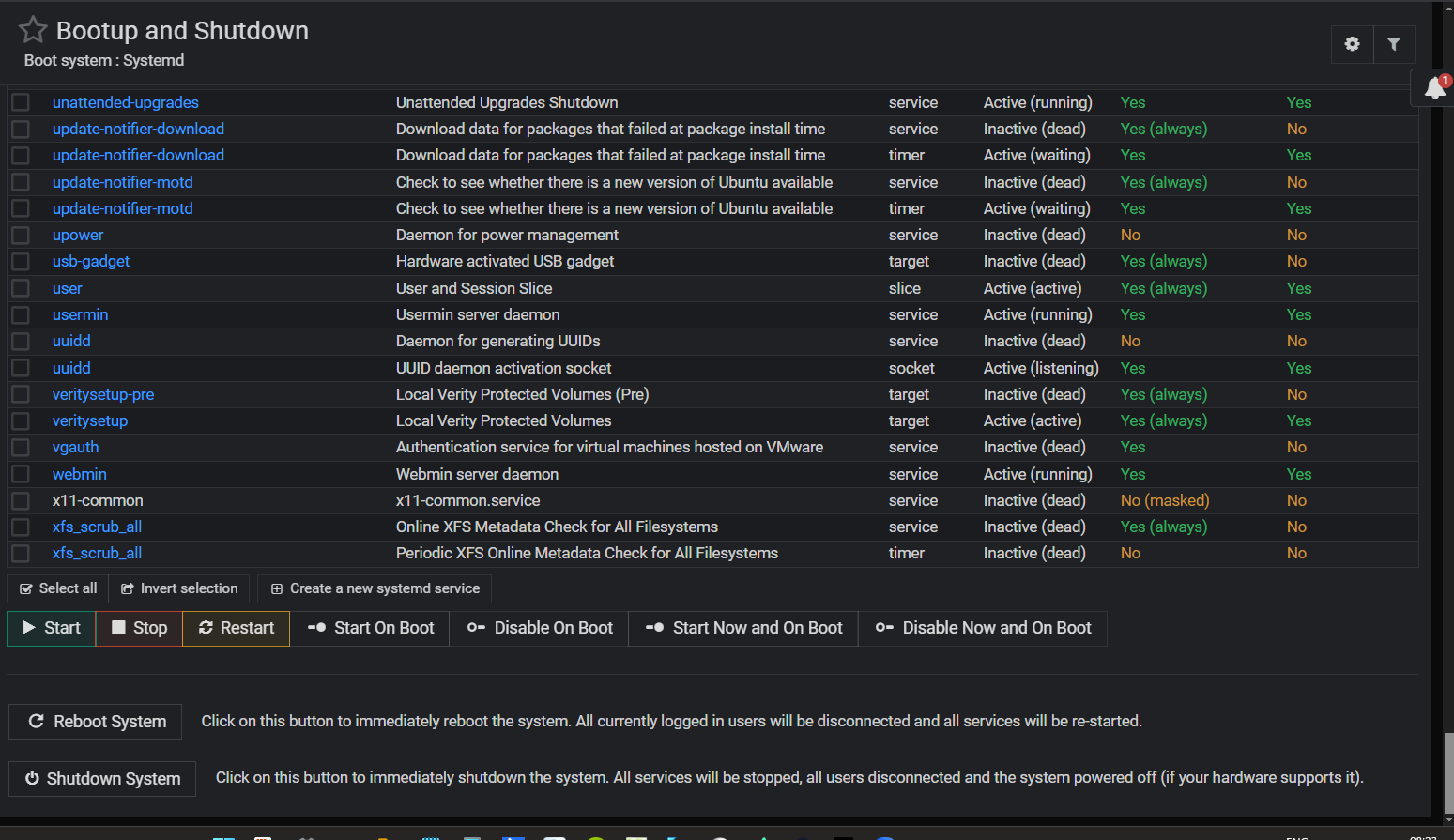
 Just scroll down once, click the “Reboot System” button, and then add the actual reboot page to your favorites!