Re-send signup email link disappeared starting Virtualmin 7.40.0?

Yeah, it could. If there are many domains, we can consider gzipping it.

Nevertheless, using a select dropdown like this on the UI isn’t ideal, especially with many sub-domains, as it can negatively impact both the UI and user experience.

And, I’m sure we shouldn’t think about further complicating it by adding an input field for this purpose as we do in other parts of UI.

So, let’s simply send information about all sub-domains. The domain owner is allowed to see this information, and even it would likely be more convenient to have everything in a single email rather than having to click hundreds of times for multiple subdomains.

Just say in the email, this virtual server has subdomains. Don’t need to list them.

All this welcome email should have is the basic server stuff.

The user can figure out the rest when they login.

When you get a welcome email 99% of the time, the account will only have the parent.

No I disagree, because each sub-domain may have it’s own block of information including the database name, prefix, IP and a bunch of other settings. This is why Virtualmin has always sent a separate creation email for each sub-domain, and why my most recent changes have added it back.

I do like the idea of including the names of all sub-domains in the email though.

Does that mean we can remove the select and replace it with a single button?

Well no, because we can’t include the full details of all sub-domains, only perhaps the list of sub-domain names.

So, what will select do? And, to which email address will it be sent? Won’t it be sent to the email address of the top-level domain owner?

It selects which domain’s details to include in the email. Basically we are just re-sending the email that’s already sent at sub-domain creation time.

To the domain owner user, right?

yes, that’s correct

Alright, considering the issues I pointed out earlier with the select dropdown, I suggest we rather add a new button on the “Edit Users” page for all subserves to handle it.
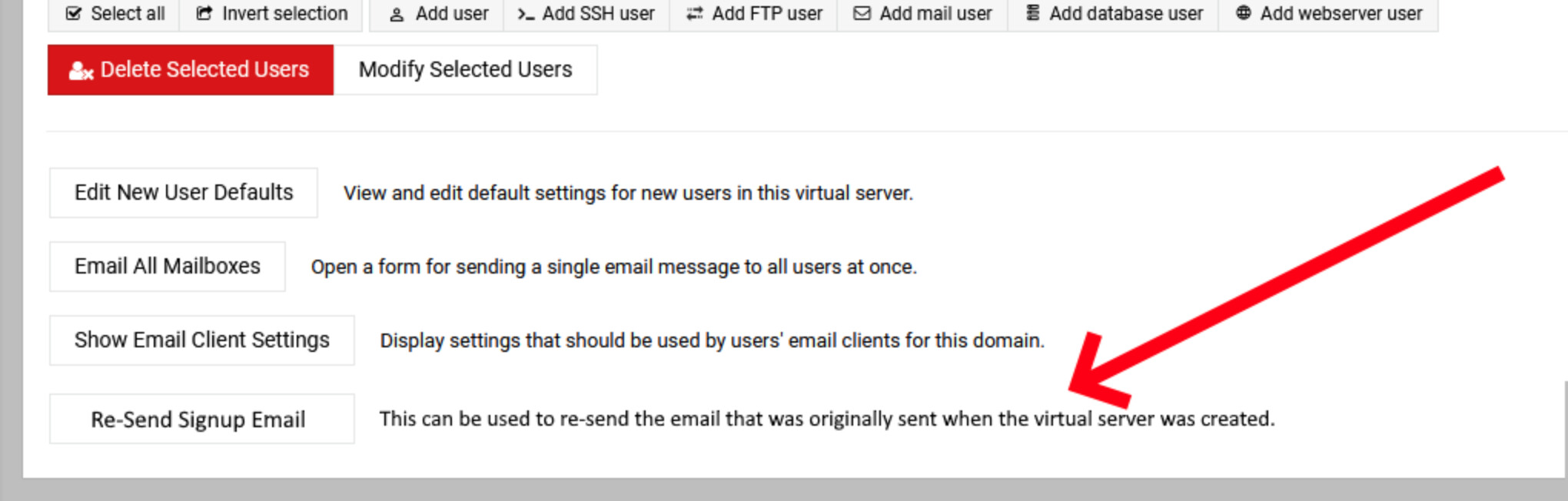
But the top-level admin user doesn’t appear on the Edit Users page for sub-servers.

I mean in the form of a button. @shoulders described it well in the previous comment:

@Jamie, so, will you add a separate button for each sub-server’s “Edit Users” page instead of using select dropdown on top-level domain user?

Example made by @shoulders earlier:

Sure, I wouldn’t mind doing it that way. Send me a PR if you like!

This topic was automatically closed 60 days after the last reply. New replies are no longer allowed.