| SYSTEM INFORMATION | |
|---|---|
| OS type and version | Debian 12 |
| Webmin version | 2.510 |
| Virtualmin version | 7.40.1 |
| Webserver version | 2.4.65 |
| PHP versions | 7.4.33, 8.3.26, 8.4.13 |
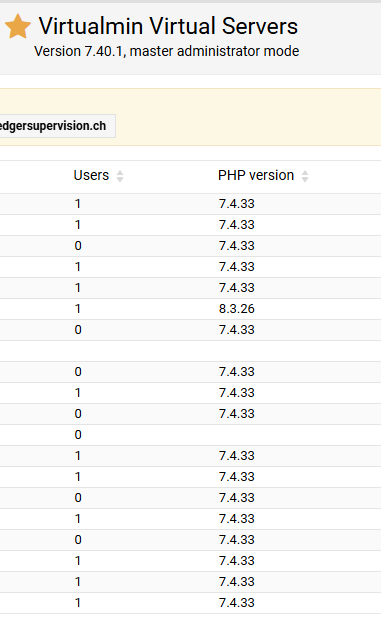
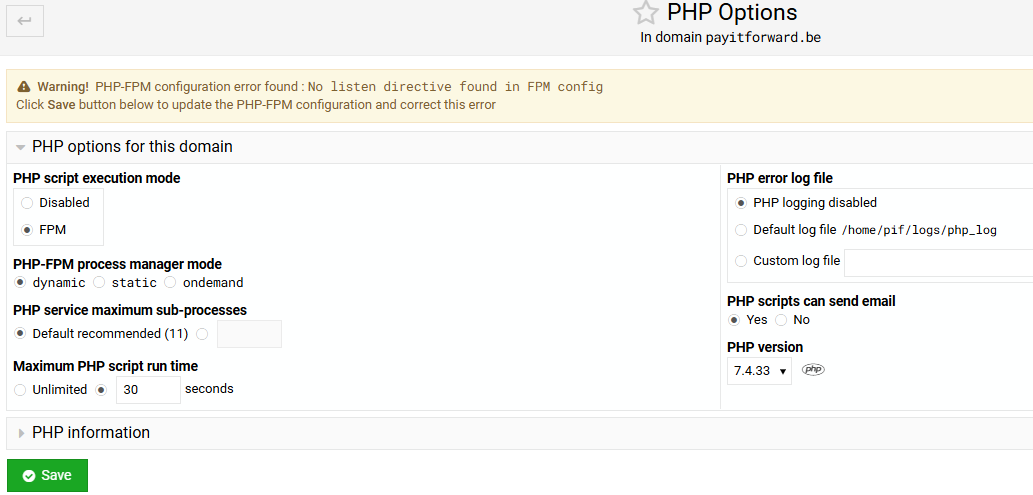
I have a weird issue that I assume happened as a result of the upgrade from 7.30 to 7.40, it’s as if some PHP options got erased within Virtualmin - in the screenshots you can see that all PHP versions show as 7.4.33 (except the one I already changed manually), and in the PHP options screen it shows an error in yellow, and it’s not how I configured it (eg. I use ondemand mode and have logging enabled).
BUT! the weirdest thing is that this info is not correct, if I use phpinfo or look within Wordpress, it actually shows that the PHP versions that I chose are active (8.3.26, 8.4.13). So it’s internal in Virtualmin.
I don’t have enough knowledge about Virtualmin to know what could explain this.
My websites are functioning (possibly loading slower than usual, not 100% sure) hence I only discovered this issue now.
When I change the options to how I want them and save, the error in yellow goes away and the info shows correctly.
I run about 20 websites, so am also wondering if there can be a fix or if I have to go through them one by one to save the PHP options.