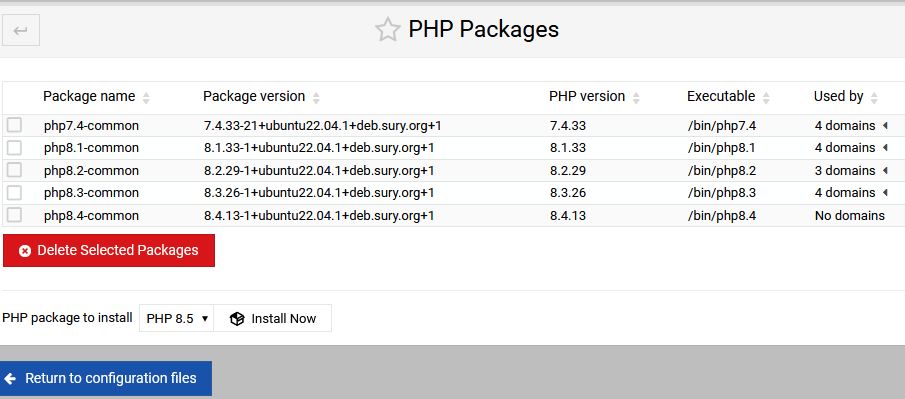
I think your sites will just break? I can’t think of how we could safely/reasonably do anything about removed packages. Virtualmin is not monitoring what packages are available in realtime and the decision for what PHP version to use is baked into the configuration files for that domain. Nothing is making realtime decisions about what version to use every time a request comes in, and web requests do not touch Virtualmin. They go to your web server and then to the PHP-FPM service configured for that domain.
I’d recommend you move those sites to another PHP version and test before removing the packages for an older version.
This is why I asked. Failsafes need to be built it .
It no migration takes place for those domains on a particular version, then you should not be allowed to remove that php version I til it has no domains on it.
Maybe the UI is misleading here, then. Webmin/Virtualmin can’t stop you from removing packages. Virtualmin (and Webmin) is not your package manager, and has no control over what you do with your package manager.
Maybe (probably) this particular form in Webmin will warn you if you’re about to delete a PHP version in use, but there’s no way we can “migrate” applications between PHP versions (because PHP versions change and deprecate features and modules, which requires some level of expertise about PHP and the application to accommodate). But, this form is just calling apt or dnf to list/install/remove packages.
This is a convenience UI layer over your package manager, it does not replace your package manager and there are several ways to add/remove packages that don’t involve Webmin/Virtualmin at all.
I wouldn’t want that, particularly. I mean, it’s an option but it seems like a brute force action to me that could, after having “migrated” a domain to a new version, give the impression that nothing broke.
Rather, I’d use the page to confirm that I’d moved all of the domains off of the version I want to remove.
It feels like you’d be starting at the wrong end of the migration journey. Wouldn’t you be basing the move on your application(s) requirements? Say, e.g. there is an update to your application that wants a more recent version of PHP than is currently installed. First, I’d get the new version of PHP installed along with any PHP extensions the application might want. Then, I’d switch the domain over to the new version of PHP, update the application and check it’s still doing what it should be. At this point, you could use that page to remove the older version of PHP if it’s not in use anywhere; though jumping the gun and doing that soon after an update is pretty much asking for trouble. So, I’d leave it alone for a while.
Fast forward a little when your updated application has been running without issue for a period. It might be handy to use the removal tool on that page but I’d prefer to use apt to do that.
Ultimately, I think the usefulness of that page is its ability to show you, in one place, which PHP versions you have installed, where they’re being used and providing you with links to their configurations.
This is not about an individual user but how someone runs their server. What happens if a PHP version becomes an extremely high attack vector and needs to be removed from the server by the admin, does he need permission from all of his clients first?
If keeping as is, then my proposal is to greyout/remove the checkbox and put a tooltip saying, you cannot delete this PHP version whilst it has accounts assigned to it.
No but you could lose a client, if their web app is designed to run on a specific version of php, without informing them first and trying to get there web app updated in some way to use a later version of php, I would at least talk to the client first to inform them this is going to happen.
is this just another example of a “client” refusing to upgrade/maintain any key software all the way from the OS/packages (even security!!) /etc/all the way down to website themes/plugins ?
surely a systems manager’s job includes “educating” the “client” to upgrade and enable the process or to stop/reject that client?
I do not see that as being part of Webmin/Virtualmin but do agree on the importance of some “warning” prior to any deletion of anything. (especially as I’m getting forgetful)
which would be fine but what I’m understanding/misunderstanding from @joe’s commens above is that the “domain count” is not a “current count” but one set at domain creation/website creation. so cannot be relied upon
I have no idea what domain count you are on about.
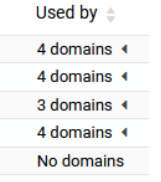
In the page where you can add and remove php versions, on each installed version it lists what domains are on that version, therefore a list of domains that need to be changed.
You either blocked the PHP version being removed (as si now) or you use the list to migrate to another version. This list will be generated by reading the php handler statements from the relevant place.
First, we won’t let you use the UI to uninstall PHP versions that some domains are currently using. Second, we shouldn’t micromanage things in any fancy way. Simplicity is a virtue.
Why allow a user to make a mistake when you can prevent it in the first place.
The greyed out option shows immediately to the user that they cannot select it. So this allows notification to the user and prevention. a tooltip on hover explaining why is also very useful.
If you remove the checkbox when the option is not available is problematic as it will confuse the user.
I appreciate a lot of your error checking is done server-side, but there is nothing wrong with client-side, or both.
is a count (from somewhere) and when clicked it expands to give a list - that is good enough (all mine on this VM use the same version) so the problem doesn’t exist