PHP 8.5 Missing From selectors

SYSTEM INFORMATION
OS type and version AlmaLinux 9.7
Virtualmin version 7.50.0 GPL

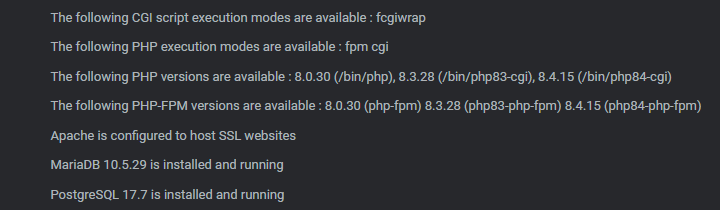
So I went through and followed the steps for installing new versions of PHP (before this post, I have 8.0 (system “maximum”), 8.3 (per the guide), and 8.4 (also from the guide). I followed the same instructions to install 8.5 and its associated configurations and modules. While I can see the new PHP version listed in Webmin > Tools > PHP Configuration list of versions, going to Virtualmin and checking the configurations, it only lists the first three that I listed. Trying to bump it up to the newest available for a server, the server cannot switch to 8.5.0.

What did I miss?

For sake of example:

A server’s configuration:

Additionally, I tried to enable the systemd unit that was made for 8.5 and restart, but to no avail.

Usually I’m loath to do this on something I can’t test directly, but the AI suggestion from search:

Re-check Configuration: After installing new PHP versions, navigate to “System Settings” → “Re-Check Configuration” in Virtualmin to ensure they are detected and available.

It does seem to do the check at least and should be non-destructive.

image

1 Like

Ran that one too:

Even removed and readded the module. Same thing.

Show us which PHP 8.5 packages you have installed.

These?

No. You installed packages when following our documentation. Show us what you actually installed for PHP 8.5.

Something like:

rpm -qa |grep php|grep 85

@Joe Does this do a full install?

That yields me:

Apply this patch and give it another shot:

webmin patch https://github.com/virtualmin/virtualmin-gpl/commit/d2f87b1
1 Like

Can confirm applying this patch has the option appear in the server configuration screen and is found during the re-check configuration app.

(Not sure I should mark this as a solution though.)

(Looking at the code, yup that’s a solution… a temp one but still.)

This topic was automatically closed 8 days after the last reply. New replies are no longer allowed.