I want (e.g.) email to be aliased, where sending mail to name@alias.com goes to the same name.primary mailbox. But I want web traffic would go to /home/primary/domains/alias.com/public_html/, like a subdomain.
My understanding of subdomains is that they do not share email like an aliased domain does, so you have to set up users for @alias.com just like you would the primary.com domain, and maintain them separately.
Has anyone ever asked for this before? Is it something I can actually do now?
(Of course, I know I could set up Email aliases on the subdomain and forward them to the primary domain, but that means maintaining both; with an aliased domain you don’t need to do that.)
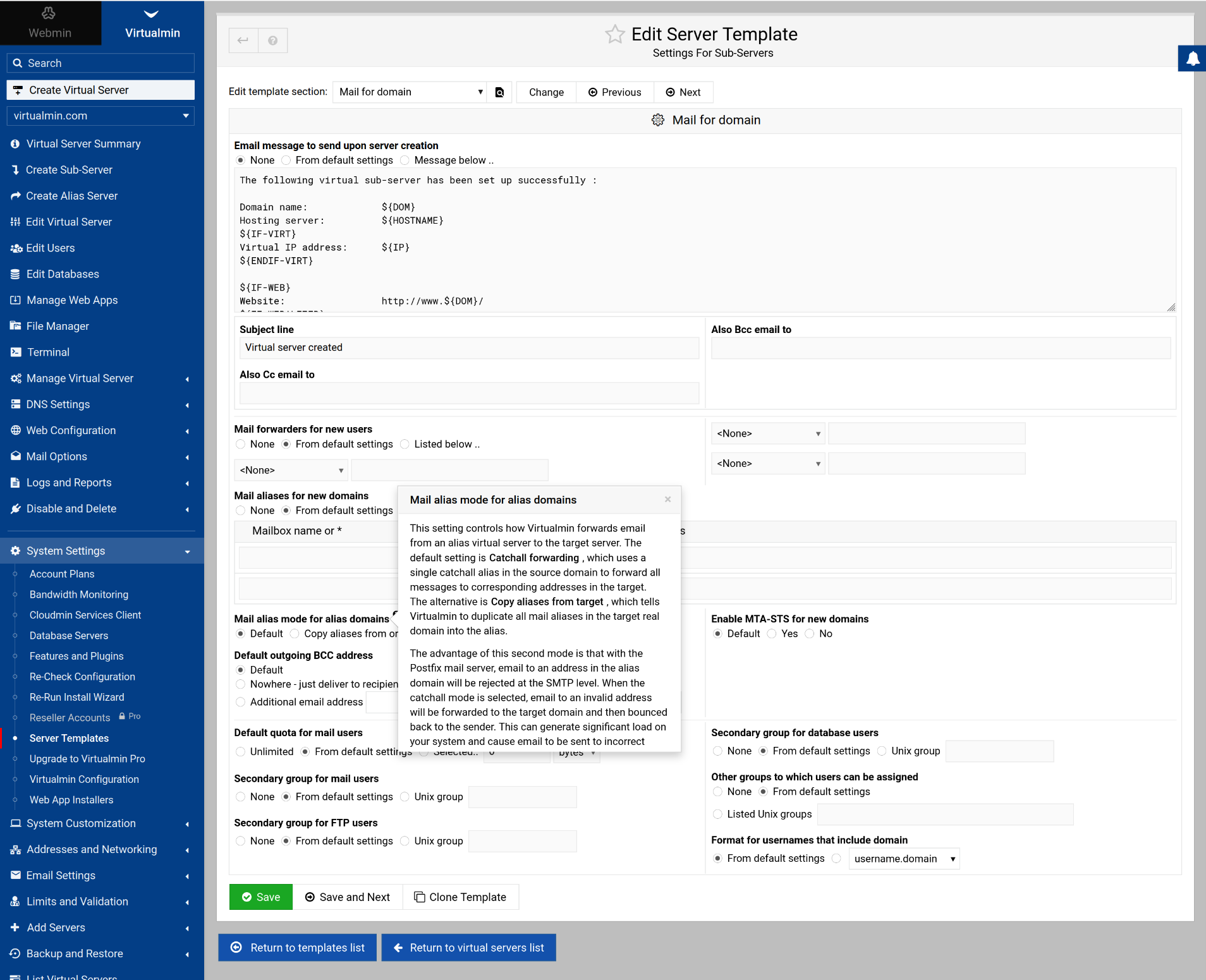
I’m not sure if it’s been asked before, and I’m not sure we don’t have a way to do this (but I don’t think we do). I’m looking at the Server Templates for Sub-servers, and seeing some confusing language in the help file (and maybe some confusing mixing and matching of Alias and Sub-Server settings), which I think I need to talk over with @Ilia and @Jamie and see if we can make something sensible happen to make this more clear (either make the docs match the facts or make the UI not conflate Alias and Sub-Server settings):
I am tempted to say this setting, despite what the help file says, would maybe do what you want. But, the help file says it applies to Alias domains (despite being in the Sub-Server Server Template), so I don’t know what it actually does.
If that doesn’t do what you’re after, you could use a virtual_alias_regexp map in addition to the regular map, probably appearing after the usual map, with something like this in it:
This wouldn’t require maintaining individual aliases for each user (which you could also automate with post-change commands in Virtualmin so you don’t have to do it manually, but a single regexp rule is easier).
Yes, an alias can’t have its own document root but let not semantics hold us back. Is there a use case where a Virtualmin server could benefit from having a single set of email credentials which receive email from multiple aliased domains but each domain has its own website? Use cases which come to mind include some sort of SaaS or a multi-silo business. If there is a viable use case and if the Virtualmin interface needs just an extra check box then this should be offered.
If we could find a way to configure Virtualmin to be used in a SaaS environment, it would be such a standout feature. In Virtualmin, wildcard support enables infinite subdomains but if there was a way to let a SaaS user add top level domains and remove the domain later without breaking anything else in the SaaS (or SSL), it would be so great.
A Sub-Server can. The question is about a Sub-Server with mail aliased to the users in the parent. Which has no technical thing preventing it, we just don’t have UI for it.
(And, also, our UI in the Server Templates for Sub-Servers is quite confusing because it has options for Alias Servers, which, as you’ve pointed out, are not like Sub-Servers.)
But I don’t think Sub Server is even correct here. Alias, in this case, is pretty well understood as a web server accepting requests for differing domain names and serving the same content.
It seems the OP needs a server that automatically forwards valid emails to another domain. There seems to be no requirement for sending.
But there appears to be a maintenance issue doing each mail account. So basically strip the ‘@domain.x’ and append ‘@domain.y’? Can this be done in Postfix address rewriting and masquerading?
It can be done with a regexp map, as I explained above. But, I think Virtualmin would probably want to just maintain the aliases in the virtual alias map, so it could be a bit more flexible (but maybe flexibility is a bad thing in this case). It’s a simple one-to-one mapping, and you could absolutely do it with post-change scripts in Virtualmin, you don’t actually need explicit support for it.
We don’t currently setup a regexp map, and I’m not even sure we have regexp map support in the Webmin Postfix module, but if I were solving this problem by hand, a regexp map is how I’d do it, just so I never have to think about it again (unless somebody changes their mind about wanting those aliased emails).
I feel like we probably ought to do a better job explaining and giving examples of using post-change scripts. A lot of custom stuff can be done pretty easily with few lines of shell or Perl or Python or whatever scripts. Lots of custom stuff folks ask for that isn’t really broadly applicable can be done with post-change scripts. I just think folks don’t really know about it.
@Ilia changed the title page of the docs so it no longer is clearly about what it’s about. I don’t know why. (This page used to be titled “Pre and Post Domain modification scripts”, which I think is much more clear about what it does. “Domain Management API” is not what this is.)
Ilia, can we please title this page something sensible and related to what it actually does?
Oh! I didn’t know about that, and didn’t see it clearly stated in the docs. That’s simpler than the regexp solution I offered above (probably more efficient, too, though a few extra cycles doesn’t matter since every mail gets gazillions of CPU cycles for spam and AV scanning, anyway).
I did what my AI (and @smolenaar ) suggested, and it worked! It definitely required the virtual_alias_domains in main.cf; otherwise mail is rejected with “Relay access denied”.
But here’s a weirdity…
In my /etc/postfix/virtual table, I saw an existing pair of lines for another aliased virtual server on another name. They were:
These were definitely created by Virtualmin, I had never edited this file before. And, although I was sure I had tested the email aliasing before, when I tested just now it did not work: I got “Relay access denied” when sending to eric@alias2.com.
but no @alias1.com @parentofalias.com. But it also has explicit email addresses copied from @parentofalias.com for each user. These all work, of course.
I’m guessing this has something to do with the way alias1.com was set up – I think it was moved as an alias into parentofalias.com? Not sure.
But the surprising thing is that when I created alias2.com (I just deleted it and added it as an alias again, to be sure), it simply added the two lines above, no copies of users, and it for sure doesn’t work (because there is no virtual_alias_domains= in main.cf.
I don’t know who out there has aliased domains on which they are receiving mail for the users of the parent, but it looks like if you add a second alias, it’s not going to receive mail.
Okay, oh boy. Had to revert everything to backup. All mail for domains not in virtual_alias_domains was being bounced with “Relay access denied”.
This could have something to do with me using SRS (SRS: Maintain Deliverability During Forwarding | Sendmarc), which I mostly forgot about (forwarders don’t work without it in the modern world), and it’s all about changing the outgoing mail, so shouldn’t have affected incoming.
Eeesh. Messed up delivery for the last ~13 hours for a mass of users. Hopefully most of those bounces are being retried; looks like they are for at least one email address.
Guess I’ll have to rethink aliased servers with regards to email.