New install - Postfix not letting me send email from any device - relay access denied

After many years working with Virtualmin systems I have to admit defeat by Postfix ! This is a VPS hosting my personal domain (real name replaced with <…> in the config posted below). Fresh Ubuntu Linux 24.04.3 installation running Virtualmin 7.50.2 GPL.

Receiving email works fine and sending from Webmin and Usermin also works. But whichever device I try to send an email from to an external domain I get “relay access denied” or “Resending limits exceeded”. Devices tried: Thunderbird on PC and K9 Mail on Android Phone.

I even went that far to setup an SSH mailtunnel on the PC, but still localhost also gets denied.

I have activated the following things in Virtualmin: Milter, Spamassassin, Greylisting, Fail2ban and FirewallD, all up and running. My IP’s I am connecting from are not in the Fail2ban jail.

Does anyone have a clue what could be wrong in my Postfix config?

Postfix Version: 3.8.6

Hostname 	nl.<myhost.name>
System 	Linux nl.<myhost.name> 6.8.0-88-generic #89-Ubuntu SMP PREEMPT_DYNAMIC Sat Oct 11 01:02:46 UTC 2025 x86_64 x86_64 x86_64 GNU/Linux

Mailbox locking methods
flock
fcntl
dotlock

Supported Lookup Tables
btree
cidr
environ
fail
hash
inline
internal
memcache
nis
pcre
pipemap
proxy
randmap
regexp
socketmap
static
tcp
texthash
unionmap
unix

main.cf

non-default parameters
alias_maps 	hash:/etc/aliases
allow_percent_hack 	no
append_dot_mydomain 	no
biff 	no
broken_sasl_auth_clients 	yes
compatibility_level 	3.6
disable_vrfy_command 	yes
home_mailbox 	Maildir/
inet_protocols 	ipv4
mailbox_command 	/usr/bin/procmail-wrapper -o -a $DOMAIN -d $LOGNAME
mailbox_size_limit 	0
milter_default_action 	accept
mydestination 	$myhostname, mail.<myhost.name>, nl.<myhost.name>, localhost.<myhost.name>, localhost
mynetworks 	127.0.0.0/8 [::ffff:127.0.0.0]/104 [::1]/128
myorigin 	mail.<myhost.name>
non_smtpd_milters 	local:/var/run/milter-greylist/milter-greylist.sock,inet:127.0.0.1:8891
readme_directory 	no
recipient_delimiter 	+
resolve_dequoted_address 	no
sender_bcc_maps 	hash:/etc/postfix/bcc
sender_dependent_default_transport_maps 	hash:/etc/postfix/dependent
smtp_dns_support_level 	dnssec
smtp_tls_CApath 	/etc/ssl/certs
smtp_tls_security_level 	dane
smtp_tls_session_cache_database 	btree:${data_directory}/smtp_scache
smtpd_banner 	mail.<myhost.name>
smtpd_client_restrictions 	permit_mynetworks check_client_access hash:/etc/postfix/sender_access reject_rbl_client zen.spamhaus.org reject_rhsbl_client dbl.spamhaus.org permit_sasl_authenticated reject_unknown_reverse_client_hostname
smtpd_helo_required 	yes
smtpd_milters 	local:/var/run/milter-greylist/milter-greylist.sock,inet:127.0.0.1:8891
smtpd_recipient_restrictions 	permit_mynetworks permit_sasl_authenticated reject_unknown_reverse_client_hostname reject_unauth_destination
smtpd_relay_restrictions 	defer_unauth_destination permit_mynetworks permit_sasl_authenticated reject_unknown_reverse_client_hostname
smtpd_sasl_auth_enable 	yes
smtpd_tls_CAfile 	/etc/postfix/postfix.ca.pem
smtpd_tls_cert_file 	/etc/postfix/postfix.cert.pem
smtpd_tls_key_file 	/etc/postfix/postfix.key.pem
smtpd_tls_mandatory_protocols 	!SSLv2, !SSLv3, !TLSv1, !TLSv1.1
smtpd_tls_security_level 	may
tls_server_sni_maps 	hash:/etc/postfix/sni_map
virtual_alias_maps 	hash:/etc/postfix/virtual

main.cf

parameters defined as per defaults
alias_database 	hash:/etc/aliases
smtp_host_lookup 	dns
You want to look in the logs for that particular email. It might show you more information.

the issue is probably in one of these lines. these are my settings

smtpd_client_restrictions = permit_mynetworks, permit_sasl_authenticated, reject_unknown_client_hostname
smtpd_helo_restrictions = permit_mynetworks, permit_sasl_authenticated, reject_invalid_helo_hostname, reject_non_fqdn_helo_hostname, reject_unknown_helo_hostname
smtpd_sender_restrictions = reject_non_fqdn_sender, reject_unknown_sender_domain
smtpd_recipient_restrictions = reject_non_fqdn_recipient, reject_unknown_recipient_domain
smtpd_relay_restrictions = permit_mynetworks, permit_sasl_authenticated, reject_unauth_destination
smtpd_data_restrictions = reject_unauth_pipelining

I have some information on setting up relays etc.. but you will have to look through my article which is what I used to set my server up.#

Thank you very much indeed, I’ll read your article and try your settings. Had a look at the logfiles too and here is what it says:

2025-12-12T23:59:33.772664+01:00 nl postfix/smtpd[130420]: connect from localhost[127.0.0.1]
2025-12-12T23:59:34.132481+01:00 nl postfix/smtpd[130420]: NOQUEUE: reject: RCPT from localhost[127.0.0.1]: 454 4.7.1 <recipient@external.email>: Relay access denied; from=<my@own.email> to=<recipient@external.email> proto=ESMTP helo=<[127.0.0.1]>
2025-12-12T23:59:45.237076+01:00 nl postfix/smtpd[130420]: lost connection after RCPT from localhost[127.0.0.1]
2025-12-12T23:59:45.237269+01:00 nl postfix/smtpd[130420]: disconnect from localhost[127.0.0.1] ehlo=2 starttls=1 auth=1 mail=1 rcpt=0/1 commands=5/6

It shouldn’t do that, was via the mailtunnel / localhost. Have checked username and password too, both are correct.

What makes me staring in wonderment on this is that SASL and all SMTP restrictions work perfectly.

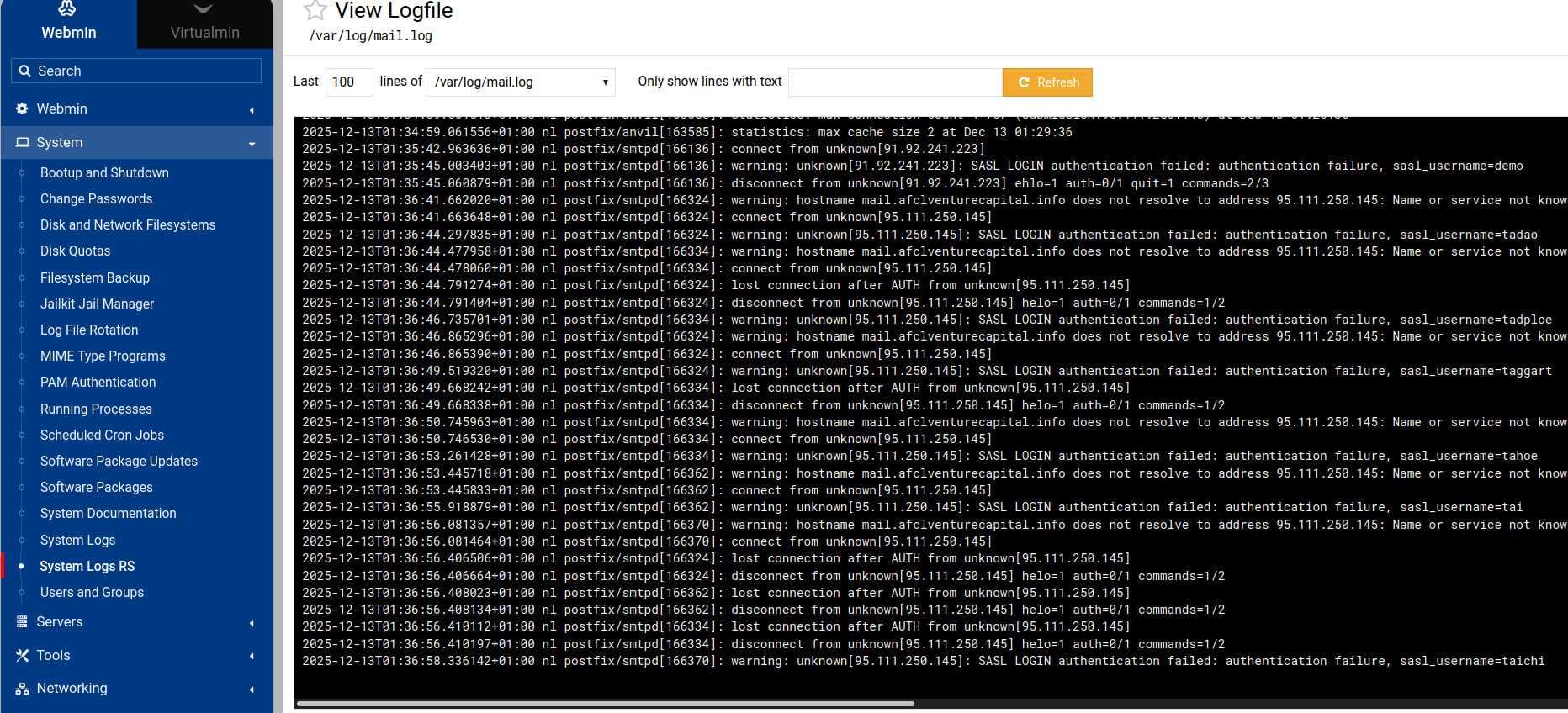
Here is an image of the mail log showing an attempt of one of the usual spammers:

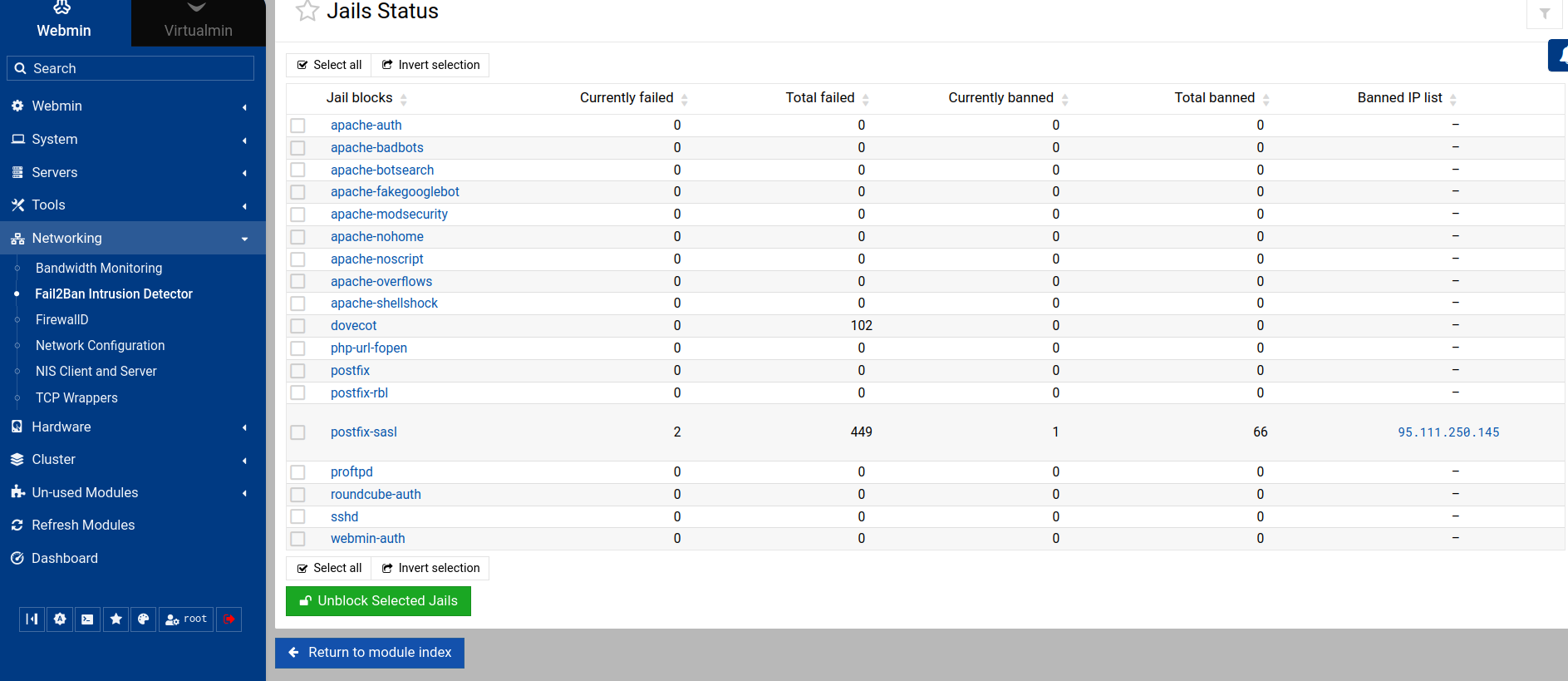
That IP ends up in the Fail2Ban jail where it belongs:

But for a legitimate connection from localhost I get a plain “relay access denied”.

  • relay access denied this means that postfix has looked at the email and discovered that the destination requires the email to be relayed out of the network and the user does not have tha permission.
  • The external IP is getting blocked as expected, and the local network emails do not cross a network boundary so might not even be inspected by fail2ban or local networks are whitelisted by default.?
  • I do not use the LOGIN authentication method, i use PLAIN only

The issue is the SASL Authentication make sure this is setup right and start by removing LOGIN authentication method. The fail2ban issue is a red herring I feel.

Try sending email from Usermin and see what happens. This would help rule out misconfigured email clients.

Tried on another VPS, reproducing the same install. During the installation with the Virtualmin Curl script Postfix installation fails.

13/21] Configuring SASL ██▒[23/Dec/2025:16:10:05 -0800] Failed to open /etc/postfix/sasl/smtpd.conf for writing : No such file or directory
Error

Failed to open /etc/postfix/sasl/smtpd.conf for writing : No such file or directory

and second time again with

21/21] Configuring Virtualmin ███[23/Dec/2025:16:28:49 -0800] Failed to query Postfix config command to get the current value of parameter virtual_maps: /bin/sh: 1: /usr/sbin/postconf: not found
Error

Failed to query Postfix config command to get the current value of parameter virtual_maps: /bin/sh: 1: /usr/sbin/postconf: not found

Manually creating those missing files and setting their permission to 777 will make the VM installation to go through.

I have another (working) Ubuntu VPS to compare with. It doesn’t use /usr/sbin/postconf. Also removed the manually created /etc/postfix/sasl/smtpd.conf with permissions set to 777 as during the installation a file with the same name and permissions 644 was created.

Still VM throws an error

Checking Configuration

The status of your system is being checked to ensure that all enabled features are available and properly configured ..

Your system has 2 GiB of memory, which is at or above the Virtualmin recommended minimum of 256 MiB
BIND DNS server is installed

.. your system is not ready for use by Virtualmin : A problem was found with your Postfix virtual maps : No map sources were found in the Postfix configuration

upon system checking.

Looks like an installation script related error, not properly installing Postfix/SASL.

Upon my first configuration check I received an error message Postfix wouldn’t be installed on the system. I ran the VM installation it offered and that worked.

Have not set any map sources on VM systems before. They are blank/empty on any working system.

Can the VM staff please look into this? Happens on Ubuntu AND Debian installs, creates a non-usable system.

That’s not any kind of solution to the problem. (And setting permissions of anything to 777 is always a terrible idea.)

You need to figure out why Postfix is not being installed correctly on your system.

Check the install log for what went wrong when Postfix was being installed. If that doesn’t explain it, try installing Postfix by itself before running the Virtualmin install script on a fresh system.

Tried complete new installation, this time on Debian with command

sudo sh -c “$(curl -fsSL https://software.virtualmin.com/gpl/scripts/virtualmin-install.sh)” – --bundle LEMP

That is on a complete “naked” VPS with nothing previously installed.

Installation script doesn’t finish due to the following Postfix installation error:

.

[1/21] Configuring AWStats :check_mark:
[2/21] Configuring Bind :check_mark:
[3/21] Configuring ClamAV :check_mark:
[4/21] Configuring Dovecot :check_mark:
[5/21] Configuring Etckeeper :check_mark:
[6/21] Configuring Firewalld :check_mark:
[7/21] Configuring MariaDB :check_mark:
[8/21] Configuring Nginx :check_mark:
[9/21] Configuring Postfix ✘
[10/21] Configuring ProFTPd :check_mark:
[11/21] Configuring Procmail :check_mark:
[12/21] Configuring Quotas
The filesystem / could not be remounted with quotas enabled.
You may need to reboot your system, and/or enable quotas
manually in Webmin/System/Disk Quotas module. :warning:
[13/21] Configuring SASL :check_mark:
[14/21] Configuring Shells :check_mark:
[15/21] Configuring SpamAssassin :check_mark:
[16/21] Configuring Status :check_mark:
[17/21] Configuring Upgrade :check_mark:
[18/21] Configuring Usermin :check_mark:
[19/21] Configuring Webmin :check_mark:
[20/21] Configuring Fail2banFirewalld :check_mark:
[21/21] Configuring Virtualmin ▒▒▒[27/Dec/2025:14:17:00 -0800] Failed to work out externally visible IPv6 address
█▒▒[27/Dec/2025:14:17:52 -0800] Failed to query Postfix config command to get the current value of parameter virtual_alias_maps: /usr/sbin/postconf: fatal: open /etc/postfix/main.cf: No such file or directory
Error

Failed to query Postfix config command to get the current value of parameter virtual_alias_maps: /usr/sbin/postconf: fatal: open /etc/postfix/main.cf: No such file or directory


▣▣▣ Cleaning up

[WARNING] The following errors occurred during installation:

◉ Postinstall configuration returned an error.

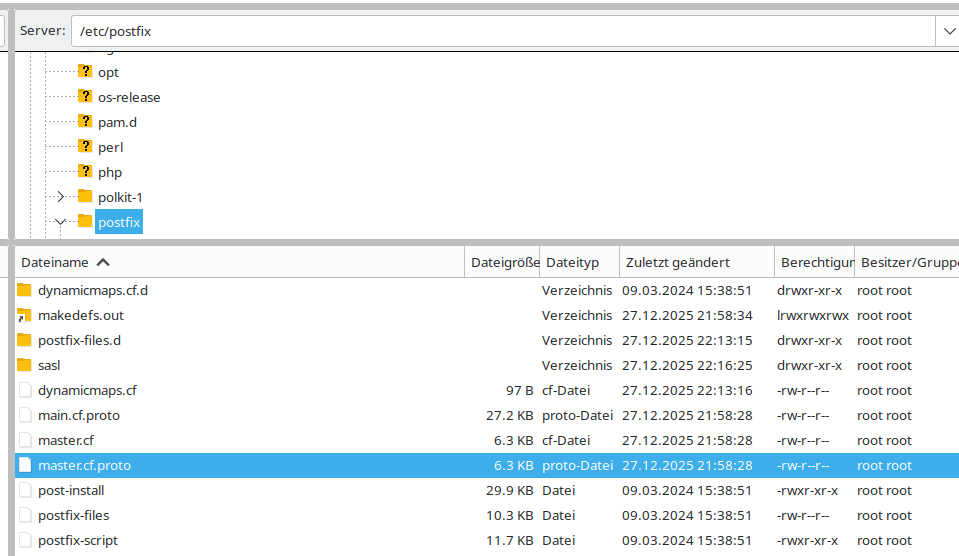
In etc/postfix/ there are 3 files that caught my attention:

main.cf.proto
master.cf
master.cf.proto

all 3 are owned by root and have 644 permission.

Why would the install script add .proto to the file name? That of course explains why VM cannot access main.cf

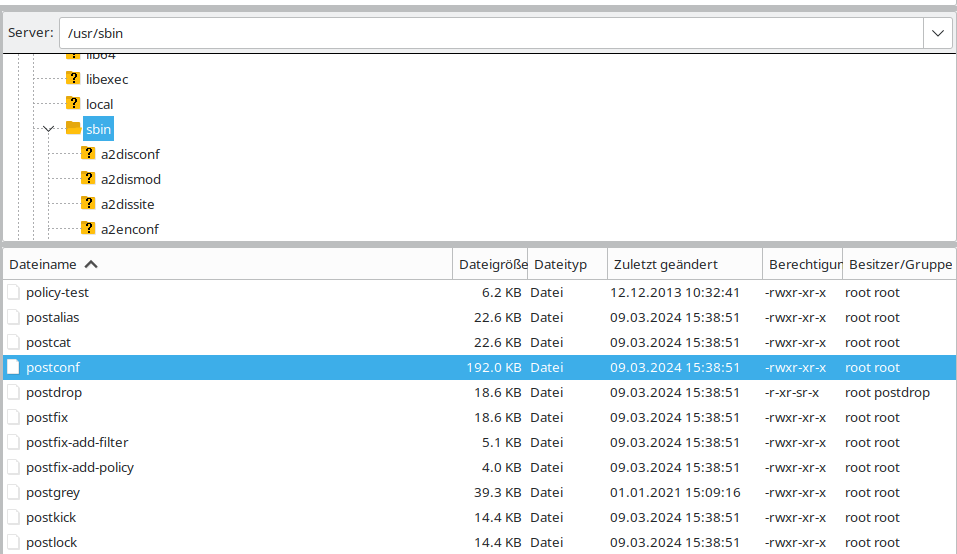
In usr/sbin/ postconf is present, once again owned by root with 755 permission.

It would not.

I ran

apt remove postfix

Reading package lists… Done
Building dependency tree… Done
Reading state information… Done
The following packages will be REMOVED:
postfix postfix-pcre
0 upgraded, 0 newly installed, 2 to remove and 0 not upgraded.
After this operation, 4748 kB disk space will be freed.
Do you want to continue? [Y/n] y

and started the VM installation once again. This time, with Postfix previously installed removed and ignoring the warning that all other VM packages are already installed (except for Postfix) I am getting:

WARNING!

Virtualmin may already be installed. This can happen if an installation
failed, and can be ignored in that case.

However, if Virtualmin has already been successfully installed you
must not run this script again! It will cause breakage to your
existing configuration.

Virtualmin repositories can be fixed using virtualmin-install.sh --setup
command.

License can be changed using virtualmin change-license command.
Changing the license never requires re-installation.

Updates and upgrades must be performed from within either Virtualmin or
using system package manager on the command line.

Continue? (y/n) y

▣:white_medium_square::white_medium_square::white_medium_square: Phase 1 of 4: Check
Checking system time OK
Checking Perl installation OK
Checking CA certificates package OK
Checking HTTP client OK
Checking GPG package OK

▣▣:white_medium_square::white_medium_square: Phase 2 of 4: Setup
Downloading Virtualmin 7 key OK
Installing Virtualmin 7 key OK
Downloading repository metadata OK
Disabling cdrom: repositories OK
Cleaning up software repo metadata OK

▣▣▣◻ Phase 3 of 4: Installation
Checking and installing system package updates OK
Installing Virtualmin 7 and all related packages OK
Installing Virtualmin 7 related package updates OK

▣▣▣▣ Phase 4 of 4: Configuration

[1/21] Configuring AWStats :check_mark:
[2/21] Configuring Bind :check_mark:
[3/21] Configuring ClamAV :check_mark:
[4/21] Configuring Dovecot :check_mark:
[5/21] Configuring Etckeeper :check_mark:
[6/21] Configuring Firewalld :check_mark:
[7/21] Configuring MariaDB :check_mark:
[8/21] Configuring Nginx :check_mark:
[9/21] Configuring Postfix ▒▒▒Can’t exec “/usr/sbin/postconf”: No such file or directory at /usr/share/perl5/Virtualmin/Config/Plugin/Postfix.pm line 69.
[27/Dec/2025:15:43:49 -0800] Failed to regenerate table /etc/postfix/virtual: sh: 1: /usr/sbin/postmap: not found
Error

Failed to regenerate table /etc/postfix/virtual: sh: 1: /usr/sbin/postmap: not found


▣▣▣ Cleaning up

[WARNING] The following errors occurred during installation:

◉ Postinstall configuration returned an error.

Is this a remote system with a host? Sometimes they mess with the image.

That’s a little newer than mine but I doubt it makes a difference.

Also, where is your apt configured to pull from? I had to manually list my own to get around the provider not having the latest Debian image when I installed. They might be doing something with the Postfix that is different.

It’s a plain OpenVZ hosted in the US. Provider supplies the minial system image. One click and you can reinstall it.

I gave up on Debian and went back to Ubuntu. Here is what I get when trying to install VM with the Curl script:

root@sip:~# sudo sh -c “$(curl -fsSL https://software.virtualmin.com/gpl/scripts/virtualmin-install.sh)” – --bundle LEMP
[INFO] Installation log is written to /root/virtualmin-install.log

Welcome to the Virtualmin GPL installer, version 7.5.2

This script must be run on a freshly installed supported OS. It does not
perform updates or upgrades (use your system package manager) or license
changes (use the “virtualmin change-license” command).

The systems currently supported by the install script are:

Red Hat Enterprise Linux and derivatives
  - RHEL 8 and 9 on x86_64
  - Alma and Rocky 8 and 9 on x86_64
  - CentOS 7 on x86_64
  
Debian Linux and derivatives
  - Debian 10, 11 and 12 on i386 and amd64
  - Ubuntu 20.04 LTS, 22.04 LTS and 24.04 LTS on i386 and amd64

If your OS/version/arch is not listed, installation will fail. More
details about the systems supported by the script can be found here:

https://www.virtualmin.com/os-support

The selected package bundle is LEMP and the size of install is
full. It will require up to 2 GB of disk space.

Exit and re-run this script with --help flag to see available options.

Continue? (y/n) y

▣:white_medium_square::white_medium_square::white_medium_square: Phase 1 of 4: Check
Checking system time :check_mark:
Checking Perl installation :check_mark:
Checking CA certificates package :check_mark:
Checking HTTP client :check_mark:
Checking GPG package :check_mark:

▣▣:white_medium_square::white_medium_square: Phase 2 of 4: Setup
Downloading Virtualmin 7 key :check_mark:
Installing Virtualmin 7 key :check_mark:
Downloading repository metadata :check_mark:
Enabling universe repositories, if not already available :check_mark:
Disabling cdrom: repositories :check_mark:
Cleaning up software repo metadata :check_mark:

▣▣▣◻ Phase 3 of 4: Installation
Checking and installing system package updates :check_mark:
Installing Virtualmin 7 and all related packages :check_mark:
Installing Virtualmin 7 related package updates :check_mark:

▣▣▣▣ Phase 4 of 4: Configuration
[1/21] Configuring AWStats :check_mark:
[2/21] Configuring Bind :check_mark:
[3/21] Configuring ClamAV :check_mark:
[4/21] Configuring Dovecot :check_mark:
[5/21] Configuring Etckeeper :check_mark:
[6/21] Configuring Firewalld :check_mark:
[7/21] Configuring MariaDB :check_mark:
[8/21] Configuring Nginx :check_mark:
[9/21] Configuring Postfix ✘
[10/21] Configuring ProFTPd :check_mark:
[11/21] Configuring Procmail :check_mark:
[12/21] Configuring Quotas
The filesystem / could not be remounted with quotas enabled.
You may need to reboot your system, and/or enable quotas
manually in Webmin/System/Disk Quotas module. :warning:
[13/21] Configuring SASL ███[28/Dec/2025:01:18:28 +0000] Failed to open /etc/postfix/sasl/smtpd.conf for writing : No such file or directory
Error

Failed to open /etc/postfix/sasl/smtpd.conf for writing : No such file or directory

▣▣▣ Cleaning up

[WARNING] The following errors occurred during installation:

◉ Postinstall configuration returned an error.

Always failing on Postfix. All the other things are being installed. And this one brings me back to the initial question why I can’t send email using FF or mobile phone. Postfix is not talking to SASL Auth.

Used the VM installation script as provided by VM with nothing on that VPS previously installed. Never experienced such strange behaviour on any Centos production servers (still running) before. I assume it has something to do with Postfix in the installation script. Tried a Fedora install as well, but VM said the installer won’t support this.

SASL is present on the system:

root@sip:~# sudo apt-get install sasl2-bin
Reading package lists… Done
Building dependency tree… Done
Reading state information… Done
sasl2-bin is already the newest version (2.1.27+dfsg2-3ubuntu1.2).
0 upgraded, 0 newly installed, 0 to remove and 0 not upgraded.

etc/postfix is completely absent on the system. There is no such folder/file, just checked.

Manually creating /etc/postfix/sasl/smtpd.conf with permissions 777 and running the VM installation again results in:

root@sip:~# sudo sh -c “$(curl -fsSL https://software.virtualmin.com/gpl/scripts/virtualmin-install.sh)” – --bundle LEMP
[INFO] Installation log is written to /root/virtualmin-install.log

Welcome to the Virtualmin GPL installer, version 7.5.2

This script must be run on a freshly installed supported OS. It does not
perform updates or upgrades (use your system package manager) or license
changes (use the “virtualmin change-license” command).

The systems currently supported by the install script are:

Red Hat Enterprise Linux and derivatives
  - RHEL 8 and 9 on x86_64
  - Alma and Rocky 8 and 9 on x86_64
  - CentOS 7 on x86_64
  
Debian Linux and derivatives
  - Debian 10, 11 and 12 on i386 and amd64
  - Ubuntu 20.04 LTS, 22.04 LTS and 24.04 LTS on i386 and amd64

If your OS/version/arch is not listed, installation will fail. More
details about the systems supported by the script can be found here:

https://www.virtualmin.com/os-support

The selected package bundle is LEMP and the size of install is
full. It will require up to 2 GB of disk space.

Exit and re-run this script with --help flag to see available options.

Continue? (y/n) y

ATTENTION!

Pre-installed software detected: BIND, Nginx, MariaDB, PHP

It is highly advised not to pre-install any additional packages on your
OS. The installer expects a freshly installed OS, and anything you do
differently might cause conflicts or configuration errors. If you need
to enable third-party package repositories, do so after installation
of Virtualmin, and only with extreme caution.

Continue? (y/n) y

WARNING!

Virtualmin may already be installed. This can happen if an installation
failed, and can be ignored in that case.

However, if Virtualmin has already been successfully installed you
must not run this script again! It will cause breakage to your
existing configuration.

Virtualmin repositories can be fixed using virtualmin-install.sh --setup
command.

License can be changed using virtualmin change-license command.
Changing the license never requires re-installation.

Updates and upgrades must be performed from within either Virtualmin or
using system package manager on the command line.

Continue? (y/n) y

▣:white_medium_square::white_medium_square::white_medium_square: Phase 1 of 4: Check
Checking system time :check_mark:
Checking Perl installation :check_mark:
Checking CA certificates package :check_mark:
Checking HTTP client :check_mark:
Checking GPG package :check_mark:

▣▣:white_medium_square::white_medium_square: Phase 2 of 4: Setup
Downloading Virtualmin 7 key :check_mark:
Installing Virtualmin 7 key :check_mark:
Downloading repository metadata :check_mark:
Enabling universe repositories, if not already available :check_mark:
Disabling cdrom: repositories :check_mark:
Cleaning up software repo metadata :check_mark:

▣▣▣◻ Phase 3 of 4: Installation
Checking and installing system package updates :check_mark:
Installing Virtualmin 7 and all related packages :check_mark:
Installing Virtualmin 7 related package updates :check_mark:

▣▣▣▣ Phase 4 of 4: Configuration
[1/21] Configuring AWStats :check_mark:
[2/21] Configuring Bind :check_mark:
[3/21] Configuring ClamAV :check_mark:
[4/21] Configuring Dovecot :check_mark:
[5/21] Configuring Etckeeper :check_mark:
[6/21] Configuring Firewalld :check_mark:
[7/21] Configuring MariaDB :check_mark:
[8/21] Configuring Nginx :check_mark:
[9/21] Configuring Postfix ✘
[10/21] Configuring ProFTPd :check_mark:
[11/21] Configuring Procmail :check_mark:
[12/21] Configuring Quotas
The filesystem / could not be remounted with quotas enabled.
You may need to reboot your system, and/or enable quotas
manually in Webmin/System/Disk Quotas module. :warning:
[13/21] Configuring SASL :check_mark:
[14/21] Configuring Shells :check_mark:
[15/21] Configuring SpamAssassin :check_mark:
[16/21] Configuring Status :check_mark:
[17/21] Configuring Upgrade :check_mark:
[18/21] Configuring Usermin :check_mark:
[19/21] Configuring Webmin :check_mark:
[20/21] Configuring Fail2banFirewalld :check_mark:
[21/21] Configuring Virtualmin ▒▒▒[28/Dec/2025:01:57:13 +0000] Failed to query Postfix config command to get the current value of parameter virtual_maps: /bin/sh: 1: /usr/sbin/postconf: not found
Error

Failed to query Postfix config command to get the current value of parameter virtual_maps: /bin/sh: 1: /usr/sbin/postconf: not found


▣▣▣ Cleaning up

[WARNING] The following errors occurred during installation:

◉ Postinstall configuration returned an error.

And manually creating /usr/sbin/postconf with permissions set to 755 results in a VM sucessful installation:

root@sip:~# sudo sh -c “$(curl -fsSL https://software.virtualmin.com/gpl/scripts/virtualmin-install.sh)” – --bundle LEMP
[INFO] Installation log is written to /root/virtualmin-install.log

Welcome to the Virtualmin GPL installer, version 7.5.2

This script must be run on a freshly installed supported OS. It does not
perform updates or upgrades (use your system package manager) or license
changes (use the “virtualmin change-license” command).

The systems currently supported by the install script are:

Red Hat Enterprise Linux and derivatives
  - RHEL 8 and 9 on x86_64
  - Alma and Rocky 8 and 9 on x86_64
  - CentOS 7 on x86_64
  
Debian Linux and derivatives
  - Debian 10, 11 and 12 on i386 and amd64
  - Ubuntu 20.04 LTS, 22.04 LTS and 24.04 LTS on i386 and amd64

If your OS/version/arch is not listed, installation will fail. More
details about the systems supported by the script can be found here:

https://www.virtualmin.com/os-support

The selected package bundle is LEMP and the size of install is
full. It will require up to 2 GB of disk space.

Exit and re-run this script with --help flag to see available options.

Continue? (y/n) y

ATTENTION!

Pre-installed software detected: BIND, Nginx, MariaDB, Postfix, PHP

It is highly advised not to pre-install any additional packages on your
OS. The installer expects a freshly installed OS, and anything you do
differently might cause conflicts or configuration errors. If you need
to enable third-party package repositories, do so after installation
of Virtualmin, and only with extreme caution.

Continue? (y/n) y

WARNING!

Virtualmin may already be installed. This can happen if an installation
failed, and can be ignored in that case.

However, if Virtualmin has already been successfully installed you
must not run this script again! It will cause breakage to your
existing configuration.

Virtualmin repositories can be fixed using virtualmin-install.sh --setup
command.

License can be changed using virtualmin change-license command.
Changing the license never requires re-installation.

Updates and upgrades must be performed from within either Virtualmin or
using system package manager on the command line.

Continue? (y/n) y

▣:white_medium_square::white_medium_square::white_medium_square: Phase 1 of 4: Check
Checking system time :check_mark:
Checking Perl installation :check_mark:
Checking CA certificates package :check_mark:
Checking HTTP client :check_mark:
Checking GPG package :check_mark:

▣▣:white_medium_square::white_medium_square: Phase 2 of 4: Setup
Downloading Virtualmin 7 key :check_mark:
Installing Virtualmin 7 key :check_mark:
Downloading repository metadata :check_mark:
Enabling universe repositories, if not already available :check_mark:
Disabling cdrom: repositories :check_mark:
Cleaning up software repo metadata :check_mark:

▣▣▣◻ Phase 3 of 4: Installation
Checking and installing system package updates :check_mark:
Installing Virtualmin 7 and all related packages :check_mark:
Installing Virtualmin 7 related package updates :check_mark:

▣▣▣▣ Phase 4 of 4: Configuration
[1/21] Configuring AWStats :check_mark:
[2/21] Configuring Bind :check_mark:
[3/21] Configuring ClamAV :check_mark:
[4/21] Configuring Dovecot :check_mark:
[5/21] Configuring Etckeeper :check_mark:
[6/21] Configuring Firewalld :check_mark:
[7/21] Configuring MariaDB :check_mark:
[8/21] Configuring Nginx :check_mark:
[9/21] Configuring Postfix ✘
[10/21] Configuring ProFTPd :check_mark:
[11/21] Configuring Procmail :check_mark:
[12/21] Configuring Quotas
The filesystem / could not be remounted with quotas enabled.
You may need to reboot your system, and/or enable quotas
manually in Webmin/System/Disk Quotas module. :warning:
[13/21] Configuring SASL :check_mark:
[14/21] Configuring Shells :check_mark:
[15/21] Configuring SpamAssassin :check_mark:
[16/21] Configuring Status :check_mark:
[17/21] Configuring Upgrade :check_mark:
[18/21] Configuring Usermin :check_mark:
[19/21] Configuring Webmin :check_mark:
[20/21] Configuring Fail2banFirewalld :check_mark:
[21/21] Configuring Virtualmin :check_mark:
▣▣▣ Cleaning up

[SUCCESS] Installation Complete!
[SUCCESS] If there were no errors above, Virtualmin should be ready
[SUCCESS] to configure at https://:10000 (or https://127.0.0.1:10000).
[SUCCESS] You may receive a security warning in your browser on your first visit.

I’ll have to get some sleep now and report back tomorrow what VM tells me.

Something is broken about your system, such that Postfix cannot be properly installed. I can’t be certain of it, but OpenVZ makes it very easy to oversell memory, and if that’s the case, processes will be killed without you ever really knowing why (there’s a beancounters log somewhere that has clues, I think, though I’m not sure if you’ll have access to it).

But, this sounds very much like the package installation is being interrupted by memory allocation failures.

After years and years of seeing this exact problem over and over with OPenVZ-based hosts overselling memory (or bugs in OpenVZ, I don’t know), I pretty much just say “don’t use an OpenVZ based host”.

Manually creating some files does not fix what’s wrong with that system. You will continue to have problems.

And, Virtualmin did not successfully complete, you have errors:

You can look at the log for more details. But, I think it’s just oversold memory. You don’t have as much memory as you think you do and as much as free and top claim you do. Again, OpenVZ allows overselling memory in a way that makes failures mysterious to the user within the container. I’d recommend you spend an extra dollar or two a month for an actual virtual machine that has the amount of memory you’re paying for.

Unanswered was my question about WHERE apt is set to pull from. I’d do a minimal install and check the repositories. I’ll bet they are the providers. Fix them to be the ‘real’ Debian/Ubuntu and see if that gives you a clean install.