Mariadb 10.11 Empty Stings

I’ve got an issue for which I could use help if anyone knows the answer.

I have some old PHP code that I use every day on my virtualmin server. It was developed back when PHP 5.6 and MySql 5.7 were the only options!

I upgraded the PHP code to be able to use PHP 7.4, but the database still thinks it needs to use MySql 5.7

By going to the Mariadb config files and including the variable sql=" " I can still update my tables with empty strings. However, when I try to do any kind of a database dump the system won’t allow me to do it.

So before I do a dump of the database I need to comment out the sql=" " and then restart the database. Then everything works as it should.

Is there a way to use this sql=" " to make the database server compatible with the old tables and still allow database dumps by Virtualmin or any other method of dumpng the data?

Thanks in advance!

Dan Lewis

hey @danwtsa mariadb is already fully compatible with old mysql - I think your issue is php code - since you mentioned that :

I upgraded the PHP code to be able to use PHP 7.4, but the database still thinks it needs to use MySql 5.7

That is huge skip regarding code base updates..

I think everything works as it should - and its not virtualmin issue. Before anything ask original app dev to update php code to reflect the version you need to run that code on as clearly something in php code needs to be changed.

Edit: I do know php as past I was freelance webdev (not any more) hence my suggestions - those php edits needs to be rewritten in correct way.

What do you mean, “the system won’t allow me to do it”. We need to see actual errors.

I have no idea what you’re doing or what’s going wrong.

I just went to the Mariadb config file and added: sql-mode = ‘’ "

That made the database work fine with the PHP code I’m using. I know that my code is not up to date but I have tons and tons of it on my website. I took me 5 years to write it all and I can’t change it overnight. This is a “stop gap” measure, but it will take me a long time to re-write everything. I’m a one man team so I can’t just put 10 people to work on it!

My code works under PHP 7.4 and even if I jump to 8.0 it stops working. It may be more efficient to just redo the whole site a section at a time. Being a tiny company with limited money and resources all these changes present a daunting task… so when I find things like this that make it still work I use them.

The only problem I’ve run into is that the backup portion of Virtualmin will not work with this little bit of code in the Mariadb config file. So every time I need to back things up I have to remark it out and restart the database server. Then once things are backed up I need to restore the code, restart the database server and we’re good to go until I need to backup the next time. If there were some workaround for this that would be great because under the current circumstances I can’t automate the backups. I need to do them manually.

The problem I have is not reading the databases with the current PHP code… the problem is updating it and entering new records.

For example… when I go to enter in a new record that contains blank fields here is the error I get back:

INSERT INTO allshows2 (ID, yearnumber, monthnumbr, month, showbegin, showend, totaldays, hours, deadline, showname, location, spacesize, setuptime, area, contacname, position, organizati, street, city, state, zip, phone, phone2, faxnumber, costoutdor, costindor, electric, attendance, admitchrg, amountchrg, numvendors, performanc, mallshow, juried, juryfee, catagories, awards, elegiblety, promoter, comments, comments2, comments3, comments4, comments5, comments6, foodinfo, hhrating, ourcomment, paidfee, datefeepai, email, carrierrt, delivpoint, logofile) VALUES (?, ?, ?, ?, ?, ?, ?, ?, ?, ?, ?, ?, ?, ?, ?, ?, ?, ?, ?, ?, ?, ?, ?, ?, ?, ?, ?, ?, ?, ?, ?, ?, ?, ?, ?, ?, ?, ?, ?, ?, ?, ?, ?, ?, ?, ?, ?, ?, ?, ?, ?, ?, ?, ?)

Field ‘latecomer’ doesn’t have a default value

If every field has a value it works. Since I was just trying to enter a new blank record I got an error in every field. The problem seems to be with the blank fields. The Mariadb does not like blank fields obviously. But I dont’ always have data for every field so it’s necessary for me to be able to enter as such. A lot of times we come back later and enter the new data into the fields as it’s available. Probably 50% of the 30,000 or so records in my database are missing some data.
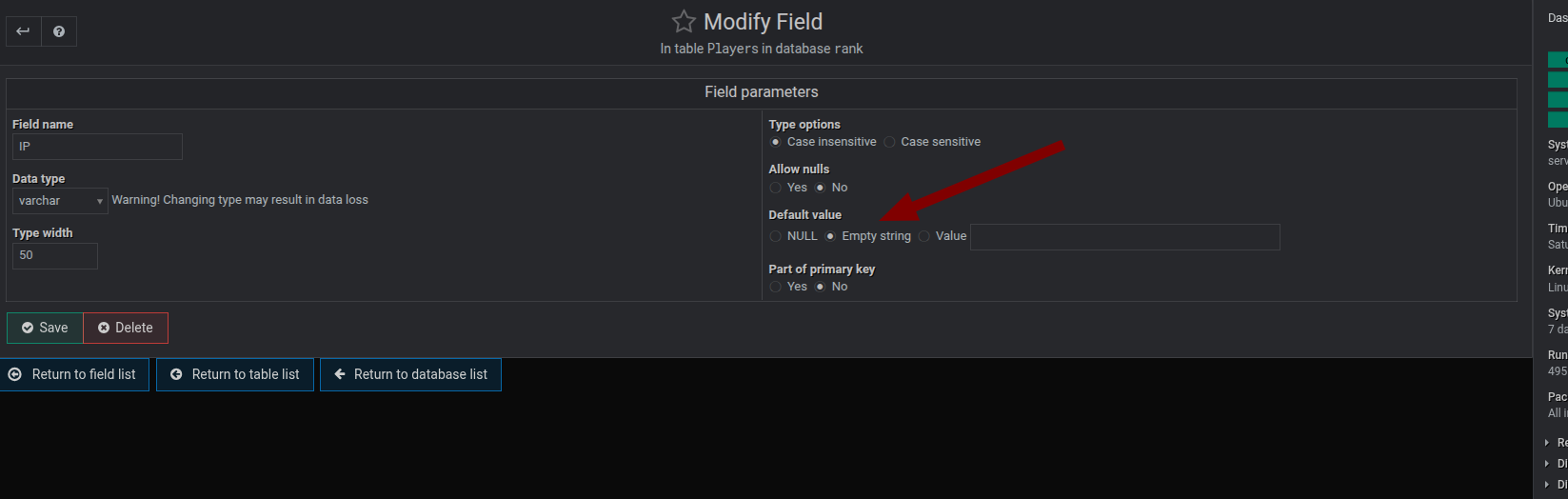
change the default for the affected fields then
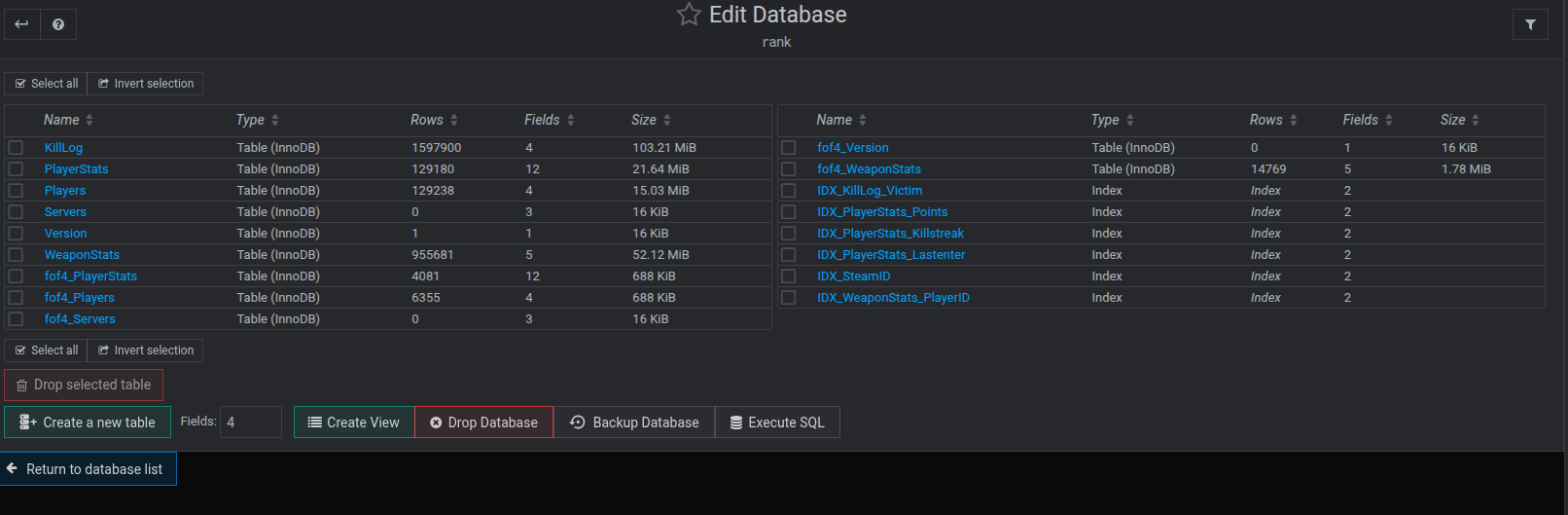
using the maria/mysql option in webmin->servers edit the database you will see


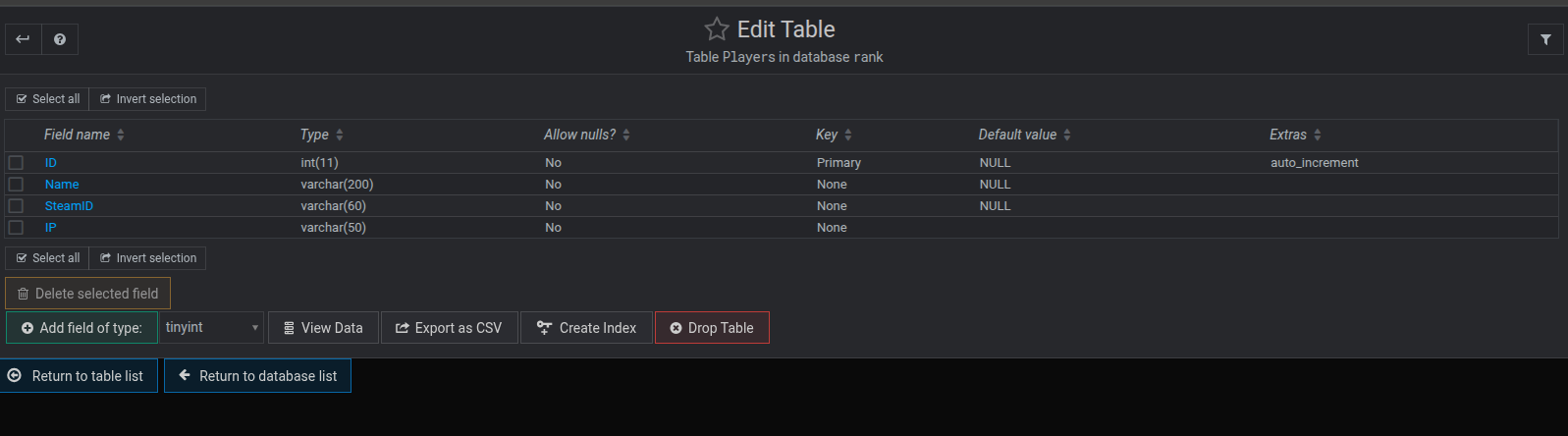
then click the affected table you will see something like

then edit the arrowed section to what you want, tend to set this to null as you can see from the above screen shot then click the field

as a side note it would be really worth while updating your current code to work with php 8.x most of the problems are just changes in syntax between 7.x and 8.x

@danwtsa - As a side note: try to spend (what little time you can afford as a sole developer) to bring yourself up to date with the changes in code between versions. Then employ some of the code analysis and refactoring tools available (eg. in VSCode extensions) to bring the most critical code up-to-date. - also note that

MySql is not the exact same as MariaDb (close but not exact)

I’ll give this a try and see how it works. Thanks for the help!

Hi Dan,

This sounds like a tricky compatibility issue between your legacy setup and MariaDB’s newer behavior. The sql_mode="" setting helps maintain backward compatibility by disabling strict modes, allowing empty strings and other old behaviors.

However, MariaDB’s dump tools (like mysqldump) and possibly Virtualmin itself may not work correctly when sql_mode is globally unset or too relaxed. This is likely why dumps only succeed after removing or commenting out that setting.

Here are a few things you could try:

  1. Set sql_mode only per session – Instead of changing it globally in the config, keep it default for the system, but set sql_mode='' at the start of your legacy PHP scripts using a SQL query like:

    mysqli_query($conn, "SET SESSION sql_mode=''");
    

    This way, your app gets the needed behavior, but other tools (like Virtualmin’s dump process) use the default stricter mode.

  2. Create a separate MariaDB user – Assign a user specifically for your legacy app with a custom login trigger or wrapper that sets the sql_mode on connect. Then let Virtualmin and other tools use a different user that runs with default settings.

  3. Script the mode switch – If per-session isn’t practical, you could automate the toggle by scripting:

    • Comment out sql_mode in your config
    • Restart MariaDB
    • Run the dump
    • Re-add sql_mode
    • Restart again

    It’s not elegant, but can be reliable with a cron or admin script.

Long term, it would be ideal to migrate away from relying on empty string inserts or adjust your schema/code to be compatible with strict SQL mode, but in the meantime, session-based control is likely the safest compromise.

Hope this helps!

Overall, the real failure is not the dump, it is the re-execution of the dump under a stricter sql_mode.

I’ve found the additional parameters that allows my legacy code to work with Mariadb and at the same time allows Virtualmin to do it’s automatic backups.

[mysqld]
sql_mode=NO_ENGINE_SUBSTITUTION

[mysqldump]

no sql_mode here!

By adding this to the end of /etc/mysql/my.conf everything seems to work.

Does this interfere with anything else that I should be aware of?

Dan Lewis

I’ll give that a try on my backup system to see if it works. Yes, I would love to migrate my code to a newer version… but I have a LOT of code to go through! It took me about 5 or 6 years to write it and I don’t have the skills to update everything everywhere quickly. I’m just not that good!

I’d love to find someone to update everything… but mostly people want to charge me more than I can afford to pay so I’m stuck doing it myself. Code is something I do when I need to and I’ve barely touched it since I finished this project a few years ago. So I’ve got a lot to learn! At 71 years old I’m not as quick a learner as I used to be!!!

Dan Lewis

Maybe AI can help, its not 100% accurate but its quick.

That’s a thought. I’ve played with it a little bit and I’ve tried a simple code and it worked. I’ll try it again and try to be a little more serious about it.

Dan

This topic was automatically closed 60 days after the last reply. New replies are no longer allowed.