Can you provide a command that you used to pre-install MySQL? I’d like to check what’s going on more closely?
wget https://dev.mysql.com/get/mysql-apt-config_0.8.36-1_all.deb

sudo dpkg -i mysql-apt-config_0.8.36-1_all.deb

sudo apt update

sudo apt install mysql-server -y

sudo systemctl enable mysql

sudo systemctl start mysql
Ok, now I have manage to get Virtualmin installed with mariaDB. There were some leftovers which I found and delete and installation script worked. How can I switch from it to mySQL (it is still not installed).
i would not bother.
i understand your desire to stick with mySQL but MariaDb is not that different (at least for basics) and not that much of a learning curve. I would test your scripts and see if anything stands out as an issue. if it does i am sure someone else will have resolved it.
You should install the common and client packages as well:
sudo apt-get install mysql-client mysql-common mysql-server
Furthermore, for it to work on Debian 13 and Webmin MySQL module you need to go to the “Webmin: MySQL Database Server ⇾ Configuration: System Configuration” page and fix all paths to use the correct command for it to work:
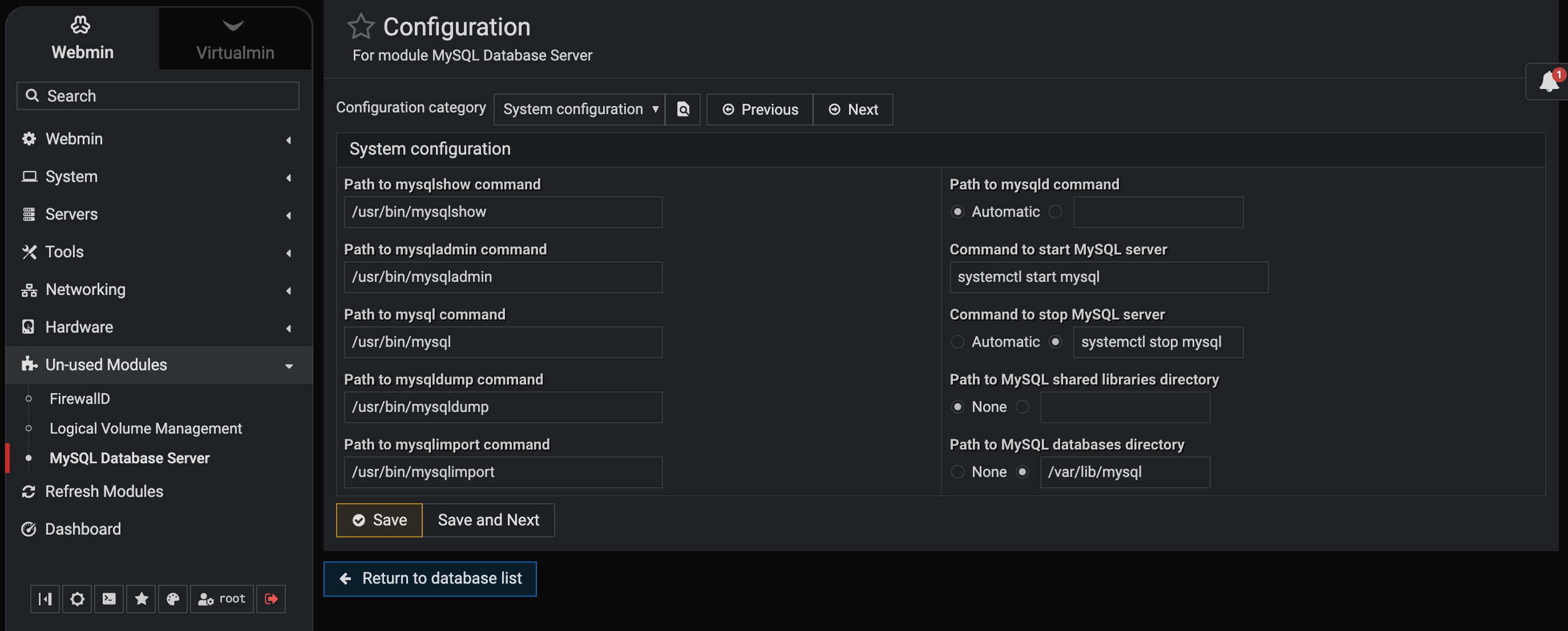
diff --git a/webmin/mysql/config b/webmin/mysql/config
index 47d2b4b..a5f7668 100755
--- a/webmin/mysql/config
+++ b/webmin/mysql/config
@@ -7,18 +7,19 @@ date_subs=0
 webmin_subs=0
 my_cnf=/etc/mysql/my.cnf
 perpage=25
-mysqladmin=/usr/bin/mariadb-admin
-mysqlshow=/usr/bin/mariadb-show
+mysqladmin=/usr/bin/mysqladmin
+mysqlshow=/usr/bin/mysqlshow
 blob_mode=0
 nodbi=0
-mysqldump=/usr/bin/mariadb-dump
+mysqldump=/usr/bin/mysqldump
 login=root
-mysqlimport=/usr/bin/mariadb-import
-mysql=/usr/bin/mariadb
-start_cmd=systemctl start mariadb
+mysqlimport=/usr/bin/mysqlimport
+mysql=/usr/bin/mysql
+start_cmd=systemctl start mysql
 add_mode=1
 style=1
 nopwd=0
 mysql_data=/var/lib/mysql
-stop_cmd=systemctl stop mariadb
+stop_cmd=systemctl stop mysql
 max_text=1000
+mysqld=
Then after the Virtualmin wizard will work for you!
@Jamie and I worked in the past to reach a consensus on how this should be handled. I wanted to automate it, and I did, but Jamie preferred to keep it manually configurable.
Thanks, actually I already did it this a little bit differently. So, technically the steps I followed were:
- Installed Virtualmin without any database system previously installed. It defaulted to Maria DB and complete installation.
- Remove everything related to Maria DB from the system. This is important because mysql crashes as there are some config files that requested some MariaDB plugins (I think they are in one of the pictures above) and otherwise MySQL won’t work.
- Clean install MySQL
- Manually changed info in Virtualmin as per your picture to replace mariadb.
As a suggestion, I would put in the install script an option to chose database system during installation process and let the user decide and Virtualmin continues with the user choice. Probably most will go with default settings anyway 
Did you remove /var/lib/mysql too?
This is not the best approach! You should install MySQL before installing Virtualmin and avoid making changes afterward. Though, it might still work if you know what you’re doing.
And if I were you, I wouldn’t install MySQL and would definitely use MariaDB instead.
Absolutely!
I cannot see the reluctance, where is the problem with MariaDb?