What’s the best way to manage my SSL certificate renewals? I currently use LetsEncrypt but my DNS is managed by Cloudflare. I have to turn off Cloudflare’s orange cloud each time I want to renew a certificate, which is quite often. It also takes time for the DNS to resolve too, so it’s a pain to do across hundreds of sites and a few servers.
Can I automate the renewal without turning off Cloudflare’s orange cloud or make it any easier for myself?
Thanks @Ilia . I read the docs on Virtualmin Pro Cloudflare integration, but I’m none the wiser. What is the difference when it comes to renewing the LetsEncrypt certificate, or is this bypassed altogether?
What type of LE validation are you using? What specific error occurs when CF proxy-mode is enabled? Are you using it with wildcard certificates?
Because HTTP challenge validation works either way, regardless of the DNS, but you can’t get a wildcard certificate.
After thinking more about it, I think I know where it’s failing for you—it’s the subdomains, right? Well, if so, this is a limitation of the CF free plan. However, you can easily bypass it by making sure that the HTTP version of your domain isn’t redirecting requests made to the .well-known/ path of your HTTP domain.
I’m not sure what you mean about about the type of LE validation - where can I find this? I’m just trying to renew the SSL certificate in Virtualmin’s GUI under Setup SSL Certificate > SSL Providers.
That is difficult. Cloudflare redirects all to HTTPS, so unless I can make a specific rule just for that path then I have to manually bypass Cloudflare for each domain certificate renewal. Any ideas if this can be done safely, e.g. exposing .well-known/ to non-filtered http traffic?
Nope, that doesn’t do it unfortunately @rikukale . I have tried several times, you would think it would be that simple. I’m also after a permanent solution that doesn’t require logging in to Cloudflare for each SSL renewal.
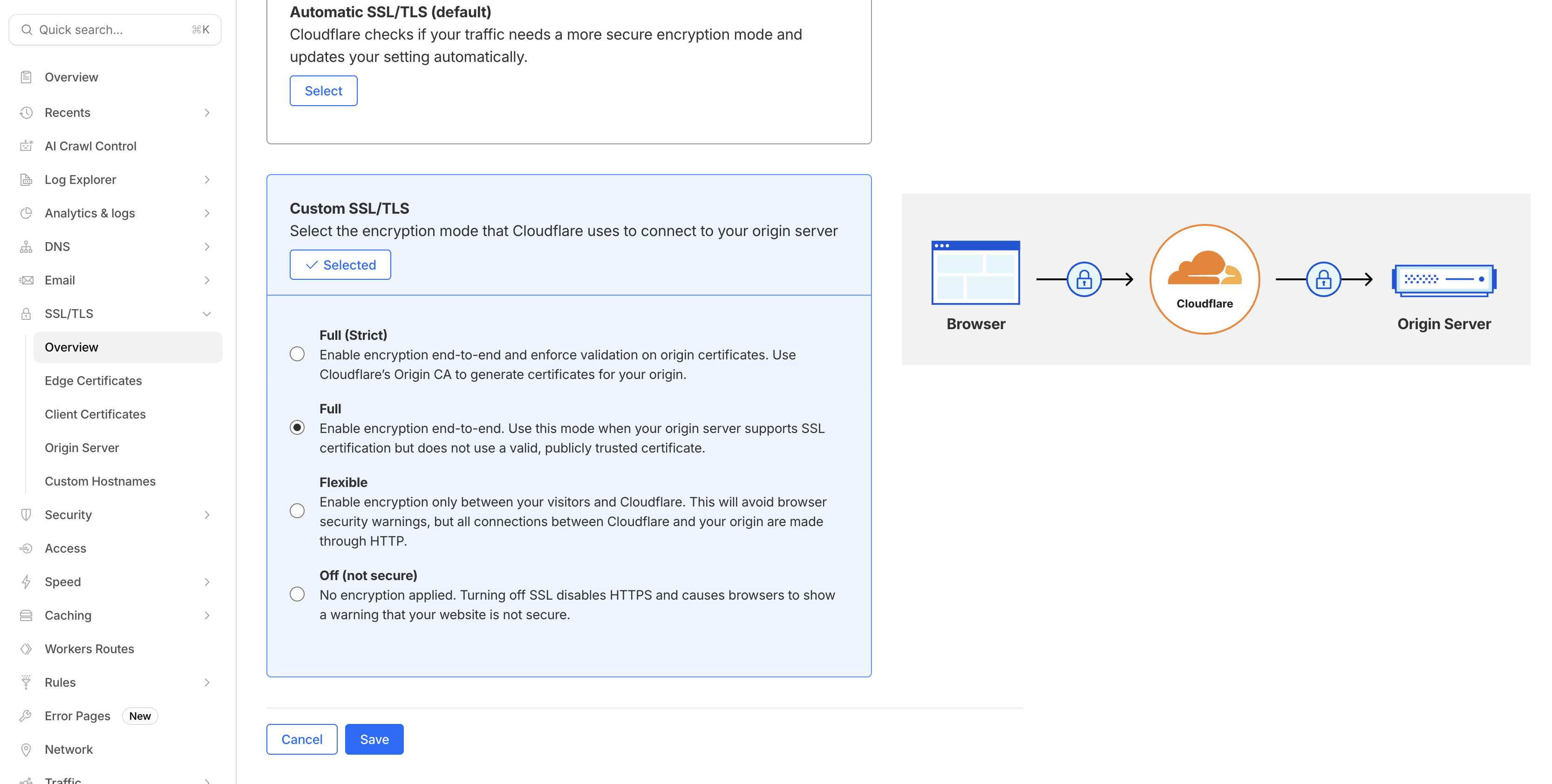
That’s strange. I have over 50 domains hosted on Cloudflare, never had issues with certificate renewal. Make sure your SSL settings on Cloudflare are like this (and also the HTTPS rewrite is off, can’t remember where exactly that setting is on Cloudflare).
You need to be aware that if Cloudflare is proxying for your website (i.e. a Cloudflare IP is what is delivered when someone pulls the A record for your domain name), Cloudflare is terminating your connections. You can no longer get TLS certs on the Virtualmin server because the Let’s Encrypt server cannot talk to the Virtualmin server any more. It only knows about the Cloudflare server.
Generally, you don’t need Let’s Encrypt at that point, you’d let Cloudflare handle the TLS (they have their own cert issuance thing). The only thing you need to setup is the encrypted connection between Cloudflare and your Virtualmin server, which can be done in a few ways.
Or, just don’t use Cloudflare proxying. In most cases (web applications with predominately dynamic data), it can only ever make things slower. There are security arguments for using Cloudflare, though I think they’re overstated.
Oh, I guess if Cloudflare allows port 80 traffic to pass through for .well-known, then you would still be able to validate Let’s Encrypt certs. I guess that’s how they do it? If so, why is OP having such a hard time with it?
@Volt31 don’t do that (set Cloudflare to redirect HTTP to HTTPS…configure that on the Virtualmin side). If you want Let’s Encrypt to be able to validate for certs generated on the Virtualmin server, it needs to be able to fetch HTTP requests to .well-known. If Cloudflare doesn’t allow you to exclude .well-known from those redirects, you need to do it on the Virtualmin side, which does allow you to exclude .well-known from redirects (and does so by default for the stuff it sets up).
Thanks all for input so far. I have turned off HTTPS redirection and will test renewal this week, but I suspect that the additional bot-blocking and hack-preventing rules that I have may come into play here too. As mentioned, when Cloudflare is not orange-clouded, the certificate renews nicely, even with HTTPS redirs enabled in the settings. Even Full (strict) certs. I couldn’t get this to work for any certificate type by just turning off HTTPS redirection.
My reason for using Cloudflare is to prevent or mitigate attacks and it does a great job of that. It has an added bonus of reducing bandwidth, so I can’t complain.
I am a bit confused as to why some domains on my site have a certificate expiry in, for example, 900 days. Is it because LE has dramatically reduced their certificate expiry times and these are still running the old expiry dates?
I’ll try to create a CF rule to allow .well-known (unless anyone knows of one). The rule example I found showed adding a URI path that excluded anything containing ‘well-known’ from the blocking rules, but that really didn’t look secure to me.
Am I right in thinking that a .well-known folder is only created on Automatic SSL renewal?