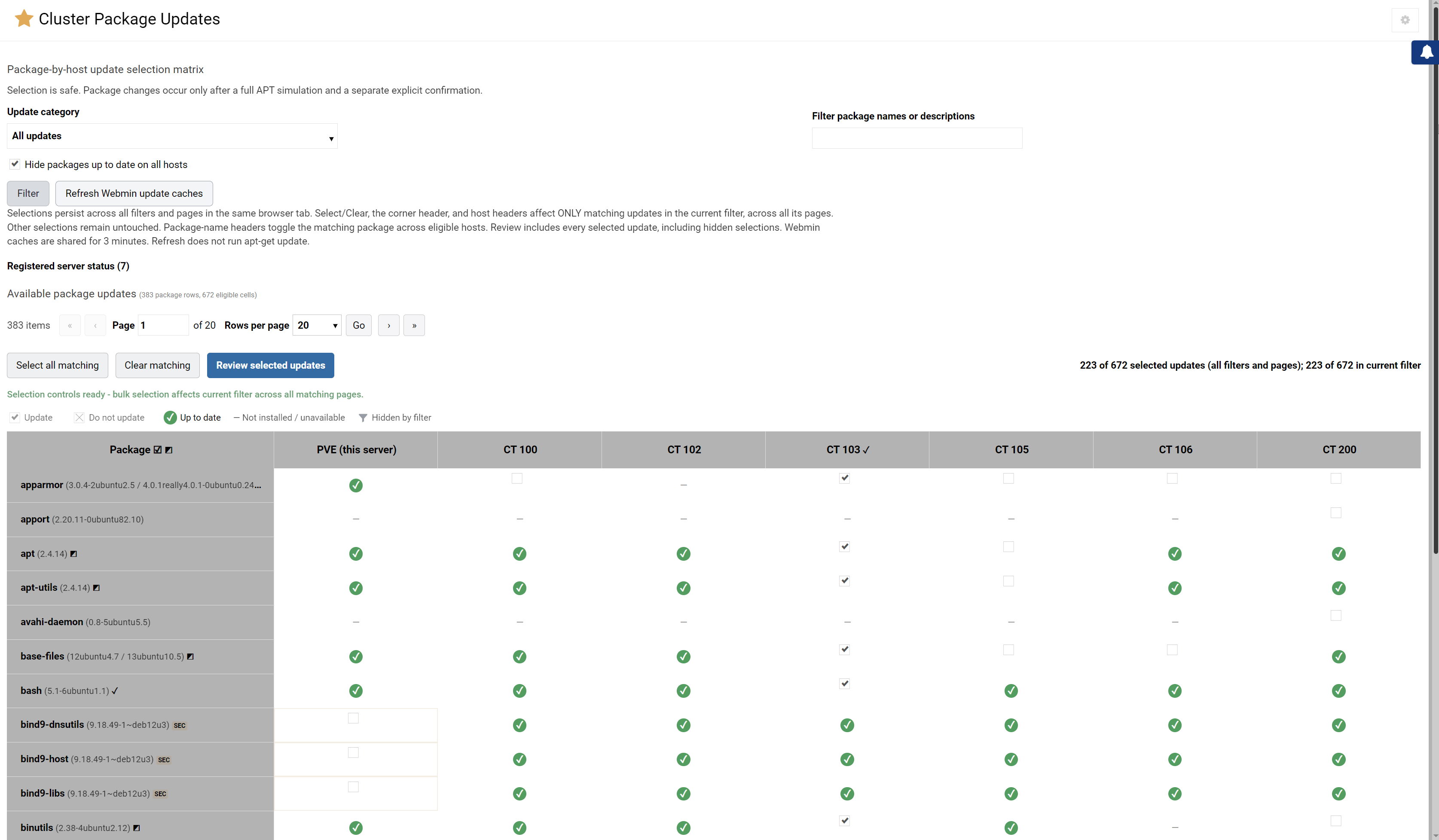
I have Webmin installed on my PVE root. After being led on a wild goose chase by ChatGPT (installing Webmin into every single CT, setting up dedicated credentials for all, setting up the Webmin cluster), ChatGPT then tells me “Oh, we can only use this to install or uninstall packages across all the CTs/VMs, but not update them.”
Is there a Webmin module which can achieve selective batch updating of packages across a PVE cluster of CTs and VMs?
Best regards,
Dax.
(It’s probably obvious from my writing, but I’m a Webmin noob, though otherwise in computing since the Commodore 64, so please excuse any dumb questions.)
You should probably define your acronyms. We’re not Proxmox developers or users, so I don’t know what a PVE or a CT is.
We have a tool that competes with Proxmox (or will, once the new version is out…current Cloudmin 9 is a bit rough around the edges and tough to use on modern Linux versions, but Cloudmin 10 is coming along nicely), which can manage VMs without having Webmin installed on every VM.
Hi @Joe thanks so much for the fast for the reply.
CT = LXC = container
PVE = Proxmox Virtual Environment (the Proxmox server)
I had been recommended Webmin as a graphical way of managing my Proxmox server and it works brilliantly for the Proxmox server itself, so I was hoping to get some of that magic for all of the CTs & VMs that this Proxmox server hosts.
Is there perhaps a Webmin module that can manage this task? As a UI/UX designer, I can imagine a table with packages in the first column, linked (managed) CTs/VMs across the top row, and a sea of checkboxes. Then a single apply/update button would roll out updates to all the managed virtuals just like it does for the server.
Ah, yeah, we don’t have that. But, if it Proxmox uses libvirt to manage VMs and containers, it’s plausible we could implement it without too much pain.
But, realistically, you do probably need something inside every container/VM in order for Webmin to manage it. Some orchestration tools use ssh with a key installed at bringup time. That’s reasonable and lightweight, but depends on ssh and a network connection to every VM. Historically, it was common to install Webmin on all system and join them up to your “primary” Webmin in Webmin Servers Index, but Webmin is maybe now larger and more complex than you want on every VM, but that can also be automated at VM bringup time.
I think we might want to implement a dedicated agent, a super tiny, fully self-contained, no or minimal UI, statically-linked MUSL binary that runs on anything Linux, that could be running on all VMs, which Webmin treats roughly like another Webmin, but the connection is reversed (the VM agent phones home to the Webmin primary, so we don’t depend on incoming network connections). Able to list/install packages, gather data about the system, etc. There are security implications to anything that has root-privileges, so I’m not sure we necessarily want it to be able to do everything…but, installing software is a privileged task as is looking at some system info and configuration, so it would need a user with some administrative capabilities to do its job.
I dunno.
For now, your ChatGPT didn’t really lead you astray. You do, in fact, need Webmin on every machine (virtual or otherwise) you want to manage in Webmin. The Webmin Server Index needs a Webmin to talk to on the other server. Memory-wise, Webmin isn’t bad, though. 10-15MB, I think, as long as all the caching and realtime stats gathering is turned off (and well under 100MB even if all the extras are turned on, still smaller than many “agents” I’ve seen in the wild).
No idea. If I do tackle it, it’ll be for Cloudmin first, since that’s what I know and have control over. But, I’m guessing making it work with Proxmox (or any other VM management tool) would be trivial once it exists, since the VM doesn’t really know or care how it came into existence. An agent running inside the VM is the same regardless.
That’s not as “handled” as one might like. Webmin has root privileges (and needs root privileges to do everything it does), so it’s a bigger surface than the ideal, if you’re only using it to manage packages.
I mean, it already does and always has (it’s a web UI for managing virtual machines), it just hasn’t always done it in a way enough people wanted to use…it wasn’t focused enough in prior versions and sort of followed a few early adopters down unusual paths to end up with a product that wasn’t easy to use for most folks, and it was neglected for quite a while as it was never very popular compared to Virtualmin. We haven’t always been good about saying, “No, that feature isn’t in line with the product we’re trying to build”, and so things got messy (this is also true of Virtualmin, but it gets so much more usage and attention that the general direction trends toward getting better even while getting larger and more complex, the weirder ideas tend to get refined into something good by the time it’s bumped up against all the different use cases people have).
Cloudmin 10 re-focuses on a really easy to use product with all the features you need to host VMs in a commercial context, whether as a hosting provider or as an enterprise that needs to delegate management of VMs or as a small web dev that wants to manage VMs for clients. We’ve dropped most virtualization types, KVM and Xen will be all it supports going forward, at least for some time. I think we want to discourage containers now that KVM is likely more efficient for most use cases and definitely more secure. LXC/LXD simply don’t get enough development effort or core kernel support to be something I can recommend in the age of LLMs, from a security standpoint. KVM has tremendously efficient page sharing, so if your VMs are similar enough, you’ll have extremely efficient use of memory, while also getting the best isolation available on Linux. And, of course Zones and AWS EC2 and some other stuff is also gone, at least for the first release.
Cloudmin predates Proxmox, they just got the formula closer to right first. But, we’re stubborn and tend to keep hammering on things until they’re good, even if there’s some dead ends along the way.
I will be looking forward to the Cloudmin 10 release.
Nevertheless, competing with Proxmox in terms of virtualization implies having a cluster implemented via the Corosync cluster engine (at least as they do) to ensure VM high availability and migration between storage locations. Are you going to present something similar?
Yeah, high availability and migration between storage locations are planned for Cloudmin Connect, but not as a Corosync cluster.
Cloudmin Connect will be a controller to manage independent hosts, with each host keeping working on its own if the controller is unavailable.
The live migration and storage migration will use libvirt and QEMU, with storage leases and watchdog fencing, so two hosts can nevet start the same disks.
So, the controller will make failover decisions with quorum. Cloudmin 10.0 is single-host, and migration comes first in Connect, followed by failover.
And, we are likely to make Connect feature-based as well, not just scale-based. Thinking more about it, the Pro edition of Connect gets the features that enterprises specifically need too, and the GPL edition should not have them.