Make User Password visibale again

SYSTEM INFORMATION
OS type and version Rocky 9.7 up-2-date
Webmin version 2.621
Virtualmin version 8.0.1.gpl

Back in the good-olßd-times, when you installed virtualmin it asked how it shoud store the passwords, plain text or encrypted.
today is uses encrypted by default :frowning:

I installed virtualmin, setup my domain and users… it worked.
paswords are encrypted.

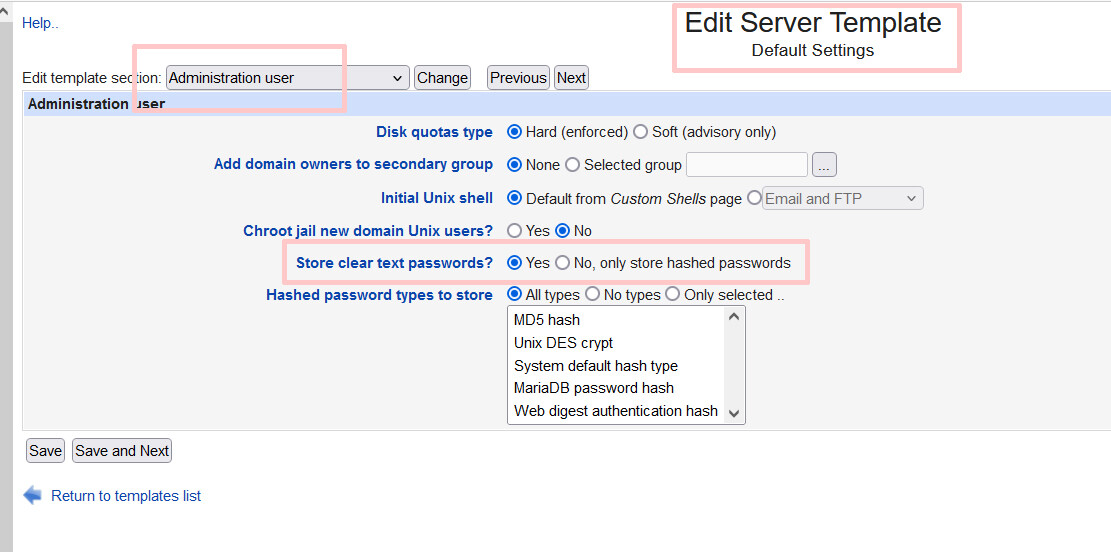
then i changed password storage to plain text.
for new created domains it works, i can see the users password.

but my old domain… after I changed the password it is still encrypted.
So i guess its a “per-domain” storage… not per user, right?

how do i make the password plaintext again? delete the domain and recreate it?

and please let the admin choose how to store the passwords again! just like in the good-old-times!

No need to delete domains.

At first, you just need to update the domain owner password and untick the checkbox to stop using hashed passwords.

And, then update the user passwords, and they will show a button to view the plaintext password.

Thx… I only changed the user password, now it works!

1 Like

I though this was removed as an option?

only by default turned off.
its hidden to turn it on agian the Virtualmin configuration.

This is a different one that appears on the “Edit Virtual Server” page when the mode is changed on the templates page.

also this is the framed theme, not authentic just in-case that makes a difference

please check also this link on this forum … to find out what happens when the user changes his password in usermin. It is not the same as when an admin changes the password

This topic was automatically closed 8 days after the last reply. New replies are no longer allowed.