| SYSTEM INFORMATION | |
|---|---|
| OS type and version | Ubuntu 24.04LTS |
| Webmin version | 2.630 |
| Virtualmin version | 8.1.0 GPL |
| Webserver version | nginx/1.24.0 (Ubuntu) |
Hi,
After a fresh LEMP install on a new server, I noticed that the “Default root directory” field is no longer present in Web Configuration > Configure Nginx Website > Document Options.
On my previous installation running an older version of Virtualmin, this field was available and allowed me to set a custom document root directly from the interface (e.g. /home/user/nodebb).
On the new installation, the Document Options page only shows:
- Directory index files
- MIME type for unknown files
The “Default root directory” field is completely gone.
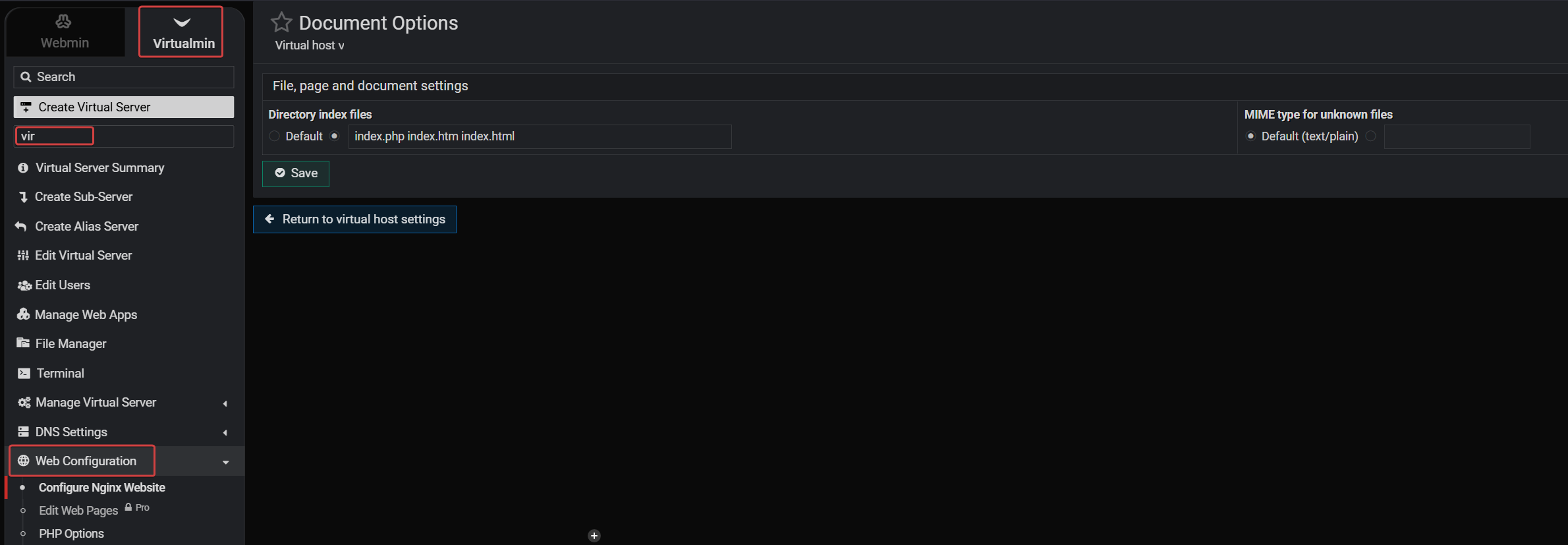
Expected behavior: The document root should be configurable from the Virtualmin interface, as it was in previous versions.
Workaround: Editing the Nginx config file directly via SSH and modifying the root directive manually, then reloading Nginx. This defeats the purpose of having a control panel.
Is this a known regression? Is there a fix or patch available?
Thanks