SYSTEM INFORMATION
OS type and version
Ubuntu Linux 24.04.5
Virtualmin version
8.3.0 GPL & PRO
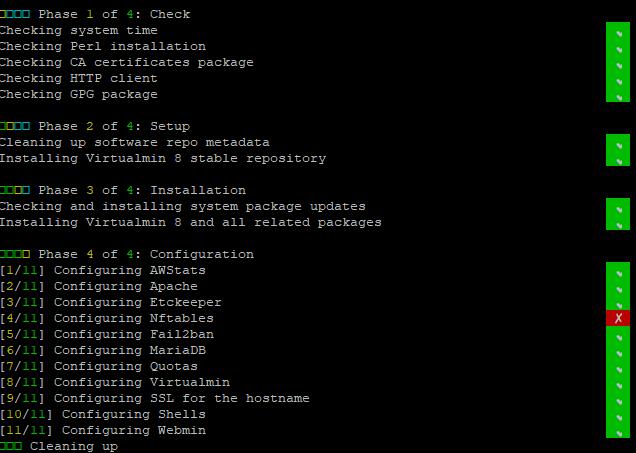
I have tried both PRO & GPL, but I get a red box on Nftables on a fresh vanilla install. I wonder what my options are here?
I have tried uninstalling Nftables, which was successful and reinstalling it, but I would like to see what the issue is on the Virtualmin install.
I will review the virtualmin-install log to see what’s going on:
[2026/09/29 09:19:00] [INFO] - Configuring Nftables
[2026/09/29 09:19:01] [ERROR] - Error configuring nftables: Undefined subroutine &nftables::create_nftables_init called at /usr/share/perl5/Virtualmin/Config/Plugin/Nftables.pm line 64.
[2026/09/29 09:19:01] [WARN] - Failed
Ilia
September 29, 2026, 1:45pm
2
Hello,
Thanks for reporting this!
Sorry about that!
This issue has been fixed!
Hey, bugs and issues happen; it’s not a huge issue. Can you elaborate on what I need to do to sort this out? I’m now running PRO on this server, if that makes a difference.
Ilia
September 29, 2026, 4:29pm
4
Yes, you’re right, this is an easy issue to fix. You’d simply want to run:
virtualmin-config-system -i Nftables
Don’t know if I have broken stuff trying to fix this. I uninstalled Nftables and reinstalled it (successfully) it seems, but when I run the command above, I see:
Ilia
September 29, 2026, 9:34pm
6
Have you installed the latest system package upgrades?
And perhaps it’s just easier to reinstall and start over in the first place?
Yep, I started over, and it worked fine, so thankyou for the pointers.
Just got to get my head around ‘Linux Firewall’