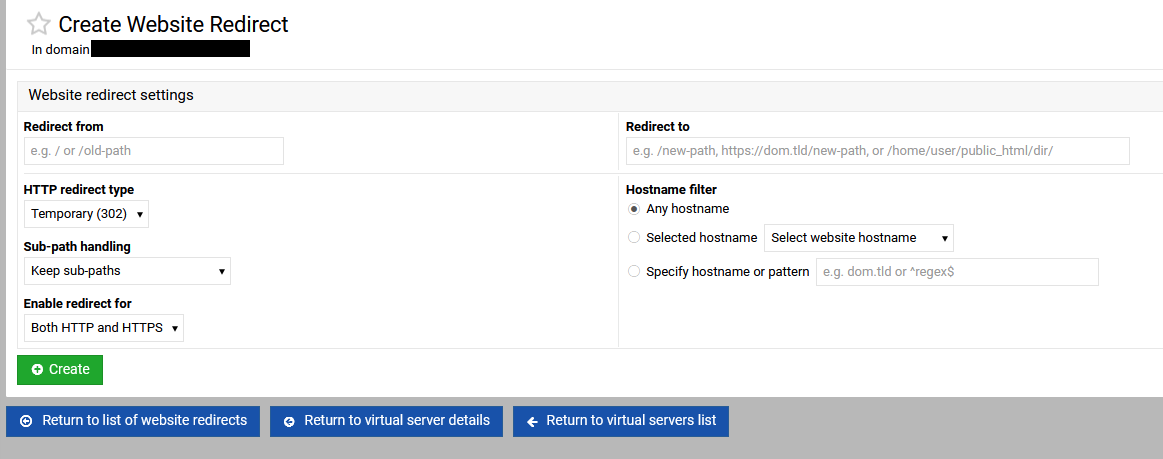
I cannot find the option to redirect my `mail.` domain to my main website

SYSTEM INFORMATION
OS type and version Ubuntu Linux 22.04.5
Webmin version 2.610
Usermin version 2.510
Virtualmin version 7.50.2 Professional
Theme version 26.20
Apache version 2.4.52
Package updates 32 package updates are available

follow up from

I cannot find the option to set this option. It should be a checkbox option because mail subdomain is created by virtualmin by default.

I seem to remember something about using

but this is not obvious or intuitive. These should be use for very custom redirects.There should be an option similar to these:

I would redirect my mail.quantumwarp.com to quantumwarp.com where as some might use the www option. I would sssume redirecting to the non-www should be the default option along with the option of no redirtect (ie leave as alias) and redirect to www

I hope I have not missed the relevant option.

If I understand correctly, it’s not a redirect, it’s DNS entry.
mail. and www. and @ would normally all point to the same IP (the host) so using a web browser mail.domain or www.doman or just domain would all point to the same website.

It is currently a DNS entry, which is the problem OP is trying to solve.

If it redirected to www or the base domain, it would not cause this problem.

Which shows that I should taken another few seconds to say that the DNS is the cause.

That’s the default setup though? If I put mail.anydomain on my Vmin server into a web browser, they all show the domain website.

If this is a problem, perhaps a VMin default needs to be looked at?

Yes, that is what is being requested, and we have discussed it before in the thread OP linked, and we decided we would add it. It just hasn’t happened yet (because nobody has implemented it yet).

1 Like

reported here Improvements to subdomain redirects (mail, webmail, admin) · Issue #1169 · virtualmin/virtualmin-gpl · GitHub

I have used the following redirect rules to redirect all of the links on my mail domain to my main domain whilst keeping all of the slugs:

RewriteCond %{HTTP_HOST} =mail.example.com
RewriteRule ^(?!/.well-known)\/(.*)$ https://example.com/$1 [R=301,L]

in Virtualmin –> Web Configuration –> Configure SSL Website –> Edit Directives

NB: These rules follow the current redirect format. They work perfectly fine but there will be some revisions to the redirect format so they are syntactically better, but function exactly the same.