Hi, I hope the day is going well.
I need some help to understand how to move.
Virtualmin made on my server a backup that has extension .tar.gz
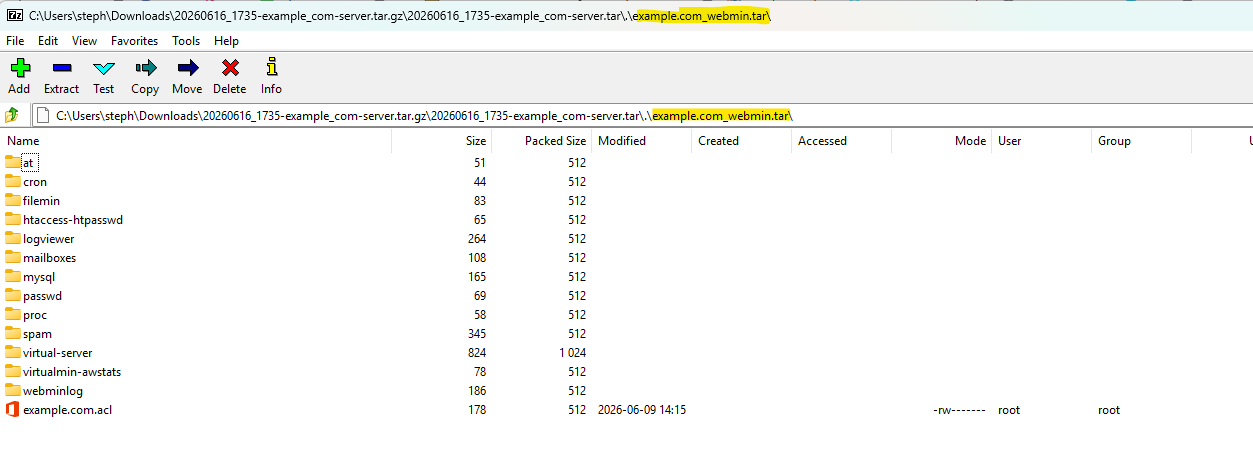
Once opened I see a list of many different files that are related to the domains I have.
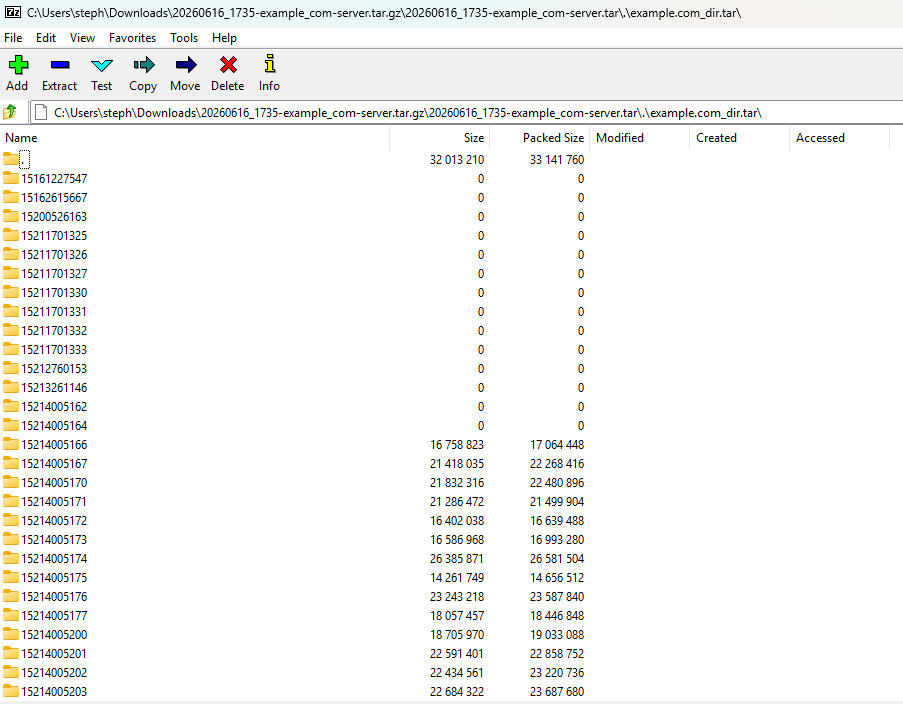
I’m looking for a specific domain public_html folder so I need to open the file for example called domain.ext_dir.tar
The only archive manager that I found is able to view correctly the public_html is WinRAR that is not free but has just a trial.
Every other open source or free archive manager that I tried are unable to show correctly my folders as a long list of folders called with random numbers names are showed.
Could you say why I see this behavior and how I can maybe ask to open source archive manager to try to implement a function to correctly show the public_folder?
I want try to see more archive manager able to manage this but I dont know how I can report this… I mean they need to reproduce the issue. I have to find a way to made they understand and I will also not sure they will implement support.
I dont know well how to report to archive manager. I don’t understand how Virtualmin can create such archive that can be read easily just from WinRAR and never found any other program on the web that’s free to manage this kind of archive.
Currently I’m asking if an user is a Windows user how can extract on a PC a backup archive generated by Virtualmin excluding to use WinRAR that’s not free even if can be run to extract the archive backup. Could be interesting maybe contribute to the web and made archive managers able to extract and manager correctly archive created by Virtualmin. I’m really asking why only WinRAR are able to show archive content correctly on Windows.
I don’t know why some tar implementations don’t work correctly. We know it works with the tar implementations found on Linux and the BSDs. I think this means it will also work on MacOS, since MacOS on the command line is roughly a BSD with some ugly Mac customizations.
But, I’ll try to take a closer look when I get some free time.
To be clear, you can use GNU Tar on Windows and I’m pretty confident that’ll work fine (since that’s what’s on most Linux distros), and there are several ways to get it.
Thanks Joe but maybe this is not a Virtualmin issue.
Today I found that also Brandizip that has a free version do a good job as WinRAR so maybe it’s just an issue that should be resolved by the archive programs managers for Windows
Many tar implementations work fine with our backups. I can’t speak for every tar implementation out there, but every tar implementation I’ve ever used works fine. But, we have had reports of some Windows tar implementations failing.
I know at one point some of the internal file names did not have the correct file extension, but illia/jamie corrected this.But it looks like the OP was having issues rather than Virtualmin.
You seems to be not correct again.
If you read my message the issue is on be able to see files where public_html folder are located.
Your screenshot to open the webmin path works also for me.
You need try to open, as i said in my previous message, the archive that ends with _dir.tar
Anyway I’m opening reports to 7zip, Nanazip and I will maybe try to report also to PeaZip with the hope they can fix this issues.
Yes that’s it!
I’m creating report for all archive manager asking them to look into this issue.
Currently I found to be not affected WinRAR (not free) and Brandizip (free version available and works)
I don’t think it’s an issue of Virtualmin, i believe Joe.
I found two software on Windows not affected by this issue so I just started a discussion here on Virtualmin because is the software that generate this kind of archive that are not well showed in many archive manager for Windows then I am also reporting now the issue to this archive managers for Windows, hoping they can made a fix.
I can’t create right now a test Virtualmin archive that I would attach to the report I done to PeaZip, NanaZip and 7Zip.
Would be nice to generate an example example.com_dir.tar small archive to attach maybe here (if it’s possibile) so can be forwarded to archive manager developers to look into the issue. It’s important that it’s an archive without sensitive info and just generated from a test instance that is deleted after and never expose sensitive info such password, etc.
And, it documents that the default format is using GNU tar, but you can also use other formats that may be more comfortable on other operating systems from Linux (but again, GNU tar is widely available, including on Windows).
The .tar.gz is a different type of format. Files are stored into a .tar file first so the file properties and file paths can be kept, the .tar file is then g-zipped to compress this single file giving rise up to the .tar.gz.
A .zip file can keep file paths and properties whilst compressing in a single step compression like most formats we are familiar with (e.g. .7z, .rar, .zip, .ace).
OK, I made a tool that can read Virtualmin backups on Windows. I don’t have any control over what your usual archive tool does, but Go has core library support for most of the formats Virtualmin supports and a third-party library for zstd, so everything is covered, so I put together a little CLI app for browsing Virtualmin backups. All common OSes supported (MacOS via Homebrew, Windows via Scoop or just curl the binary to your system). I’ll add a Linux package to our package repos as soon as I figure out how to publish to the new repos.
It can extract everything to a mostly human readable directory layout, or extract individual files, and show the basic structure of the backup and information about it, like when it was made, IP it was associated with, features in the backup, etc.
It’s a read only tool, you can’t edit a backup with this tool. That’s too risky and complicated for something I whipped up in an afternoon. But, it answers the question, “What program can I use to look at Virtualmin backups on Windows?” (And Mac OS and Linux, but Mac OS and Linux don’t have a bunch of incomplete tar implementations, AFAIK).
I haven’t actually tested the Scoop repo yet, as I don’t have a Windows machine readily available. But, I’ll try to get it tested tomorrow. But, you can fetch a binary with curl from the Releases page and it’ll Just Work on Windows. Downloading from the browser will require you to click through a security warning. (And, if the Scoop install works, it will also work fine and without warning.)