I am curious, specifically, why the setup of my network would be an issue? I think maybe I’m just ignorant about how FirewallD is supposed to work.
In my imagination each of the “zones” has ports and services that are allowed through it, with “public (default)” being “available for everyone”. When I add an IP or range to another zone, that IP or range would then be able to use the ports and services in that zone (and their names or just for easier “human” organizing). (That, at least, is one dummy’s way of interpreting this web interface.)
Therefore my expectation is that adding an IP to “internal” will give that IP access to the ports and services there (in addition to the “public (default)” ones) and that no other action, save maybe an “Apply” or “Reload” would be needed on my part.
It is for that reason that I do no know what you mean really about my network/s setup.
In a fresh example case the setup is simple (from my view):
network:
  version: 2
  ethernets:
    ens18:
      addresses:
      - "[MY-IP-HERE]/22"
      nameservers:
        addresses:
        - 127.0.0.1
        - [MY-DNS-HERE]
        - [MY-DNS-HERE]
        search:
        - [MY-DOMAIN-HERE]
      routes:
      - to: "default"
        via: "[MY-GATEWAY-HERE]"
The only thing I have in /etc/firewalld/zones (at the start) is:
public.xml public.xml.old
And the live one looks like this:
<?xml version="1.0" encoding="utf-8"?>
<zone>
  <short>Public</short>
  <description>For use in public areas. You do not trust the other computers on networks to not harm your computer. Only selected incoming connections are accepted.</description>
  <service name="ssh"/>
  <service name="dhcpv6-client"/>
  <service name="smtp"/>
  <service name="smtps"/>
  <service name="smtp-submission"/>
  <service name="ftp"/>
  <service name="pop3"/>
  <service name="pop3s"/>
  <service name="imap"/>
  <service name="imaps"/>
  <service name="http"/>
  <service name="https"/>
  <service name="dns"/>
  <service name="mdns"/>
  <service name="dns-over-tls"/>
  <port port="20" protocol="tcp"/>
  <port port="2222" protocol="tcp"/>
  <port port="10000-10100" protocol="tcp"/>
  <port port="20000" protocol="tcp"/>
  <port port="49152-65535" protocol="tcp"/>
  <forward/>
</zone>
With the addition of:
<port port="49152-65535" protocol="tcp"/>
Being the only difference between the .old and the current.
In:
Webmin > Networking > FirewallD > Edit Config Files
I have only:
If I go to:
Webmin > Networking > FirewallD
And select “internal” and then add an IP to:
A new zone file is written automatically in:
/etc/firewalld/zones:

or:
Like this:
<?xml version="1.0" encoding="utf-8"?>
<zone>
  <short>Internal</short>
  <description>For use on internal networks. You mostly trust the other computers on the networks to not harm your computer. Only selected incoming connections are accepted.</description>
  <service name="ssh"/>
  <service name="mdns"/>
  <service name="samba-client"/>
  <service name="dhcpv6-client"/>
  <rule family="ipv4" priority="-32767">
    <source address="10.12.39.17"/>
    <accept/>
  </rule>
  <forward/>
</zone>
It is my observation that this does not cause the IP there to be allowed access to those services. Or at least that adding service that I can easily test:
(Which results in its addition the said new file):
<?xml version="1.0" encoding="utf-8"?>
<zone>
  <short>Internal</short>
  <description>For use on internal networks. You mostly trust the other computers on the networks to not harm your computer. Only selected incoming connections are accepted.</description>
  <service name="ssh"/>
  <service name="mdns"/>
  <service name="samba-client"/>
  <service name="dhcpv6-client"/>
  <service name="checkmk-agent"/>
  <rule family="ipv4" priority="-32767">
    <source address="10.12.39.17"/>
    <accept/>
  </rule>
  <forward/>
</zone>
…does not allow the IP specified to connect, even after “Reload FirewallD”

I will continue to get this (using checkmk to test its connection):
However, if I manually edit the internal.xml file
And only remove the two lines with “rule” int them, thusly:
<?xml version="1.0" encoding="utf-8"?>
<zone>
  <short>Internal</short>
  <description>For use on internal networks. You mostly trust the other computers on the networks to not harm your computer. Only selected incoming connections are accepted.</description>
  <service name="ssh"/>
  <service name="mdns"/>
  <service name="samba-client"/>
  <service name="dhcpv6-client"/>
  <service name="checkmk-agent"/>

    <source address="10.12.39.17"/>
    <accept/>

  <forward/>
</zone>
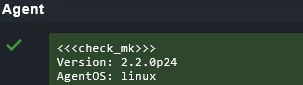
And then “Save and Close” and “Reload FirewallD”, my test of the checkmk agent on port 6556 works fine:
So in my view either:
“Webmin’s FirewallD zones interface writes incorrect .xml files.”
or:
“I do not understand how FirewallD zones are supposed to work.”
…Actually both of those things can be true at the same time.
My concern is that if this is an “I don’t know what I’m doing” thing, I have opened these services or ports to the world without realizing it (or set myself up for some such condition). I guess as a secondary concern I am worried that further edits to using the web interface will break whatever I do manually (so someday when someone else is working on this or I have totally forgotten it, all hell will break loose because someone tries to add an IP).
What is the proper use case or the obvious thing that I don’t see?
Thanks.
Ron

 …
…


