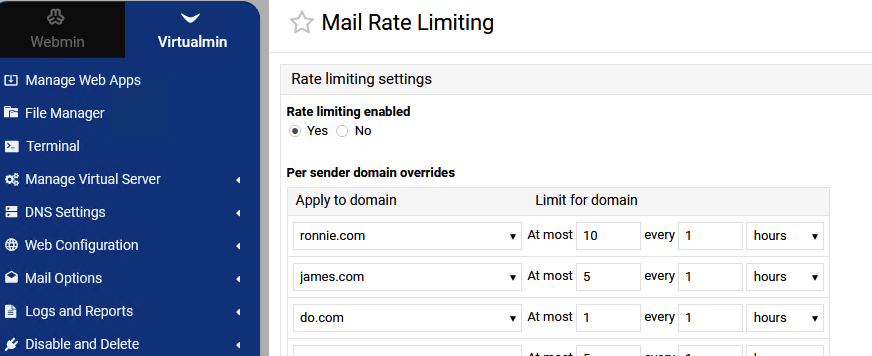
System Settings > Email Settings > Mail Rate Limiting
Are in order of addition (or I suppose, in the order they appear in the /etc/milter-greylist/greylist.conf) and this list is not sortable. In my browser the domains (which are pulldowns) are not searchable with “Find in Page”.
It’s minor but if this list could be sortable or searchable or perhaps parsed as a property of each virtual server (and so probably up above “System Settings”) it would make manipulating them easier when, for example, a legitimate user trips the message limit and requires it to be raised.
Sorry, I am not sure what the correct vector is “suggestion box”.
The dropdown works fine like it is. If I want to change the number of allowed mails for a domain, and I have 100 domains, scanning to find that domain is the bottleneck.
Those domains are in order of when the domain was created (or I guess in the order of when they were given Mail Rate Limiting settings) not alphabetically. If there are a large number of domains on the server and I get a “some-domain exceeded their quota” mail, I have to scan for it on the list in order to increase their quota (if their “graymail”/spam is legitimate and that is what I want to do). That list is not sortable or searchable with “Find in page”.
Understood. There’s no straightforward solution to this. However, applying this patch will make the currently selected value in the HTML <select> element searchable using the browser’s built-in page search (Ctrl+F or ⌘+F).
It isn’t a perfect solution, but it’s good enough to solve the problem. It’s hard to believe that in 2026 this still isn’t something every browser can do.
We will improve support for this new feature in the next releases of Webmin and the Authentic Theme. Currently, the found text is slightly shifted downward by a few pixels. Just cosmetic, but keep it in mind.