Failed cross webmin backup thru VPS

SYSTEM INFORMATION
Ubuntu Linux 22.04.5 REQUIRED
Virtualmin version 7.30.8 REQUIRED
SYSTEM INFORMATION
Ubuntu Linux 24.04.2 REQUIRED
Virtualmin version 7.30.8 REQUIRED

Hello,
i’ve 2 VPS with Webmin/Virtualmin trying to backup one webmin on the other and viceversa just to see if it works before going on production. Honestly i’ve more than 2 VPS but i’d like to understand the routine to expand backups.

Local backups work fine since the start but backups thru VPS are not. this is the message i receive

Login to RPC server as USERNAME_REPLACED rejected web-lib-funcs.pl (line 8523)

Root is disabled as i use double admin profiles, and i know it’s just a newbie question but i’m looking for big hints to fix this. Reading ~10 related topics on this forum didn’t help.

Thanks, have a nice day
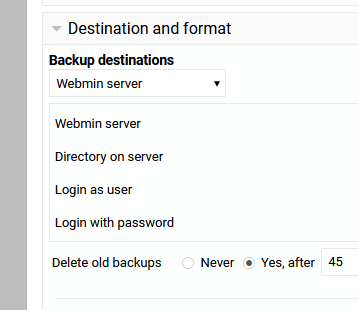
How are you trying to backup? The RPC server kinda confuses me. If you are doing this through the interface can you screenshot the page?

Sounds like it might be an authentication issue between the two VPS instances. Since root is disabled, you’ll probably need to make sure the user you’re using has RPC/API access enabled in Webmin. Double-check the credentials and permissions it usually comes down to that when cross-backups fail.

sorry for late answer turned off notifies

this is where i said Server1 to point Server2

I don’t see a user and password here. You need some kind of credential to transfer a file.

1 Like

We do not need user info (certainly never passwords) on a public forum but we do need the requested system information

to help

This is what’s involved, those are my 3 VPS where i’m trying to backup local and on each other VPS.

SYSTEM INFORMATION
OS type and version Ubuntu Linux 24.04.3
Usermin version 2.400
Virtualmin version 7.40.1
Theme version 25.10
Apache version 2.4.58
Package updates All installed packages are up to date
SYSTEM INFORMATION
OS type and version Ubuntu Linux 24.04.3
Usermin version 2.400
Virtualmin version 7.40.1
Theme version 25.10
Apache version 2.4.58
Package updates All installed packages are up to date
SYSTEM INFORMATION
OS type and version Ubuntu Linux 22.04.5
Usermin version 2.420
Virtualmin version 7.40.1.gpl-1
Theme version 25.20
Apache version 2.4.52
Package updates All installed packages are up to date

is the clue in the different versions? (OS Virtualmin and Apache) - shouldn’t be - but?

I’m still thinking it is a authentication issue between them like @ID10T said.

Well i just logged in on target server and used the same credentials on scheduled backup.

i tried to backup on different and same server version, but i still receive that warning. Should i enable something on user permissions?

Thanks

:man_shrugging: I’m afraid it has bee a long while since i attempted backup between two VM using Webmin/Virtualmin it is not a routine/frequent requirement as most of my backups are either handled by the VM provider (eg. Linode) or direct to my internal storage. It was easy then (and would still expect it to work now) it was between identical VM then so same OS and Webmin/Virtualmin but as I indicated that should not be the problem.

of course much has changed in the cloud so I’m left guessing :man_shrugging: