Email address not found yet configured to use

SYSTEM INFORMATION
OS type and version Debian 12
Perl version 5.036000
Path to Perl /usr/bin/perl
Python version 3.11.2
Path to Python /bin/python3.11
BIND version 9.18.41
Postfix version 3.7.11
Mail injection command /usr/lib/sendmail -t
Apache version 2.4.65
PHP versions 8.2.29
Logrotate version 3.21.0
MariaDB version 10.11.14
SpamAssassin version 4.0.1
ClamAV version 1.0.9

Since a update, I am finding it hard to connect my email addresses to a client email programme.

I have the auto config and auto discover set for all dns records, thunderbird and others picks up the domain name in question.

But, when it come to entering a password, the client just denies access to none existant email, even though I have put in the correct password and the email is on the server, seems it cannot find the address.

I would love to know why this takes so long to answer, when you need to see all green in thunderbird, only the autodiscover and autoconfig is working.

Are you sure you’re entering the actual username? Look at the Edit Users page, and look at the Username field. Are you actually entering the username exactly as it appears there? By default, that usually means, e.g. joe@virtualmin.com is the username. The username is not just joe. (It is possible configured Virtualmin to allow different username formats and conventions, but if you exclude the domain, you’ll likely have clashing names, and at least some will need the domain appended, anyway.)

Yep I enter the email address, then thunderbird discovers my setting but not my account.

leon@domain.com

Correct password

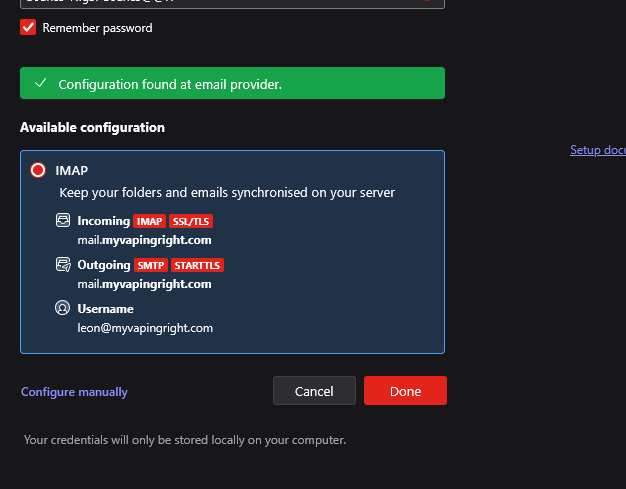
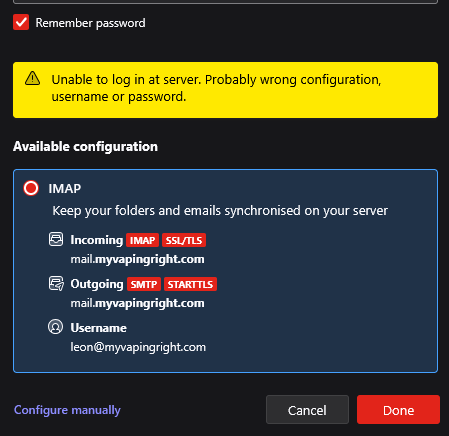
But thunderbird says above

All that looks correct. I don’t think I understand what problem we’re supposed to solving here?

What error do you get? What errors appear in the journal for dovecot and postfix units when you try to send and receive email in Thunderbird and it fails? (We have docs for troubleshooting email that tell you how to read those logs: https://www.virtualmin.com/docs/server-components/troubleshooting-emails/ )

it says misconfigured setting as either the email or password was incorrect at top.

I am trying to connect my email to thunderbird.

This is what i get when i hit done.

even when trying to manually configure, retesting only give the old antage of could not find server information.

We still need to see those server-side logs.

Dec 14 17:52:34 ns2.baillat.uk systemd[1]: Starting postfix.service - Postfix Mail Transport Agent…
Dec 14 17:52:34 ns2.baillat.uk systemd[1]: Finished postfix.service - Postfix Mail Transport Agent.
Dec 14 19:19:58 ns2.baillat.uk systemd[1]: postfix.service: Deactivated successfully.
Dec 14 19:19:58 ns2.baillat.uk systemd[1]: Stopped postfix.service - Postfix Mail Transport Agent.
Dec 14 19:19:58 ns2.baillat.uk systemd[1]: Starting postfix.service - Postfix Mail Transport Agent…
Dec 14 19:19:58 ns2.baillat.uk systemd[1]: Finished postfix.service - Postfix Mail Transport Agent.

Nope, we need to see the interaction with your mail client.

how would i get that detail for you, I am a noob at computing but get by.

Just look at them in the System Logs module. Look at the dovecot and postfix units. It’ll show the most recent ones by default (while using journalctl you have to tell it you want to see specific logs or it starts at the beginning, which is not useful). Try to authenticate and then refresh the log viewer so you see exactly the interaction you just attempted.

Then copy/paste the relevant logs entries from both dovecot and postfix units here (not a screenshot as that’s hard to read for me). Emphasis on relevant. We just want to see the failed authentication events that occur when you try to login with your mail client.

seems as though i had to change the name server to my main virtualmins hostname.

1 Like

So, you were missing glue records at your registrar, so you weren’t talking to the new server, I guess?

How would one go about naming the namedserver for each of my virtual servers, would it just be the domain name and sub name, or would it be the actual servers hostname.

I don’t think I understand the question.

You’d generally not name the name server for each virtual server. You’d configure two name servers in one zone (the Virtualmin server plus a secondary configured according to our documentation: How to Configure Secondary DNS | Virtualmin — Open Source Web Hosting Control Panel).

But, the key element that I think is probably missing is the glue records at your registrar, which Virtualmin can’t do anything about.

OK, looking at your domain, here’s what I see:

$ host myvapingright.com
myvapingright.com has address 104.21.38.209
myvapingright.com has address 172.67.138.148
myvapingright.com has IPv6 address 2606:4700:3033::6815:26d1
myvapingright.com has IPv6 address 2606:4700:3030::ac43:8a94
myvapingright.com mail is handled by 5 _dc-mx.91d9c04063d5.myvapingright.com.

That’s Cloudflare addresses and a mail service I don’t recognize (but also not your Virtualmin server).

$ whois myvapingright.com|grep Name
   Domain Name: MYVAPINGRIGHT.COM
   Registrar: NameCheap, Inc.
Name Server: dax.ns.cloudflare.com
Name Server: nelci.ns.cloudflare.com

Your Virtualmin server is not the authoritative DNS server for your zone, which is fine, but you need to make sure things are right with Cloudflare DNS. And you should let Virtualmin know it is not responsible for local DNS management (Virtualmin Pro can manage DNS at Cloudflare in the Cloud DNS providers section if you want to do that).

But, your mail name is misconfigured at Cloudflare, currently:

$ host mail.myvapingright.com
mail.myvapingright.com has address 104.21.38.209
mail.myvapingright.com has address 172.67.138.148
mail.myvapingright.com has IPv6 address 2606:4700:3030::ac43:8a94
mail.myvapingright.com has IPv6 address 2606:4700:3033::6815:26d1

Cloudflare doesn’t proxy IMAP/POP3/SMTP, so you can’t use Cloudflare IP addresses for your mail.domain.tld names that you expect mail clients to talk to. If you want to send and receive mail, you need to talk to the Virtualmin server, not a proxy that doesn’t proxy mail protocols (Cloudflare in this case).

So, make the A record for mail.yourdomain.tld not proxied, and give it the Virtualmin address. If you also want to receive mail, you probably need to set the MX record to mail.yourdomain.tld, as well (though maybe the paid plans at Cloudflare have some kind of relay service, I don’t know).