| SYSTEM INFORMATION | |
|---|---|
| OS type and version | Ubuntu 24.04.3 LTS |
| Webmin version | 2.510 |
| Virtualmin version | 7.40.1 |
| Webserver version | Apache/2.4.58 |
| Related packages | Dovecot 2.3.21 (47349e2482) |
Recently on a server that only provides email dovecot.conf entries are mangled, out of bounds, and duplicated.
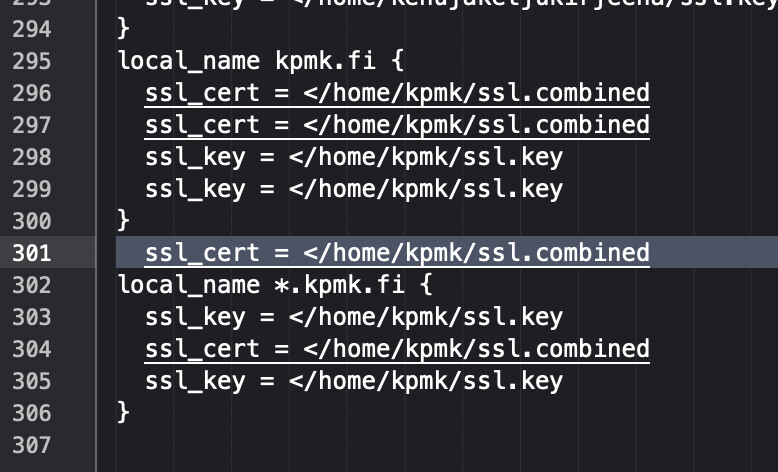
The duplicates are like the example below. example1.com is what we would typically expect, and example2.com shows the duplications:
local_name example1.com {
  ssl_cert = </etc/ssl/virtualmin/17594035742849915/ssl.combined
  ssl_key = </etc/ssl/virtualmin/17594035742849915/ssl.key
}
local_name *.example1.com {
  ssl_cert = </etc/ssl/virtualmin/17594035742849915/ssl.combined
  ssl_key = </etc/ssl/virtualmin/17594035742849915/ssl.key
}
local_name webmail.example1.com {
  ssl_cert = </etc/ssl/virtualmin/17549938561617050/ssl.combined
  ssl_key = </etc/ssl/virtualmin/17549938561617050/ssl.key
}
local_name *.webmail.example1.com {
  ssl_cert = </etc/ssl/virtualmin/17549938561617050/ssl.combined
  ssl_key = </etc/ssl/virtualmin/17549938561617050/ssl.key
}
local_name example2.com {
  ssl_cert = </etc/ssl/virtualmin/17594265633325517/ssl.combined
  ssl_cert = </etc/ssl/virtualmin/17594265633325517/ssl.combined
  ssl_cert = </etc/ssl/virtualmin/17594265633325517/ssl.combined
  ssl_key = </etc/ssl/virtualmin/17594265633325517/ssl.key
  ssl_key = </etc/ssl/virtualmin/17594265633325517/ssl.key
  ssl_cert = </etc/ssl/virtualmin/17594265633325517/ssl.combined
  ssl_key = </etc/ssl/virtualmin/17594265633325517/ssl.key
}
  ssl_key = </etc/ssl/virtualmin/17594265633325517/ssl.key
  ssl_cert = </etc/ssl/virtualmin/17594265633325517/ssl.combined
local_name *.example2.com {
  ssl_key = </etc/ssl/virtualmin/17594265633325517/ssl.key
  ssl_cert = </etc/ssl/virtualmin/17594265633325517/ssl.combined
  ssl_key = </etc/ssl/virtualmin/17594265633325517/ssl.key
}
We seem to have stablized the system somewhat by upping default_vsz_limit = 256M to 512M, so no more memory crashes, but we can reliably reproduce the duplications by simply adding a new domain.
Maybe the duplications are fine, because they are exactly the same, but other times we end up with this issue by removing the duplications.
2025-10-02T19:35:26.185272+02:00 host dovecot: imap-login: Error: Failed to initialize SSL server context: Can't load SSL certificate (ssl_cert setting): The certificate is empty: user=<>, rip=1.2.3.4, lip=5.6.7.8, session=<BgYaaTBACuqcm7Fw>
Our fix then is to just remove and add the domain again, and ignore the duplications.
We need to break the system down and simplify it and gain some insight into volumes. My one gut feeling is the configuration interpreter reads the dovecot.conf file, gets confused due to the sheer volume of line items, and doesn’t complete it’s job.
I’m not sure. Just need anything to try next.