Dovecot: able to log in locally, but not remotely

SYSTEM INFORMATION
OS type and version AlmaLinux 10
Virtualmin version 8.1.0

I’ve been struggling for a few days trying to get email set up (using dovecot) on my new server.

I fixed some issues using dovecot’s documentation, especially their page about testing. That helped me understand that I shouldn’t use exotic characters (in my case, {) in my user password, something that seems to be surprisingly under-documented online.

Using nc localhost 143 from a terminal logged into my server, I can connect to dovecot and issue commands without a problem. So I know the server is up and running. However, when I try to connect remotely using openssl s_client -connect [server]:993, I get through the initial SSL handshaking but inevitably fail to authenticate:

   ...
   Start Time: 1782864052
   Timeout   : 7200 (sec)
   Verify return code: 0 (ok)
   Extended master secret: no
   Max Early Data: 0
---
read R BLOCK
* OK [CAPABILITY IMAP4rev1 LOGIN-REFERRALS ID ENABLE IDLE SASL-IR LITERAL+ AUTH=PLAIN AUTH=LOGIN] Dovecot ready.
a login isohedral [password]
a NO [AUTHENTICATIONFAILED] Authentication failed.

My instinct is to blame an SSL certificate issue. But I’m fairly naive about SSL, so I don’t know if that could be it. Besides—if openssl is getting me as far as the Dovecot ready message, doesn’t that imply that all the SSL stuff succeeded? But if that’s the case, I can’t form a mental model of why things should work locally but not remotely.

Any ideas or suggestions would be welcome, thanks.
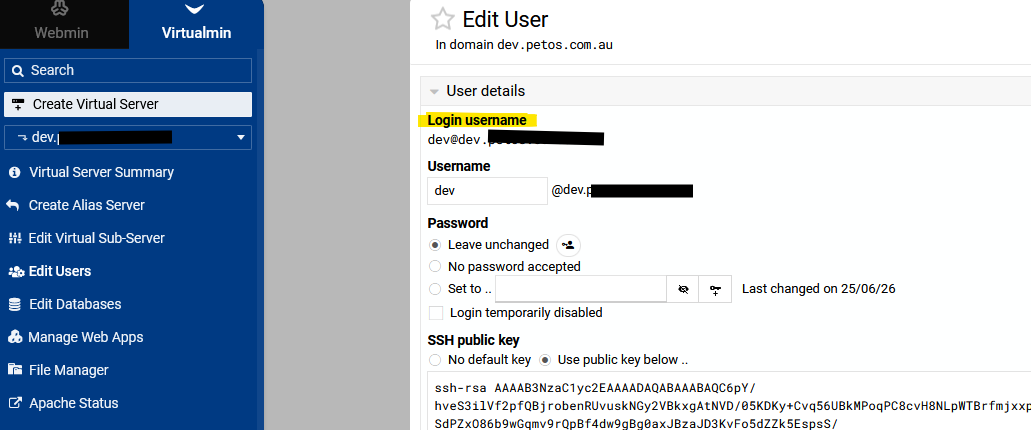
That means its strictly a authentication issue.
Maybe use a email client, like thunderbird and see if you can login.
Most time with virtualmin you need a @ sign in the username
Check edit user to see

That means its strictly a authentication issue.
Maybe use a email client, like thunderbird and see if you can login.
Most time with virtualmin you need a @ sign in the username
Check edit user to see

Right, but if it were purely an incorrect username and/or password, wouldn’t I get the same error when trying to connect from localhost? In any case, I’ve tried both with and without the @, and I get the same response. I’ve also tried repeatedly to create an account using the MacOS mail client, and that hasn’t worked (I guess if someone said that I shouldn’t trust MacOS mail, I could be persuaded to try something else, but that seems like a remote possibility for fixing the problem).

The only other thing that’s different is that this is the owner account for the virtual server, so when I edit the user I see the “Virtual server owner user details” page instead of the one in your screenshot. But I can’t imagine that’s the source of the problem. And I created a separate email account on that virtual server and had the same issue.

OK, I have some possible progress to report. There was lots of good information on Dovecot IMAP Login Fails: Where Auth Breaks and How to Fix It – cr0x.net. In particular, they specifically suggest the following:

2) Symptom: Only remote users fail; localhost tests succeed

Root cause: TLS interception/proxy misconfiguration, SNI mismatch, or network policy differences (WAF, geo-blocking).

Fix: Compare openssl s_client from a remote host, verify cert chain, and ensure the proxy passes SNI and ALPN as expected.

Indeed, I compared the outputs from an ssl connection via localhost and via a remote server, and the information was quite different.

Connect via localhost

I used the command openssl s_client -connect 127.0.0.1:993 to connect. The output starts like this:

Connecting to 127.0.0.1
CONNECTED(00000003)
Can't use SSL_get_servername
depth=3 C=US, O=Internet Security Research Group, CN=ISRG Root X2
verify return:1
depth=2 C=US, O=ISRG, CN=Root YE
verify return:1
depth=1 C=US, O=Let's Encrypt, CN=YE2
verify return:1
depth=0 CN=www.domain.com
verify return:1

Remote connection

I used the command openssl s_client -connect mail.domain.com:993 to connect. Here I got this:

Connecting to x.y.z.w
CONNECTED(00000005)
depth=2 C=US, O=Internet Security Research Group, CN=ISRG Root X1
verify return:1
depth=1 C=US, O=Let's Encrypt, CN=R12
verify return:1
depth=0 CN=www.subdomain.domain.com
verify return:1

OK, so the two forms of connection yield two completely different CNs (common names) in their SSL info. I’d say that domain.com is what I want; www.subdomain.domain.com is a surprising aberration, as it refers to a little-used subdomain of mine that was ported over from my previous server. After that, they report two quite distinct certificate chains too.

None of this looks directly like authentication failure, but the web page cited above says that imap can often report lots of other problems as auth failure. Regardless, this looks like a mismatch that I should fix before checking if there’s a problem downstream of it.

So, wise people, what do I change to ensure that local and remote SSL connections see the same CN and the same certificate chain? I’m not sure where that information is stored/configured. It’s possible that this problem crept in because my install wasn’t completely clean—my hosting provider helpfully (?) migrated my web data, and DNS before handing me the server, which means they also set up some SSL stuff.