1 package update is available, of which 1 is security update
Hi,
after updating to Webmin 2.610 and Authentic Theme, all disk quota related options seem to have disappeared from several places in Virtualmin.
Virtualmin → select a domain → Edit Virtual Server
Before the update, there used to be a section/tab on this page where I could set the disk space / quota limits for that virtual server (“Quotas and limits”). After updating to 2.610, those quota-related options are no longer visible anywhere on the Edit Virtual Server page.
Virtualmin → select a domain → Edit Users
On the user edit screen I previously could also see the user’s quota and the amount of disk space used. Those fields/indicators have also disappeared after the update.
So it looks like all quota-related controls and usage information have vanished from both “Edit Virtual Server” and “Edit Users” in the new version.
Is this an intentional change in Webmin 2.610 (have the quota settings been moved to another place in the UI), or is this a bug/regression with the latest Webmin/Virtualmin + Authentic Theme?
If they’ve been relocated, could you please point me to the new location?
I’ve checked Virtualmin Configuration → Server Settings and “Set quotas for domain and mail users” is already set to “Yes (if enabled)”.
Filesystem quotas are currently not enabled on this box (Disk Quotas shows /home with user and group quotas inactive). This is an older system that I’ve always run without disk quotas.
What confuses me is that before updating to Webmin 2.610 I could still see the quota/limit fields in “Edit Virtual Server” and the quota/usage fields in “Edit Users”, even though quotas were not enabled at the filesystem level. After the update those UI elements disappeared completely.
At the moment I have an mdadm RAID1 rebuild in progress on this server, so I’m trying to avoid changing anything low-level (like enabling quotas) until that completes. For now I’m just trying to understand whether this new behaviour — hiding quota-related UI when quotas are not enabled — is expected in 2.610 or if it might be a regression.
If you don’t have quotas enabled, I don’t know what displaying the quotas fields would accomplish? They would have to be empty and disabled for entering data. You can’t change or do anything to quotas that don’t exist.
Virtualmin also supports soft quotas, which don’t require disk quotas to be enabled at the filesystem level. You can find that in Server Templates-><template name>->Administration User. That feature might only be in Virtualmin Pro, though, I’m not sure. If you don’t see it, it’s in Pro. (But, regular hard quotas are definitely in GPL, if you have quotas enabled.)
I am unaware of any bugs fixed related to this (if Virtualmin was showing quota information where there was no information to show, that would be a bug), but I could have missed it. Jamie and Ilia fix a lot of bugs I don’t know about.
Just to clarify why this change is noticeable for me: I was actually using the quota fields as a kind of monitoring/accounting tool, even without real filesystem quotas being enforced. When I needed to increase a customer’s quota, I would adjust it there and use it as a reference to decide when to notify them and how to price additional disk usage. So for me it acted more like a “soft” quota / limit and reporting mechanism rather than a hard enforcement.
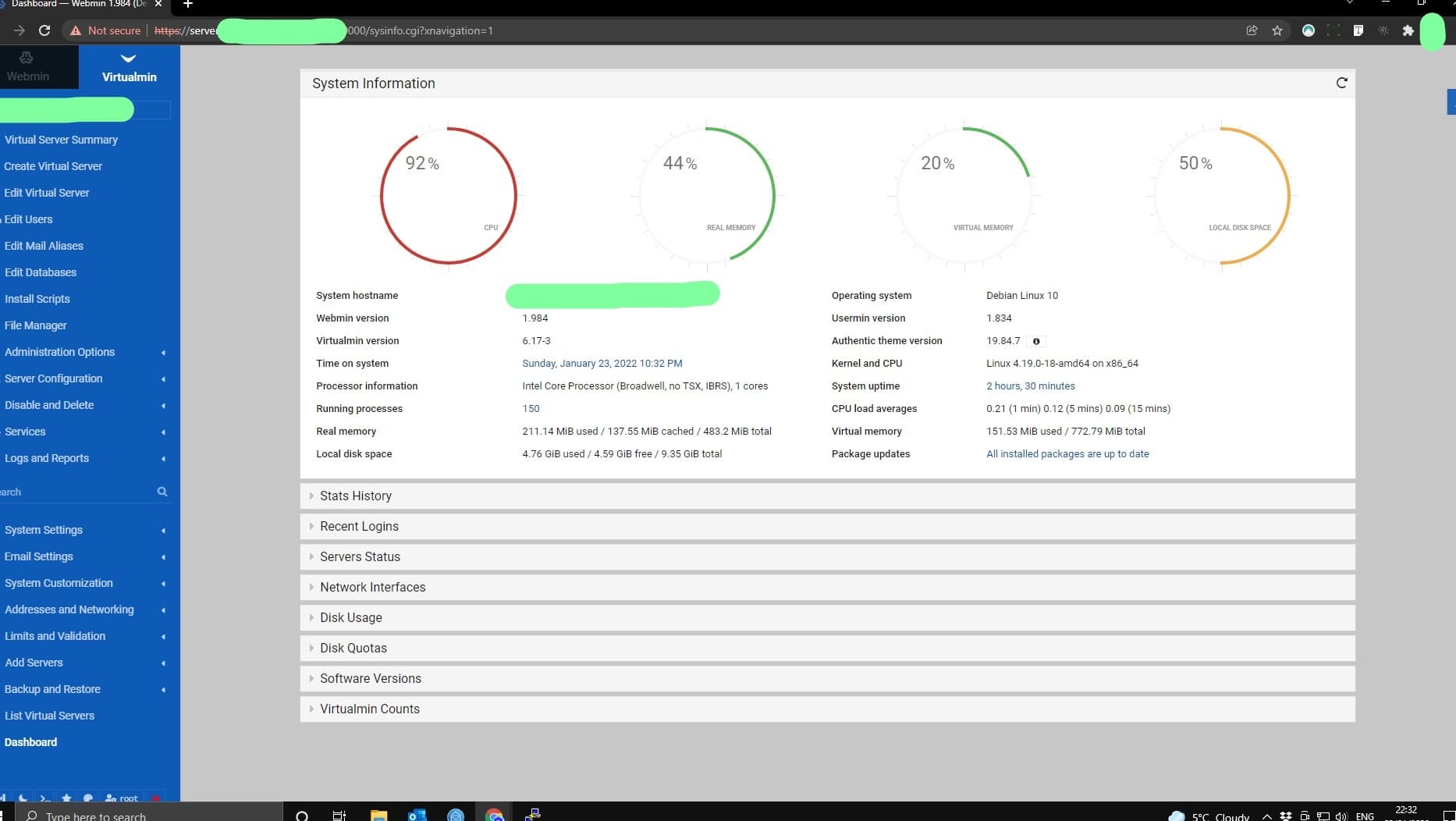
Some time ago I also had a nice global overview on the System Information / dashboard page. I’ve attached an older screenshot from the forum which shows what I mean: under System Information there is a “Disk Quotas” section (below Stats History, Recent Logins, etc.). I used to have exactly this section on my own server.
When you expanded “Disk Quotas” there was a list of all virtual servers with colored bars (green / yellow / red) indicating how close each domain was to its quota limit. Together with the per-domain quota fields, that view was very useful for monitoring and billing disk usage, even though filesystem quotas were not actually enforced on the OS level.
In recent versions this “Disk Quotas” panel has disappeared from my dashboard, and now in 2.610 the quota fields in Edit Virtual Server and the quota/usage information in Edit Users are also gone. So from my perspective I’ve lost both:
the global Disk Quotas overview on the dashboard, and
the per-domain/user quota fields I used as soft limits.
If this is now the expected behaviour when filesystem quotas are disabled, is there any alternative way in the current GPL version to get a similar quota/usage overview for monitoring/billing purposes? Or, if possible, it would be great to consider bringing back some form of that soft-quota style reporting, even when hard quotas are not enabled at the filesystem level, because it was genuinely useful in my workflow.
And, based on a quick search of the source code, I think that feature is in GPL. So, maybe just turn those on (I told you where that is above) and see if you get the behavior you want.
I still don’t believe there have been any changes in this area. But, I could be wrong, you’d need to search through the change logs to see.
Tou have quotas switched on it would appear the op doesn’t, I’m guessing that is why they are missing from the display, that said the op’s OS is getting a bit long in the tooth (ubuntu 20.04) may be this has a bearing but I doubt it