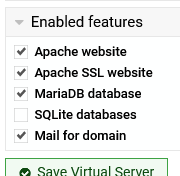
Enabling or disabling a Virtual Server causes the file /etc/dkim-domains.txt to become 0 bytes in size. This only happens if the Mail for domain feature is enabled.
If there is anything I can test, please let me know. I can provide debugging logs, or give you access to take a look.
Perhaps it is caused by some custom setting or something? idk.
I just tested on another system (also of the Debian family), and I have the following observations:
I noticed the issue also happened upon Virtual Server creation (with Mail option selected), at the stage Adding to email domains list .. .. done..
Upon disabling/enabling Virtual Server, the dkim file is getting reset at the stage Processing postfix mail config... .. done processing postfix mail config..
Updating a Virtual Server settings to enable the Mail for domain feature, causes the dkim reset at the stage Saving server details .. .. done.
Deleting a sub-Server that has the Mail for domain feature enabled, ONLY causes the dkim reset if the domain exists in the dkim file, and at the stages Processing postfix mail config... .. done processing postfix mail config. Disabling DKIM signing for example.org .. .. done. (too fast to pinpoint which one).
Between these tests, I’m manually restoring the contents of /etc/dkim-domains.txt and using watch ... cat ... to see when it gets reset.