Creating email only plans doesn't procure Let's Encrypt SSL Certificate on domain creation

SYSTEM INFORMATION
OS type and version Ubuntu Linux 24.04.3
Webmin version 2.621
Virtualmin version 8.0.0 Professional
Webserver version Apache/2.4.58
Related packages SUGGESTED

We’re trying to create email plans in bulk but the system is failing us when it comes to the Let’s Encrypt part.

Instead of reaching out to Let’s Encrypt during the creation process, it doesn’t try to obtain a certificate at all. Furthermore, when we look at the Manage Virtual Server / Setup SSL Certificate / SSL Providers tab, the Domains to be linked to this server is empty.

Steps to reproduce:

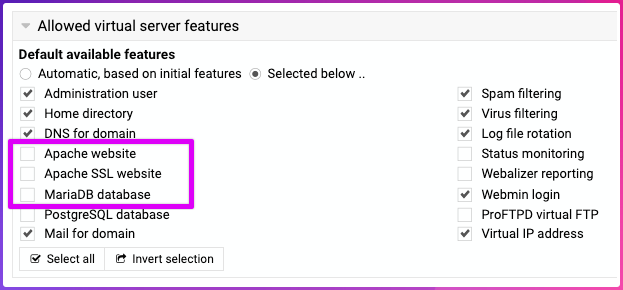
  1. Create Account Plan and deselect Apache and database features:
  1. Ensure in Edit Server Template, SSL website for domain, the following option is selected:
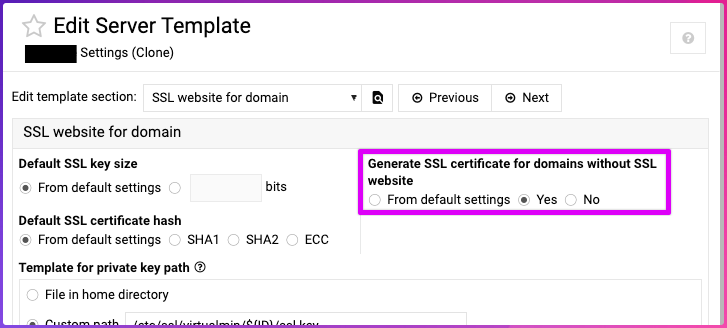
The help for that feature is:

“By default Virtualmin will not create a SSL certicate for new virtual servers unless they have the SSL feature enabled - however, a certificate can be added later. When this option is enabled, all new domains will get a cert that can be used by other services like Dovecot, Postfix or external SSL proxies.”

  1. Create the new server based on the plan and the template.

Expected results:

  • In the output of server creation, we would expect text similar to:

“Request SSL certificate for…”

Actual results:

“Creating SSL certificate and private key ..
.. done”
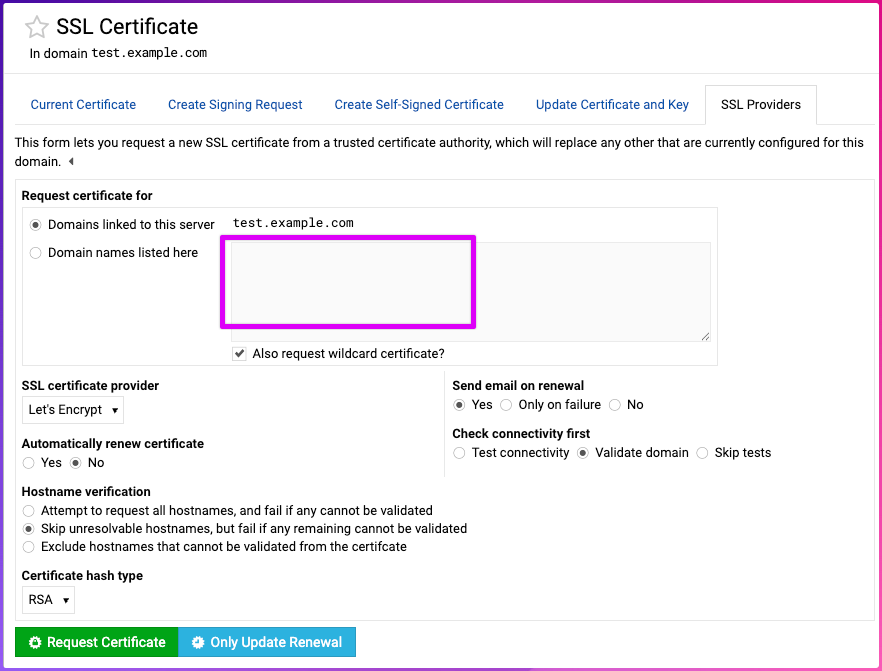
As you can see, no domain name listed there. One would expect at least these 3 to 4 record present:

mail.example.com
autoconfig.example.com
autodiscover.example.com
webmail.example.com

Of course, we can add those manually and it works, but the whole point of creation of email plans is to automate it. Additionally, the setting above clearly states “all new domains will get a cert that can be used by other services like Dovecot, Postfix…”

I’m not sure if this is user error.

In my opinion the blank box above and especially above that “Domains linked to this server” is closely related to Apache. I’ve noticed when you add or remove a domain virtualhost name in Apache .conf the “Domains linked to this server is auto populated”.

So I guess maybe Let’s Encrypt is closely tied to Apache upon creation?
Your showing example, you are using a real domain and dns is being handled my virtualmin?

Yes I showed an example, but we are using real domains that are anchored on four name servers before creating the domain.

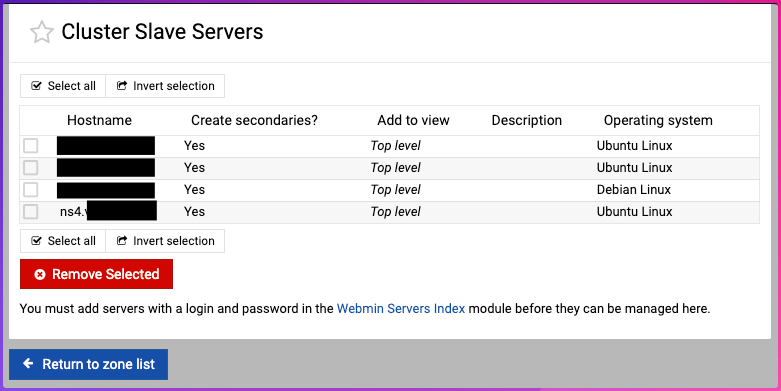
Our Virtualmin system uses the Webmin Cluster / Slave hierarchy to automatically create name server entries.

Last I knew Let’s Encrypt checked port 80. I know there was some discussion about work arounds in some cases. Not sure it that applies here. Maybe enable a website on one of these and try again just as a test?

No. This is an OVERRIDE section. You list ONLY the domains you wish , one by one. I also see you have ‘wildcard selected’. I don’t use that so I don’t know what will end up in you actual BIND record.
What records do you have here?

Virtualmin can only validate in two ways: Web validation, which requires a website. DNS validation which requires Virtualmin be managing DNS (whether locally or in a cloud service).

There is no way for Virtualmin to obtain a certificate without at least one available validation method. So, you’ll need to either turn on Apache website feature or configure Virtualmin to manage DNS for this domain. Or, use certbot with one of the manual validation methods.

In case it’s unclear, Virtualmin is managing the DNS.

When we create new domains, they are perfectly replicated using the Webmin Bind / Cluster Slaver servers:

No. This is an OVERRIDE section.

Yes, I am aware. This is our manual workaround because this setting:

“all new domains will get a cert that can be used by other services like Dovecot, Postfix…”

DOES NOT WORK UPON DOMAIN CREATION.

After domain was created, if you visit “Manage Virtual Server ⇾ Setup SSL Certificate” page, then click “SSL Providers” tab—does it show any specific error?

You can create a virtualserver for the domain itself with most features and then just do “add mail user” for only mail users.

@Jamie, do you think having “Exclude unverifiable domain names” on the template set to “No” by default is the best way to go?

Maybe, but isn’t the real issue here that when Let’s Encrypt is doing DNS-based valdiation, hostnames that aren’t in the Apache virtualhost can still be included in the default set of hostnames.

1 Like

I don’t think I understand what you’re asking, as DNS-based validation doesn’t care about webserver at all.

Yes exactly! The current code attempts to validate that any domains being requested in the cert are configured to be served by Apache, as this is required for web-based validation to work. But we don’t need to enforce any such restriction for DNS-based validation.

Should validate_letsencrypt_config itself figure out which features to check, rather than the callers?

Alright, it should be fixed now! @Jamie, check out this patch:

1 Like

Looks good, thanks!

1 Like