dont try to install cloudmin on debian 13. it try to install qemu but that package dont exist on the repo. or it exist but it are named qemu-kvm. i ssoon think cloudmin are discontinued..
So general feedback of the installer with RHEL 9.6:
- I don’t believe the configuration checks were accurate.
- There are cgroups-v1 and cgroups-v2 in RHEL 9
- KVM was configured ok (I didn’t have to install additional software)
-
Provisioning of the network was still a manual task, so I had to create the required network bridges.
-
Provisioning of the LVM storage was a manual task, so I had to create the LVM storage volume.
Otherwise, I was able to connect the primary Cloudmin server to this new server and have been able to move VMs and create new VMs.
Which software was missing?
This step is missing still.
What do you expect of these in Cloudmin?
You got a copy of this modified installer you want to share ?
There wasn’t anything missing and I don’t expect anything of cgroups…just suggesting a possible reason that an error was detected at install time:
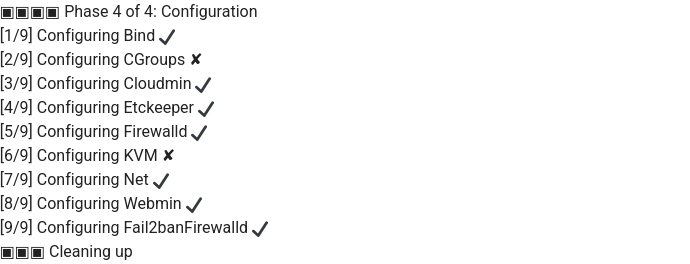
Log output
…
Installed:
cloudmin-config-1.0.202510062054-1.noarch wbm-server-manager-2:9.8-1.noarch
[2025-10-22 07:33:49 BST] [INFO] Installing Cloudmin 10 and all related packages: [2025-10-22 07:33:49 BST] [INFO] Success.
[2025-10-22 07:34:08 BST] [INFO] Spin pid is: 66753
[2025-10-22 07:34:08 BST] [INFO] Installing Cloudmin 10 related package updates: [2025-10-22 07:34:08 BST] [INFO] Success.
[2025-10-22 07:34:09 BST] [DEBUG] Phase 4 of 4: Configuration
[2025/10/22 07:34:09] [INFO] - Starting init-system log…
[2025/10/22 07:34:09] [INFO] - Total plugins to be run: 9
[2025/10/22 07:34:09] [INFO] - Configuring Bind
[2025/10/22 07:34:11] [INFO] - Succeeded
[2025/10/22 07:34:11] [INFO] - Configuring CGroups
[2025/10/22 07:34:11] [WARN] - Failed
[2025/10/22 07:34:11] [INFO] - Configuring Cloudmin
[2025/10/22 07:34:11] [INFO] - Succeeded
[2025/10/22 07:34:11] [INFO] - Configuring Etckeeper
[2025/10/22 07:34:12] [INFO] - Code: 0 Result: hint: Using ‘master’ as the name for the initial branch. This default branch name
hint: is subject to change. To configure the initial branch name to use in all
hint: of your new repositories, which will suppress this warning, call:
hint:
hint: git config --global init.defaultBranch
hint:
hint: Names commonly chosen instead of ‘master’ are ‘main’, ‘trunk’ and
hint: ‘development’. The just-created branch can be renamed via this command:
hint:
hint: git branch -m
Initialized empty Git repository in /etc/.git/
[2025/10/22 07:34:12] [INFO] - Code: 0 Result: Created symlink /etc/systemd/system/multi-user.target.wants/etckeeper.timer → /usr/lib/systemd/system/etckeeper.timer.
[2025/10/22 07:34:12] [INFO] - Code: 0 Result:
[2025/10/22 07:34:12] [INFO] - Succeeded
[2025/10/22 07:34:12] [INFO] - Configuring Firewalld
[2025/10/22 07:34:12] [INFO] - Code: 0 Result: Warning: ZONE_ALREADY_SET: public
success
[2025/10/22 07:34:12] [INFO] - Code: 0 Result: Warning: ALREADY_ENABLED: ‘ssh’ already in ‘public’
success
[2025/10/22 07:34:13] [INFO] - Code: 0 Result: Warning: ALREADY_ENABLED: ssh
success
[2025/10/22 07:34:13] [INFO] - Code: 0 Result: success
[2025/10/22 07:34:13] [INFO] - Code: 0 Result: success
[2025/10/22 07:34:13] [INFO] - Code: 0 Result: success
[2025/10/22 07:34:13] [INFO] - Code: 0 Result: success
[2025/10/22 07:34:14] [INFO] - Code: 0 Result: success
[2025/10/22 07:34:14] [INFO] - Code: 0 Result: success
[2025/10/22 07:34:14] [INFO] - Code: 0 Result: success
[2025/10/22 07:34:14] [INFO] - Code: 0 Result: success
[2025/10/22 07:34:15] [INFO] - Code: 0 Result: success
[2025/10/22 07:34:15] [INFO] - Code: 0 Result: success
[2025/10/22 07:34:15] [INFO] - Code: 0 Result: success
[2025/10/22 07:34:15] [INFO] - Code: 0 Result: success
[2025/10/22 07:34:15] [INFO] - Code: 0 Result: success
[2025/10/22 07:34:16] [INFO] - Code: 0 Result: success
[2025/10/22 07:34:16] [INFO] - Code: 0 Result: success
[2025/10/22 07:34:16] [INFO] - Code: 0 Result: success
[2025/10/22 07:34:16] [INFO] - Code: 0 Result: success
[2025/10/22 07:34:16] [INFO] - Code: 0 Result: success
[2025/10/22 07:34:17] [INFO] - Code: 0 Result: success
[2025/10/22 07:34:17] [INFO] - Code: 0 Result: success
[2025/10/22 07:34:17] [INFO] - Code: 0 Result: success
[2025/10/22 07:34:17] [INFO] - Code: 0 Result: success
[2025/10/22 07:34:17] [INFO] - Code: 0 Result: success
[2025/10/22 07:34:18] [INFO] - Code: 0 Result: success
[2025/10/22 07:34:18] [INFO] - Code: 0 Result: success
[2025/10/22 07:34:18] [INFO] - Code: 0 Result: success
[2025/10/22 07:34:18] [INFO] - Code: 0 Result: success
[2025/10/22 07:34:19] [INFO] - Code: 0 Result: success
[2025/10/22 07:34:19] [INFO] - Code: 0 Result: success
[2025/10/22 07:34:19] [INFO] - Code: 0 Result: success
[2025/10/22 07:34:19] [INFO] - Code: 0 Result: success
[2025/10/22 07:34:19] [INFO] - Code: 0 Result: success
[2025/10/22 07:34:20] [INFO] - Code: 0 Result: success
[2025/10/22 07:34:20] [INFO] - Code: 0 Result: success
[2025/10/22 07:34:20] [INFO] - Code: 0 Result: success
[2025/10/22 07:34:20] [INFO] - Code: 0 Result: success
[2025/10/22 07:34:24] [INFO] - Code: 0 Result: success
[2025/10/22 07:34:24] [INFO] - Succeeded
[2025/10/22 07:34:24] [INFO] - Configuring KVM
[2025/10/22 07:34:24] [INFO] - Code: 0 Result:
[2025/10/22 07:34:24] [WARN] - Failed
[2025/10/22 07:34:24] [INFO] - Configuring Net
[2025/10/22 07:34:24] [INFO] - Succeeded
[2025/10/22 07:34:24] [INFO] - Configuring Webmin
[2025/10/22 07:34:27] [INFO] - Succeeded
[2025/10/22 07:34:27] [INFO] - Configuring Fail2banFirewalld
[2025/10/22 07:34:28] [INFO] - Succeeded
[2025-10-22 07:34:29 BST] [DEBUG] Cleaning up temporary files in /tmp/.cloudmin-62411.
[2025-10-22 07:34:29 BST] [DEBUG] Primary address detected as ...
[2025-10-22 07:34:29 BST] [SUCCESS] Installation Complete!
I used this repo:
Make sure networking is configured correctly and you have a FQDN.
Get the install script:
wget https://rc.software.cloudmin.dev/cloudmin-install-10.0.0.sh
Edit the install script and add your Cloudmin Pro license.
Run the install script with the --branch rc flag
sh cloudmin-install-10.0.0.sh --branch rc
I’d make sure the repository is set to the RC one and not unstable, as otherwise you’ll get a nightly Webmin release installed.
You’ll need to make sure the network bridge is configured - make sure it’s called br0 or you’ll hit a bug when moving VMs between servers.
Hi,
I have already used that repo but I got the same errors you mentioned above. You mentioned “my modified installer” which says to me you have one that you have made alterations to and hopefully with out errors ?
Thanks
I didn’t have to modify the new installer (I did modify the original installer).
What step are you at?
step ?
I stopped once the above errors where outputted during the install .. never went any further as I didnt trust it.
Did you ever see this?
[SUCCESS] Installation Complete!
sure .. but like I said I also saw the 2 errors, and given this server is for resale I wasnt comfortable with that.
So are you suggesting that even with the install errors the system works ?
You’ll need to manually configure networking and storage, but as long as Cloudmin doesn’t throw any errors, it should work. Cloudmin is a management interface to the underlying qemu-kvm for virtual machines and uses native networking and storage (configurable via Webmin), so as long as that is all working correctly, then it will work.
Caveat: I’ve not used it on Debian based systems, only Redhat.
Ill give it another go next week ..
Thanks
Since you’ve used Cloudmin a lot, if you provide the steps you take to configure it further, I can automate it. Otherwise, I’ll need to look into it deeper, but it won’t happen as soon as I’d like.
To be honest, the network bridge is super easy, especially via nmcli.
Configuring storage using LVM is a little trickier as the partition needs to be a Volume Group that is created within a formatted partition (but does not have a file system). The logical volumes of the virtual machines, then sit within that VG.
Getting iSCSI to work again would also be amazing…and there’s Ceph too 
I guess there has to be an initial configuration step once Cloudmin is installed to set up the various options. Maybe it exists already?
Yeah, I remember the old Cloudmin installer didn’t use nmcli in the past. We’d have to fix that.
Are you talking about an extra partition, not one created during the OS installation? If so, how can the installer know which partitions can and can’t be used?
What do you expect our installer to do in this regard?
I’d suggest storage is a post install action…
Cloudmin supports local file, LVM and iSCSI (although iSCSI doesn’t work as the software is now different in RHEL 9, where it uses targetcli).
I mention Ceph as it’s scalable object/block storage that would be a great addition.
This topic was automatically closed 60 days after the last reply. New replies are no longer allowed.