where “owner” is the owner of a Virtual Server (not root). But the first command (just a user within the Virtual Server, but not owner) doesn’t connect. I get prompted for the password, I enter the password for that user, and it does not accept it. I have been very careful with the password not to introduce any typos, but the server just doesn’t accept it. What do I do wrong?
I run rsync on the source server, which is the old one. The new one (destination) runs Virtualmin. I have set the user’s login capabilities to “Email, FTP and SSH”, yet there is no way of logging in via SSH.
I have also checked Fail2ban, it has locked the domain out several times, I unbanned it, yet no success. I restarted sshd, after that again no logging in possible.
It tells me Invalid user user1 from 34.45.67.89
Of course “user1” and “34.45.67.89” are only for illustration, they are not the real username or IP address. I find that odd, as the user is porperly created, it may login according to Virtualmin, etc.
I found this in secure log file, is there another log in which I should look? I didn’t find a ssh logfile, and in messages I don’t find any reference to “user1”.
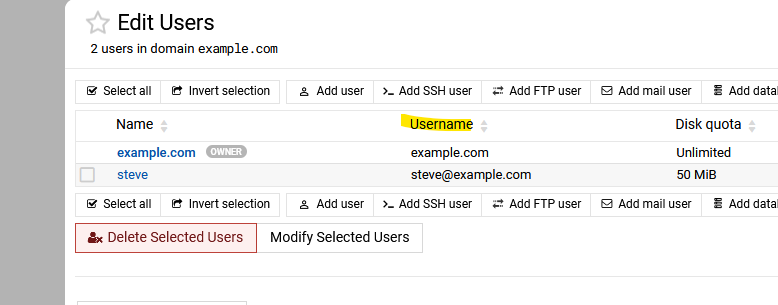
Ok, user1 would normally need a @ symbol. When you list the users for that domain does it show user1@domain.com or user1 under username, I suspect thats the problem.
Not sure how that will work with rync using a ip number
Ok, first of all thank you for your input! I appreciate it! I have created this user within a Virtual Server in Virtualmin, i.e. it’s a “sub user” (my choice), not the owner. However, there is an option to set “Login access”, and that I have set (as already mentioned) as “Email, FTP and SSH”. Doesn’t that qualify it as a valid user? And if not: how can I remedy this?
Since I have disabled root access, I can only connect using a specified user who is a sudoer, but using rsync I cannot use that user, because then I get the response that there are no rights to access that particular folder.
One idea I just got: I could copy the stuff into that privileged user’s folder and from there move it to the proper folder of the other user, using Virtualmin’s file manager, but wouldn’t that mess horribly with the ownership and access rights? I’m not sure if I want to do that.
A workaround to use user1 (as long as there is no other user with that name) is in webmin Users and Groups clone that user and add just user1 as the name edit it to have the same id, same group ,same folder location and bash login.
If the username is user@domain.tld, you need to login with the actual username. (ssh -l user@domain.tld domain.tld or the IP address or ssh user@example.com@example.com). The default username format for email users is user@domain.tld.
user is not a valid user unless you do what stefan1959 suggested, but you don’t need to do that. Just login with the actual username, which is shown on the Edit Users page in the “Username” field.
Just login with the actual username (user@domain.tld). user is not the username. The Edit Users page shows you the username in the “Username” field. That’s the username.
Well, but I need to do the rsync from the source server. It’s not just a ssh login. Or can I do rsync -aH /from/path user@domain.tld 12.34.56.78:/to/path? I’m pretty sure that won’t work.
I tried the rsync with ssh, but ran into a multitude of different problems, hence I put the data into one archive, copied that over and distributed the appropriate data to the appropriate users, hoping that all rights and ownerships (which I then set) are properly done. I couldn’t preserve ownership anyway, because on the old server there was a different administration system. It took some time, but not too much.