Its for the autodiscovery , /mail/config-v1.1.xml
apache log
I’m guessing this bit will be working fine, back i the day when I had clients that used outlook the problem occured because of a file that was created by outlook to store user data which had the domain in question set up, we had delete that file and create a new one (I think the file extension was .pst) but this was over a decade ago so I would guess this is irrelevant as Outlook has most likely changed since then or perhaps it hasn’t I don’t know
Hope you get it working!
Sorry you have issues as well!
top of my head
I am on office 2021 (outlook classic) and my email is using a PST.
You can deliver email from IMAP based emails to a PST with this version.
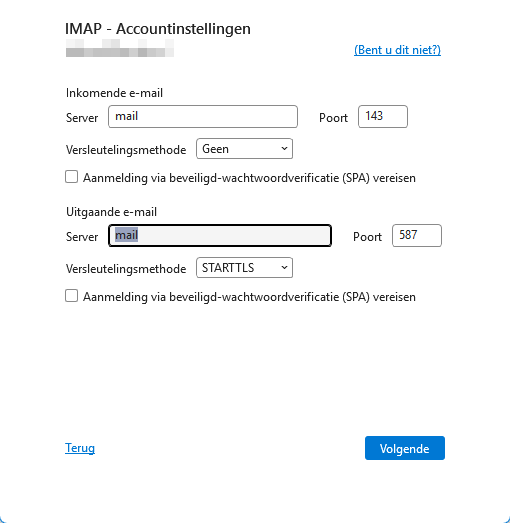
One issue with some older versions of outlook is that it got the SSL/TLS and STARTTLS options mixed up.
The new outlook email client you get free with windows is crippled, I can’t remember why but it is not brilliant.
Well, that’s a lo t of replies all a sudden. 
Please, I’m not looking for personal opinions, just asking for advice, because I feel I’m stuck.
Okay, still working on it, getting some good idea’s.
For clarity I’m using an outlook version prior to or just starting office 365.?
It’s version 2608 (build 20326.20132 plug and play)
Microsoft® Outlook® voor Microsoft 365 MSO (Versie 2608 Build 16.0.20326.20072) 32 bits.
it does support IMAP and POP because I’m using it on other mail accounts and I can connect with it, normally without problems.
so, that’s that.. new update coming soon.
Thanks for your interest.
It would help getting a diagram with some proper names. Server a and server b Hurts.my head.
Put the servers in a network diagram with some IP addresses.
I feel this would help.
Then bullet point what works and what doesn’t below.
Update:
I’m trying several options
when using my browser to contact
/mail/config-v1.1.xmlmail/config-v1.1.xml
at first I got as page not found, nothing in the logs.
And yes I’m looking in the Apache Access and Error logs @stefan1959 thanks for that.
Using thunderbird as well, which seem to work right out of the box, I was thinking..
Is outlook cashing DNS data? 
Because prior to my server move I also moved the email server from a external server to the new one, to get everything in one place and having cheaper hosting for it .
This could be the start of the problems"
Because doing the same thing right now, does make outlook get the correct parameters, so the autoconfigure seems to be working now:
The IMAP isn’t correct yet, it should be 993
So I corrected that and now waiting for it to connect. 
Well, I see some post deleted and reactions about that.
Nothing personal at that per say, but I just want to have some insight in what is going on on my system.
Maybe personal opinions wasn’t the best way to say it.
I’m just tired, No offense intended or directed at anyone by that remark.
LOL okay I’ll try to be more clear about that.
Every thing is now gonna be on server A.
As I returned to the old server trying to get my outlook to connect.
As I said earlier I move the mail from an online server to my server while in the process of moving it to the new server when I’d run into the issues.
Also testing it using Mxtoolbox resulted in a red flag, it was not working.
So now I’ve set everything up on the old (original, but mail is new) server.
Everything checks out, Mxtoolbox is all green and mail is received and sends okay.
But the remainder is Outlook connectivity, witch doesn’t want to connect .
So that’s a short recap,. I hope this helps.
thank you for your interest.
I don’t think it’s out look doesn’t support it, as I said it works with other accounts just fine.
Just tried that with a test account and it worked just fine, so I don’t believe that is the case.
Another update about the autoconfig:
At first when accessing it from within a browser I got:"GET /cgi-bin/autoconfig.cgi HTTP/2.0" 404
404 is not found, right?
So I disabled and restarted, then I enabled it again from the advice I got from @Ilia
reboot it again and now I got: "GET /cgi-bin/autoconfig.cgi HTTP/2.0" 200
and in my browser the URL changes to cgi-bin/autoconfig.cgi
So now it seems to work, as I can see in outlook because it is starting to get the parameters right.
and YES, it appears in the Apache Access log..
So my theory, as there is anything logical about it:
for some storage reason things got cached on my computer and the wrong IP address has been accessed all along.
that doesn’t explain the NEW server hiccups, but that’s for another day now, I need to get this working before I can address the other issue..
One thing at a time, or I will be fighting several issues at once , and that never a good thing.
Because you never know what issue fowls your connection.
Because I think my system cached IP-addresses and I’m connecting on domain names (changing them from changing servers, twice)
No correct autoconfig or correct smtp/POP/IMAP was accessed.
Why do I think that?
Because over time, more and more started to work, that’s a good thing.
I’ll wait this one out, to see I get connected.
Then I will try and get it all over to the new server and see what it does.
Hopefully that transfer will be smoother, because outlook is behaving better
I do hope this all makes sense, I’m really tired. Been working all day, and still not really understanding what is going on.
Trying to.. lol
thank you all for your help and considiration,
It’s all ‘out of the box’ for me.
so yes it should work but it did not with this virtual server.
All other servers were moved with or without mail and work perfectly, as far as I can see..
just this one didn’t want to move for some unknow reason.
apologies for the many edits, as I said I’m very tired right now..
3 things, same here tired.
Forget autoconfig, do not use it for now, it is another failure point to deal with.
You can connect to a mail server by IP, I recommend doing that for now.
Are your SSL certs correct.
Yay!
So, was this a new Ubuntu 24.04 install? Can you tell me more—was this domain restored or newly created, maybe? I would like to know more in order to understand whether there is a bug to fix or whether it’s something system-specific.
With thunderbird is not a problem, it connects and works just fine.
Outlook keep being a pain in the behind, so to speak.
"
Yes, SSL certificates are are installed and current,
Just for clarification, is it outlook classic that comes with office or the free one.
You can play around with setting for amil easier via the control panel if you have classic.
I installed a new server, with Ubuntu 24.04
completely from scratch, installed Virtualmin/Usermin on it also from scratch.
The domains I moved are backups from the old server.
The last one is indeed different, I moved the mail from an outside provider, to reduce costs,
So that was created on the new server.
when it didn’t work (tested with Mxtoolbox email-server test, all red, unreachable etc..)
I made a backup, moved it to the old sever.
Where it is at the moment, but on the old server it just works.
(tested with Mxtoolbox all green IMAP/SMTP/OPO all reachable on domain name level like: mail.domain.nl)
Outlook still doesn’t want to connect.
I have a copy of thunderbird running, with the same settings and that just works.
Don’t know why Outlook doesn’t want to connect 
I Know Thunderbird can import from outlook, and that would have been a nice problem solver..
but..
yea, you guessed it, for some treason it can’t “see” my outlook so It won’t import..
This “ah it will take 5 minutes” idea, is now being stretched over 3 weeks now, and still no clue if this can be fixed.
maybe find a program that can connect to IMAP and can read the PST just to get the backup back on the new server.
That’s my goal at the moment.
I have 2 accounts that have the mail in it on my computer, used outlook to get all the mail from their accounts.
Why Outlook, have been using this since the beginning and frankly never had any problems.
But when you really need it.. Murphy’s Law is just around the corner apparently -lol-
Anyway I do appreciate all the input I get from this thread, and I do hope there still is a golden tip or something.
So again, thank you all
Is this the New Outlook? I had my first experience with it last week on a clients laptop. He had all the settings right, yet it didn’t work. I saw a button to use “Classic” outlook, so I hit it.
Up came familiar outlook, using the same settings - no need to enter again, and it just worked!
Turns out there are 2 versions of Outlook on the Laptop, so for his convenience I had to Unpin the link to New and then Pin the Classic icon instead.
All good, but another bad look for Microsoft.